> ## Documentation Index
> Fetch the complete documentation index at: https://www.cashfree.com/docs/llms.txt
> Use this file to discover all available pages before exploring further.
# Dispute Report
> View the Cashfree Embedded Payments dispute report to track disputed transactions, chargeback statuses, and resolution timelines for any selected date range.
Through the dispute report, you can view the list of disputed transactions for the selected time period.
## Generate dispute report
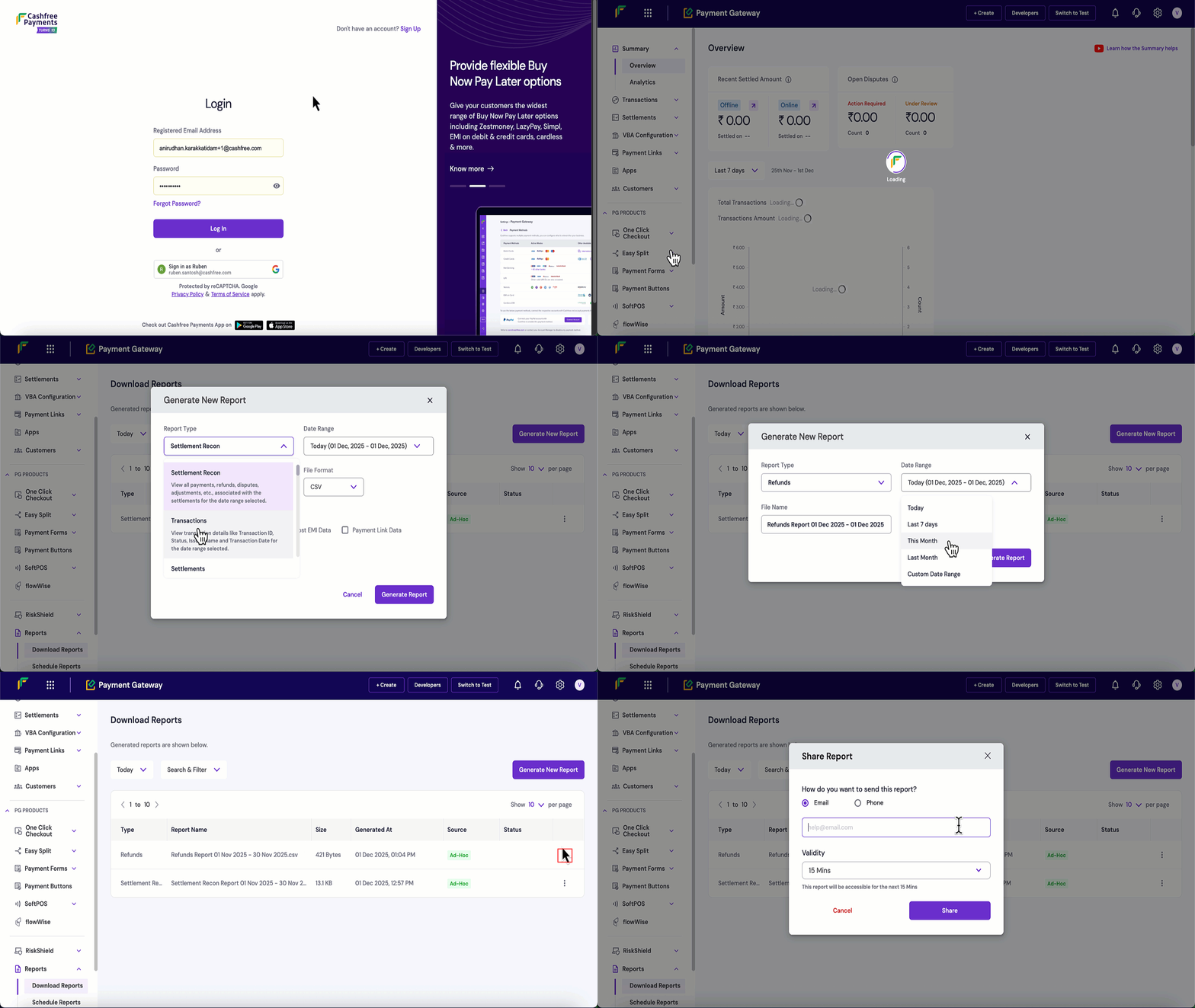
Follow these steps to generate and download a dispute report:
1. Log in to the [Merchant Dashboard](https://merchant.cashfree.com/auth/login).
2. Navigate to **Payment Gateway** > **Reports** > **Download Reports**.
3. Click the **Generate New Report** button.
4. Configure your report settings:
* **Report Type**: Select **Disputes** from the dropdown.
* **Date Range**: Choose the time period for the report.
* **File Format**: Select CSV or XLSX.
* **File Name**: Modify if needed, this is optional.
5. Click **Generate Report**.
6. Once generated, click the **three dots (⋮)** next to your report.
7. Click **Download Report** to save the file.
8. Click **Share Report** to share the report via email or mobile number and set the validity period.