> ## Documentation Index
> Fetch the complete documentation index at: https://www.cashfree.com/docs/llms.txt
> Use this file to discover all available pages before exploring further.
# Ledger Report
> Review the Cashfree Embedded Payments ledger report to see every credit and debit on your partner account for any selected date range and reconcile balances.
The ledger report summarises all the debits and credits that have happened in your account for the selected time period.
## Generate ledger report
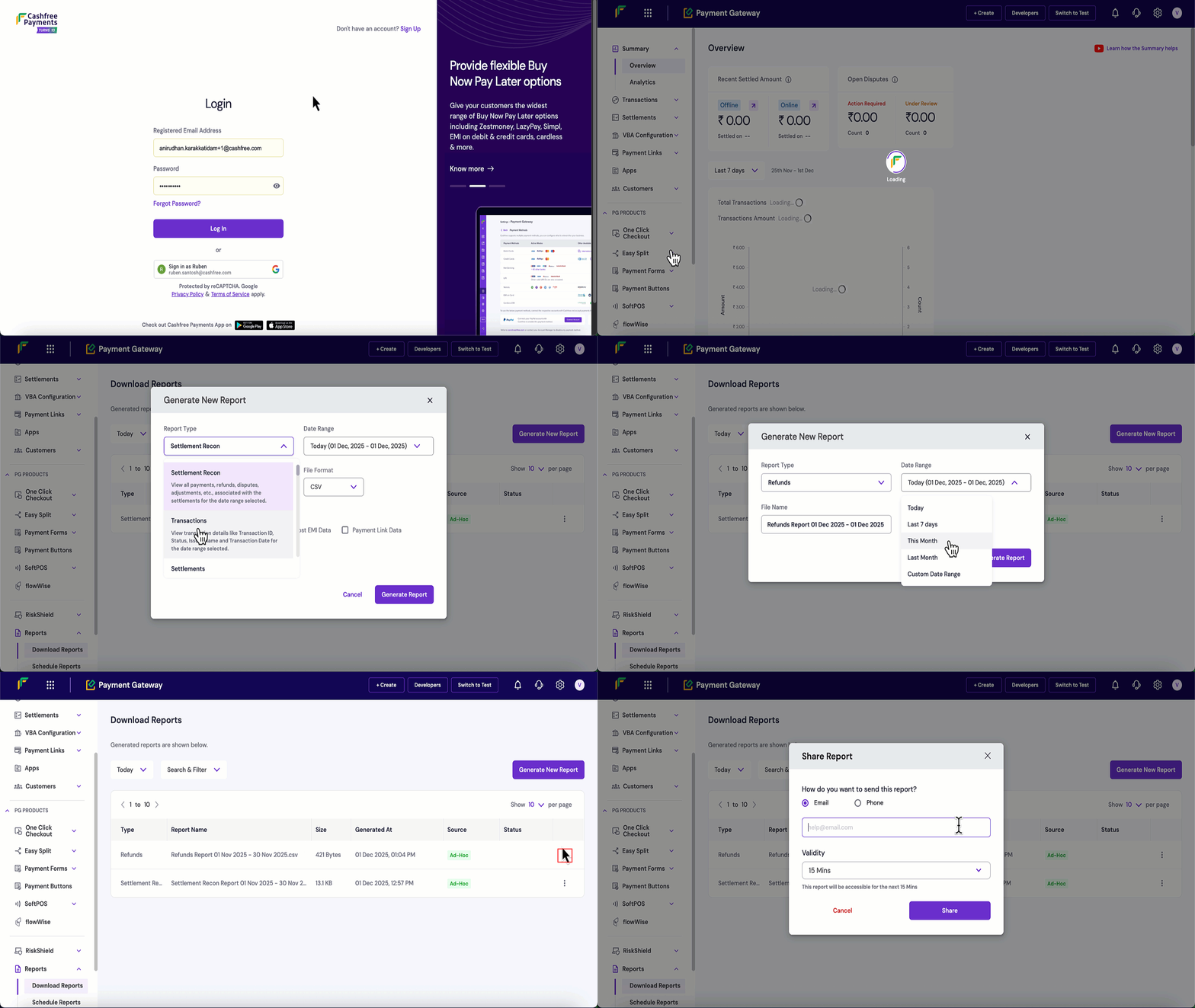
Follow these steps to generate and download a ledger report:
1. Log in to the [Merchant Dashboard](https://merchant.cashfree.com/auth/login).
2. Navigate to **Payment Gateway** > **Reports** > **Download Reports**.
3. Click the **Generate New Report** button.
4. Configure your report settings:
* **Report Type**: Select **Ledger** from the dropdown.
* **Date Range**: Choose the time period for the report.
* **File Format**: Select CSV or XLSX.
* **File Name**: Modify if needed, this is optional.
5. Click **Generate Report**.
6. Once generated, click the **three dots (⋮)** next to your report.
7. Click **Download Report** to save the file.
8. Click **Share Report** to share the report via email or mobile number and set the validity period.
 ## Ledger report specification
The following table describes the parameters available in the ledger report:
| Parameter | Sample value | Flag | Description |
| --------------- | ------------------- | -------- | ------------------------------------------------------------------------------------------------------------------------------------------------------------------------------------ |
| Ledger ID | 130872636 | id | Unique identifier assigned by Cashfree to each ledger entry. |
| Sale Type | DEBIT | enum | Indicates whether this ledger entry decreases or increases your balance. Possible values include: **DEBIT** - amount deducted from balance and **CREDIT** - amount added to balance. |
| Event | REFUND | enum | The type of event that generated this ledger entry. The common values are: **REFUND**, **FUND\_SWEEP**, **SETTLEMENT\_COMPUTE**, **CORRECTION\_CREDIT**. |
| Amount | 3.00 | amount | The monetary value of this ledger transaction. This amount is either added to or subtracted from your balance based on the **Sale Type** (CREDIT or DEBIT). |
| Event ID | 98307625 | id | The identifier for the underlying event associated with this ledger entry. For example, for **REFUND** events this corresponds to the Refund ID. |
| Added On | 2025-10-31 15:49:41 | datetime | Date and time at which this ledger entry was recorded in the ledger. |
| Closing Balance | -17.52 | amount | Ledger balance immediately after applying this entry. Reading the report in sequence allows you to follow how your balance evolves over time. |
## Ledger report specification
The following table describes the parameters available in the ledger report:
| Parameter | Sample value | Flag | Description |
| --------------- | ------------------- | -------- | ------------------------------------------------------------------------------------------------------------------------------------------------------------------------------------ |
| Ledger ID | 130872636 | id | Unique identifier assigned by Cashfree to each ledger entry. |
| Sale Type | DEBIT | enum | Indicates whether this ledger entry decreases or increases your balance. Possible values include: **DEBIT** - amount deducted from balance and **CREDIT** - amount added to balance. |
| Event | REFUND | enum | The type of event that generated this ledger entry. The common values are: **REFUND**, **FUND\_SWEEP**, **SETTLEMENT\_COMPUTE**, **CORRECTION\_CREDIT**. |
| Amount | 3.00 | amount | The monetary value of this ledger transaction. This amount is either added to or subtracted from your balance based on the **Sale Type** (CREDIT or DEBIT). |
| Event ID | 98307625 | id | The identifier for the underlying event associated with this ledger entry. For example, for **REFUND** events this corresponds to the Refund ID. |
| Added On | 2025-10-31 15:49:41 | datetime | Date and time at which this ledger entry was recorded in the ledger. |
| Closing Balance | -17.52 | amount | Ledger balance immediately after applying this entry. Reading the report in sequence allows you to follow how your balance evolves over time. |