> ## Documentation Index
> Fetch the complete documentation index at: https://www.cashfree.com/docs/llms.txt
> Use this file to discover all available pages before exploring further.
# Native OTP
> Authenticate Cashfree card payments natively in your website or app so customers stay in your flow during OTP entry to lift checkout conversion.
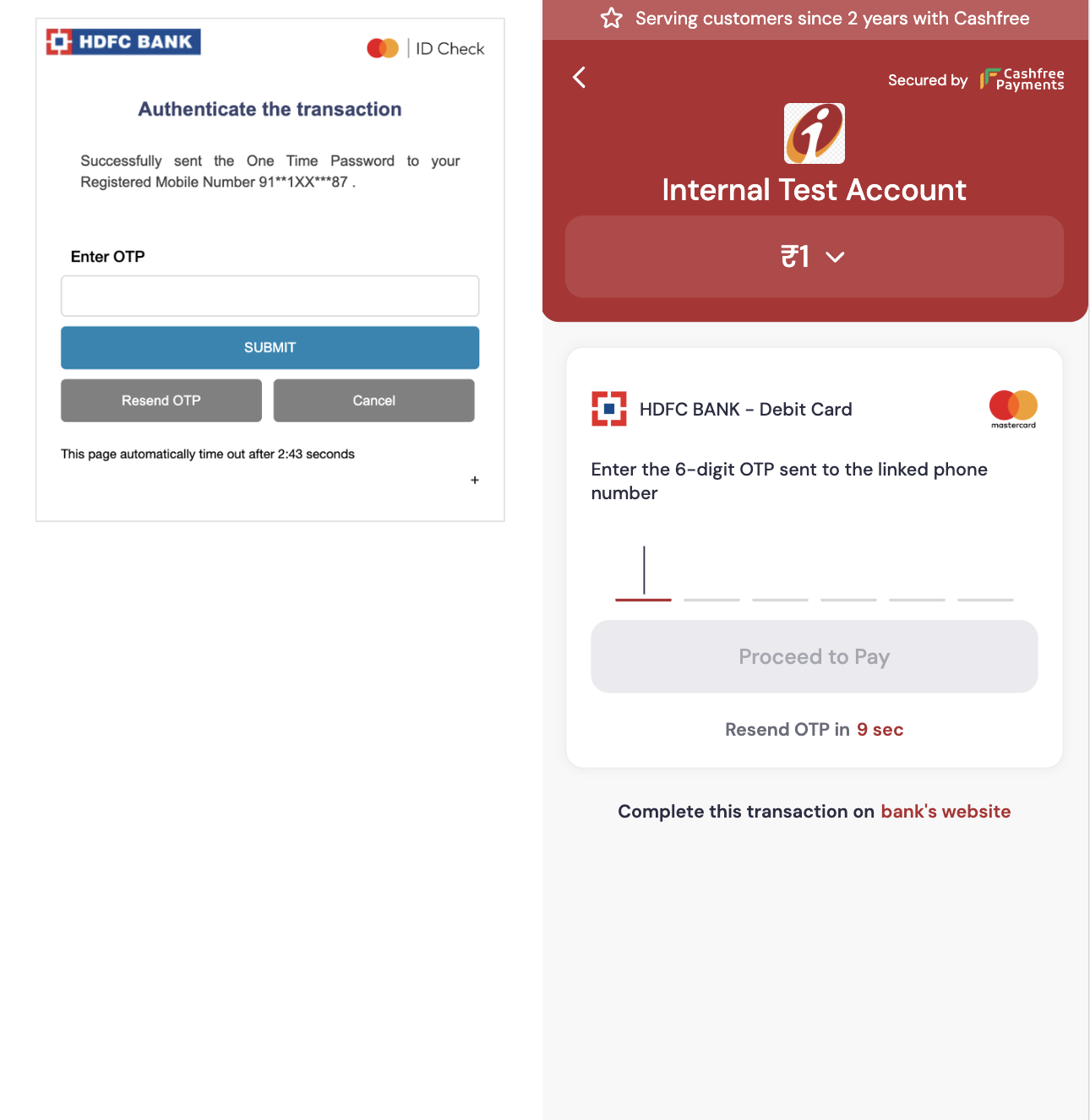
In a typical card payment flow, the bank’s page collects the OTP after the payment gateway redirects the customer. With Cashfree’s Native OTP functionality, you can collect the OTP directly on your website or app, improving the customer experience.
**Benefits of Native OTP**
* **No redirects, no friction**: Eliminates redirects and reduces payment failures due to drop-offs or slow network.
* **Single-click OTP experience**: Provides seamless single-click experience to customers via auto-read and auto-submit functionality.
Native OTP boosts success rates by approximately 5%.
 Use the [raise an issue support form](https://merchant.cashfree.com/merchants/landing?env=prod\&raise_issue=1) to request enabling this feature for your account.
## Cashfree-hosted checkout
Native OTP functionality is supported by default on Cashfree checkout. Cashfree displays the Native OTP page directly within the checkout, allowing customers to submit the OTP without redirection.
Use the [raise an issue support form](https://merchant.cashfree.com/merchants/landing?env=prod\&raise_issue=1) to request enabling this feature for your account.
## Cashfree-hosted checkout
Native OTP functionality is supported by default on Cashfree checkout. Cashfree displays the Native OTP page directly within the checkout, allowing customers to submit the OTP without redirection.
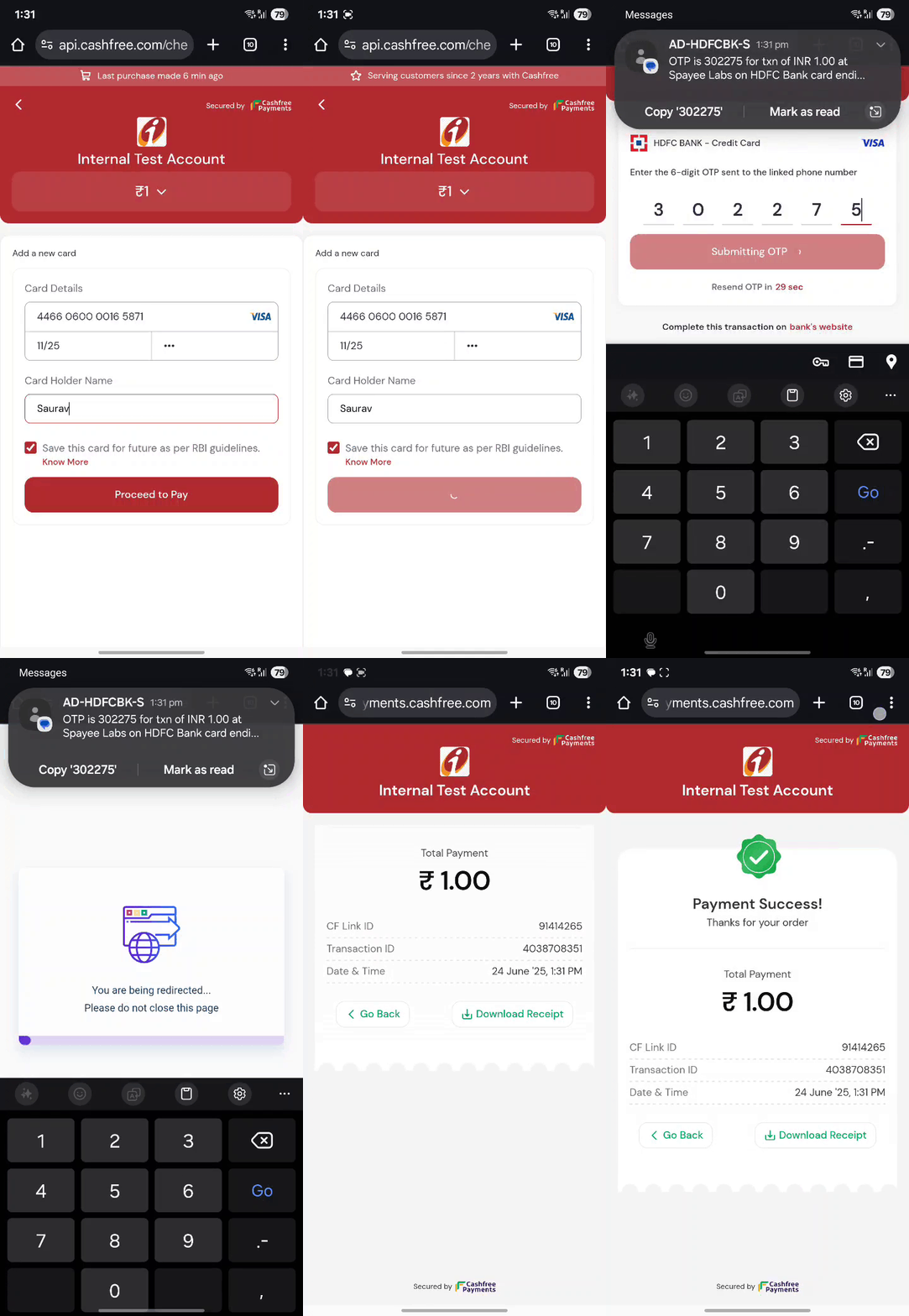 Cashfree's Native OTP is also enriched with **OTP auto-read and auto-submit** functionality, enabling **single-click OTP experience** for customers.
## Seamless checkout
To implement Native OTP on seamless checkout, merchants must build their own custom Native OTP interface and use Cashfree’s APIs to perform authentication.
**Best practices for designing a Native OTP page**
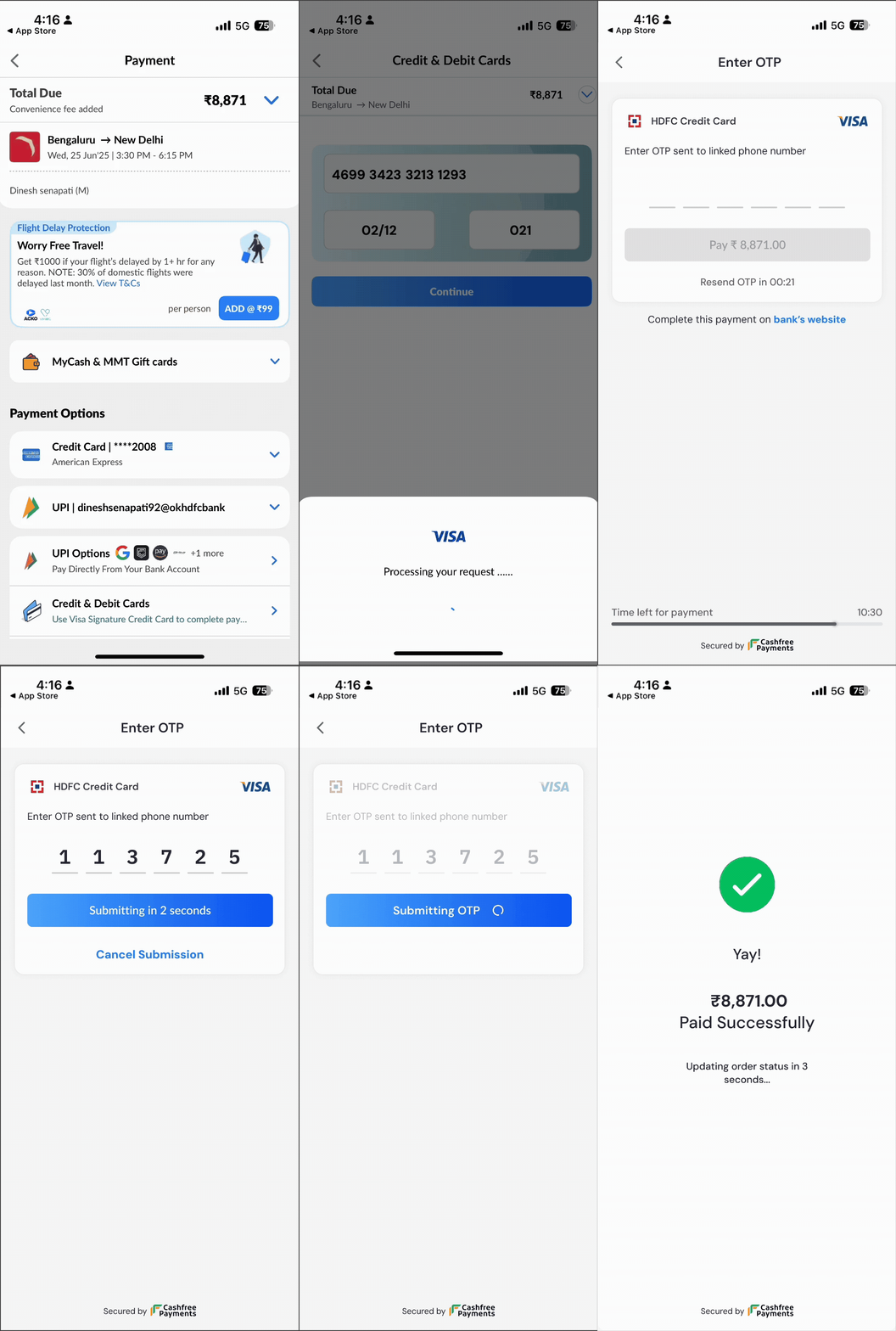
Seamless merchants can draw inspiration from Cashfree’s Native OTP design, which adheres to EMV 3DS user experience guidelines, thereby enhancing customer familiarity and trust.\
The UI should include the following elements:
* OTP input field and submit button.
* OTP auto-read and auto-submit functionality.
* Display of bank and scheme logos.
* Resend OTP option, allowed twice, enabled after 30 seconds each, per bank limits.
* Option to complete the transaction on the bank’s website.
* 5-minute session timeout, in accordance with bank timeout.
Call the [Order Pay API](/api-reference/payments/latest/payments/pay) with `"channel": "post"` to request for Native OTP flow for authentication.
```shell Native OTP request {9} theme={"dark"}
curl --request POST \
--url https://sandbox.cashfree.com/pg/orders/sessions \
--header 'Content-Type: application/json' \
--header 'x-api-version: ' \
--data '{
"payment_session_id": "session_Cke8Y9LKs2CQP9KuTzsomExG1x5CKBLo8MynNCv8QT",
"payment_method":{
"card": {
"channel":"post",
"card_number": "4111111111111111",
"card_expiry_mm": "03",
"card_expiry_yy": "25"
"card_cvv": "326",
"card_holder_name": "john"
}
}
}'
```
If Native OTP flow is enabled and supported for a given transaction, the Order Pay API response will return `"action": "post"`. Render the native OTP UI to collect the OTP and submit it on the link provided in the `data.url` field for authentication.
```json Collect OTP response {2,6,10} theme={"dark"}
{
"action": "post",
"cf_payment_id": "3991346241",
"channel": "post",
"data": {
"url": "https://api.cashfree.com/pg/orders/pay/authenticate/3991346241",
"payload": null,
"content_type": "application/json",
"method": "post",
"redirect_to_bank": "https://api.cashfree.com/pg/view/redirecttobank/MV47yJlEMkr8X_Er5YDZ-uiKHU7IGrK2kH7CTtcjeaU8v10fAeLoLL9osqoUQrmBxnbV809FFzyQTKQy"
},
"payment_amount": 1.00,
"payment_method": "card"
}
```
It is advisable to keep 10 seconds of max timeout for the Order Pay API response, as our Native OTP response is subject to bank ACS load time.
When `channel = 'post'` is sent in Order Pay API request for Native OTP flow:
* If Native OTP is supported, you'll receive `channel = "post"` and `action = "post"` in response → render Native OTP UI and submit OTP to `data.url`; If user clicks on redirect to bank page, then redirect the user to `data.redirect_to_bank`.
```json Sample response {2,6,10} theme={"dark"}
{
"action": "post",
"cf_payment_id": "3991346241",
"channel": "post",
"data": {
"url": "https://api.cashfree.com/pg/orders/pay/authenticate/3991346241",
"payload": null,
"content_type": "application/json",
"method": "post",
"redirect_to_bank": "https://api.cashfree.com/pg/view/redirecttobank/MV47yJlEMkr8X_Er5YDZ-uiKHU7IGrK2kH7CTtcjeaU8v10fAeLoLL9osqoUQrmBxnbV809FFzyQTKQy"
},
"payment_amount": 1.00,
"payment_method": "card"
}
```
* If Native OTP isn't supported, you'll receive `channel = "post"` and `action = "link"` in response → redirect the user to `data.url` or `data.redirect_to_bank` (both will have the same URL).
```json Sample response {2,6} theme={"dark"}
{
"action": "link",
"cf_payment_id": "3991389813",
"channel": "post",
"data": {
"url": "https://api.cashfree.com/pg/view/gateway/session_N45NkEY97Jwp--7qMG88UI6gZ5etAqlxHAe-LqJf-tWCguYEZUehSvDhTeXoTFGEvHI1TzQ0Z1qHgTC9mBup0Zxn3NCYEvzo4kLajub-98c4QuN2bLnDWKdZ2a3dcde9-7080-451b-9dff-b57f03873c68",
"payload": null,
"content_type": null,
"method": null,
"redirect_to_bank": "https://api.cashfree.com/pg/view/gateway/session_N45NkEY97Jwp--7qMG88UI6gZ5etAqlxHAe-LqJf-tWCguYEZUehSvDhTeXoTFGEvHI1TzQ0Z1qHgTC9mBup0Zxn3NCYEvzo4kLajub-98c4QuN2bLnDWKdZ2a3dcde9-7080-451b-9dff-b57f03873c68"
},
"payment_amount": 1.00,
"payment_method": "card"
}
```
When `channel = 'link'` is sent in Order Pay API request for non-Native OTP flow:
* Redirect the user to `data.url` which will be the bank ACS page or [Cashfree ACS](/payments/features/native-otp#cashfree-acs) page if Cashfree ACS is enabled; `data.redirect_to_bank` won't be present in this case.
```json Sample response {2,6} theme={"dark"}
{
"action": "link",
"cf_payment_id": "3991367114",
"channel": "link",
"data": {
"url": "https://api.cashfree.com/pg/view/gateway/session_N45NkEY97Jwp--7qMG88UI6gZ5etAqlxHAe-LqJf-tWCguYEZUehSvDhTeXoTFGEvHI1TzQ0Z1qHgTC9mBup0Zxn3NCYEvzo4kLajub-98c4QuN2bLnDWKdZ4d4ecf9d-328a-4460-964b-df8d8096be6f",
"payload": null,
"content_type": null,
"method": null
},
"payment_amount": 1.00,
"payment_method": "card"
}
```
Seamless merchants can also leverage **Cashfree's seamless Native OTP SDK** which offers customisable UI and in-built **auto-read and auto-submit functionality**, enabling **single-click OTP experience** for customers.
Cashfree's Native OTP is also enriched with **OTP auto-read and auto-submit** functionality, enabling **single-click OTP experience** for customers.
## Seamless checkout
To implement Native OTP on seamless checkout, merchants must build their own custom Native OTP interface and use Cashfree’s APIs to perform authentication.
**Best practices for designing a Native OTP page**
Seamless merchants can draw inspiration from Cashfree’s Native OTP design, which adheres to EMV 3DS user experience guidelines, thereby enhancing customer familiarity and trust.\
The UI should include the following elements:
* OTP input field and submit button.
* OTP auto-read and auto-submit functionality.
* Display of bank and scheme logos.
* Resend OTP option, allowed twice, enabled after 30 seconds each, per bank limits.
* Option to complete the transaction on the bank’s website.
* 5-minute session timeout, in accordance with bank timeout.
Call the [Order Pay API](/api-reference/payments/latest/payments/pay) with `"channel": "post"` to request for Native OTP flow for authentication.
```shell Native OTP request {9} theme={"dark"}
curl --request POST \
--url https://sandbox.cashfree.com/pg/orders/sessions \
--header 'Content-Type: application/json' \
--header 'x-api-version: ' \
--data '{
"payment_session_id": "session_Cke8Y9LKs2CQP9KuTzsomExG1x5CKBLo8MynNCv8QT",
"payment_method":{
"card": {
"channel":"post",
"card_number": "4111111111111111",
"card_expiry_mm": "03",
"card_expiry_yy": "25"
"card_cvv": "326",
"card_holder_name": "john"
}
}
}'
```
If Native OTP flow is enabled and supported for a given transaction, the Order Pay API response will return `"action": "post"`. Render the native OTP UI to collect the OTP and submit it on the link provided in the `data.url` field for authentication.
```json Collect OTP response {2,6,10} theme={"dark"}
{
"action": "post",
"cf_payment_id": "3991346241",
"channel": "post",
"data": {
"url": "https://api.cashfree.com/pg/orders/pay/authenticate/3991346241",
"payload": null,
"content_type": "application/json",
"method": "post",
"redirect_to_bank": "https://api.cashfree.com/pg/view/redirecttobank/MV47yJlEMkr8X_Er5YDZ-uiKHU7IGrK2kH7CTtcjeaU8v10fAeLoLL9osqoUQrmBxnbV809FFzyQTKQy"
},
"payment_amount": 1.00,
"payment_method": "card"
}
```
It is advisable to keep 10 seconds of max timeout for the Order Pay API response, as our Native OTP response is subject to bank ACS load time.
When `channel = 'post'` is sent in Order Pay API request for Native OTP flow:
* If Native OTP is supported, you'll receive `channel = "post"` and `action = "post"` in response → render Native OTP UI and submit OTP to `data.url`; If user clicks on redirect to bank page, then redirect the user to `data.redirect_to_bank`.
```json Sample response {2,6,10} theme={"dark"}
{
"action": "post",
"cf_payment_id": "3991346241",
"channel": "post",
"data": {
"url": "https://api.cashfree.com/pg/orders/pay/authenticate/3991346241",
"payload": null,
"content_type": "application/json",
"method": "post",
"redirect_to_bank": "https://api.cashfree.com/pg/view/redirecttobank/MV47yJlEMkr8X_Er5YDZ-uiKHU7IGrK2kH7CTtcjeaU8v10fAeLoLL9osqoUQrmBxnbV809FFzyQTKQy"
},
"payment_amount": 1.00,
"payment_method": "card"
}
```
* If Native OTP isn't supported, you'll receive `channel = "post"` and `action = "link"` in response → redirect the user to `data.url` or `data.redirect_to_bank` (both will have the same URL).
```json Sample response {2,6} theme={"dark"}
{
"action": "link",
"cf_payment_id": "3991389813",
"channel": "post",
"data": {
"url": "https://api.cashfree.com/pg/view/gateway/session_N45NkEY97Jwp--7qMG88UI6gZ5etAqlxHAe-LqJf-tWCguYEZUehSvDhTeXoTFGEvHI1TzQ0Z1qHgTC9mBup0Zxn3NCYEvzo4kLajub-98c4QuN2bLnDWKdZ2a3dcde9-7080-451b-9dff-b57f03873c68",
"payload": null,
"content_type": null,
"method": null,
"redirect_to_bank": "https://api.cashfree.com/pg/view/gateway/session_N45NkEY97Jwp--7qMG88UI6gZ5etAqlxHAe-LqJf-tWCguYEZUehSvDhTeXoTFGEvHI1TzQ0Z1qHgTC9mBup0Zxn3NCYEvzo4kLajub-98c4QuN2bLnDWKdZ2a3dcde9-7080-451b-9dff-b57f03873c68"
},
"payment_amount": 1.00,
"payment_method": "card"
}
```
When `channel = 'link'` is sent in Order Pay API request for non-Native OTP flow:
* Redirect the user to `data.url` which will be the bank ACS page or [Cashfree ACS](/payments/features/native-otp#cashfree-acs) page if Cashfree ACS is enabled; `data.redirect_to_bank` won't be present in this case.
```json Sample response {2,6} theme={"dark"}
{
"action": "link",
"cf_payment_id": "3991367114",
"channel": "link",
"data": {
"url": "https://api.cashfree.com/pg/view/gateway/session_N45NkEY97Jwp--7qMG88UI6gZ5etAqlxHAe-LqJf-tWCguYEZUehSvDhTeXoTFGEvHI1TzQ0Z1qHgTC9mBup0Zxn3NCYEvzo4kLajub-98c4QuN2bLnDWKdZ4d4ecf9d-328a-4460-964b-df8d8096be6f",
"payload": null,
"content_type": null,
"method": null
},
"payment_amount": 1.00,
"payment_method": "card"
}
```
Seamless merchants can also leverage **Cashfree's seamless Native OTP SDK** which offers customisable UI and in-built **auto-read and auto-submit functionality**, enabling **single-click OTP experience** for customers.
 On the Native OTP page, it is advisable to provide an option for customers to complete the transaction on the bank’s website. If the customer clicks on this option, another transaction is created in the backend and processed on the bank ACS page. In this scenario, the merchant receives two webhooks—one for the primary transaction and another for the secondary transaction created during the redirection.\
Merchants should consume these webhooks based on their `order_id`. For reconciliation of order status, always use the [Get Payments for an Order API](/api-reference/payments/latest/payments/get-payments-for-order). If any transaction for the order is successful, the order status should be considered paid.
After merchant collects the OTP on Native OTP page, they can submit it to Cashfree using the [Submit OTP API](/api-reference/payments/latest/payments/authenticate).
```bash Submit OTP {8-9} theme={"dark"}
curl --request POST \
--url https://sandbox.cashfree.com/pg/orders/pay/authenticate/{payment_id} \
--header 'accept: application/json' \
--header 'content-type: application/json' \
--header 'x-api-version: ' \
--data '
{
"action": "SUBMIT_OTP",
"otp": "111000"
}'
```
Also, give an option to resend OTP on your Native OTP page by calling this same API with `"action": "RESEND_OTP"`.
```bash Resend OTP {8} theme={"dark"}
curl --request POST \
--url https://sandbox.cashfree.com/pg/orders/pay/authenticate/{payment_id} \
--header 'accept: application/json' \
--header 'content-type: application/json' \
--header 'x-api-version: ' \
--data '
{
"action": "RESEND_OTP"
}'
```
## Cashfree ACS
For merchants who prefer not to build a custom Native OTP interface, Cashfree provides an ACS page where customers can submit the OTP. This page offers a standardised experience with auto-read and auto-submit functionality for a smoother payment flow.
Call the [Order Pay API](/api-reference/payments/latest/payments/pay) with `"channel": "link"` to request Cashfree ACS for authentication → redirect the user to `data.url` to open Cashfree ACS page. Cashfree will collect and submit the OTP for authentication.
```json Sample response {2,6} theme={"dark"}
{
"action": "link",
"cf_payment_id": "3991367114",
"channel": "link",
"data": {
"url": "https://api.cashfree.com/pg/view/gateway/session_N45NkEY97Jwp--7qMG88UI6gZ5etAqlxHAe-LqJf-tWCguYEZUehSvDhTeXoTFGEvHI1TzQ0Z1qHgTC9mBup0Zxn3NCYEvzo4kLajub-98c4QuN2bLnDWKdZ4d4ecf9d-328a-4460-964b-df8d8096be6f",
"payload": null,
"content_type": null,
"method": null
},
"payment_amount": 1.00,
"payment_method": "card"
}
```
On the Native OTP page, it is advisable to provide an option for customers to complete the transaction on the bank’s website. If the customer clicks on this option, another transaction is created in the backend and processed on the bank ACS page. In this scenario, the merchant receives two webhooks—one for the primary transaction and another for the secondary transaction created during the redirection.\
Merchants should consume these webhooks based on their `order_id`. For reconciliation of order status, always use the [Get Payments for an Order API](/api-reference/payments/latest/payments/get-payments-for-order). If any transaction for the order is successful, the order status should be considered paid.
After merchant collects the OTP on Native OTP page, they can submit it to Cashfree using the [Submit OTP API](/api-reference/payments/latest/payments/authenticate).
```bash Submit OTP {8-9} theme={"dark"}
curl --request POST \
--url https://sandbox.cashfree.com/pg/orders/pay/authenticate/{payment_id} \
--header 'accept: application/json' \
--header 'content-type: application/json' \
--header 'x-api-version: ' \
--data '
{
"action": "SUBMIT_OTP",
"otp": "111000"
}'
```
Also, give an option to resend OTP on your Native OTP page by calling this same API with `"action": "RESEND_OTP"`.
```bash Resend OTP {8} theme={"dark"}
curl --request POST \
--url https://sandbox.cashfree.com/pg/orders/pay/authenticate/{payment_id} \
--header 'accept: application/json' \
--header 'content-type: application/json' \
--header 'x-api-version: ' \
--data '
{
"action": "RESEND_OTP"
}'
```
## Cashfree ACS
For merchants who prefer not to build a custom Native OTP interface, Cashfree provides an ACS page where customers can submit the OTP. This page offers a standardised experience with auto-read and auto-submit functionality for a smoother payment flow.
Call the [Order Pay API](/api-reference/payments/latest/payments/pay) with `"channel": "link"` to request Cashfree ACS for authentication → redirect the user to `data.url` to open Cashfree ACS page. Cashfree will collect and submit the OTP for authentication.
```json Sample response {2,6} theme={"dark"}
{
"action": "link",
"cf_payment_id": "3991367114",
"channel": "link",
"data": {
"url": "https://api.cashfree.com/pg/view/gateway/session_N45NkEY97Jwp--7qMG88UI6gZ5etAqlxHAe-LqJf-tWCguYEZUehSvDhTeXoTFGEvHI1TzQ0Z1qHgTC9mBup0Zxn3NCYEvzo4kLajub-98c4QuN2bLnDWKdZ4d4ecf9d-328a-4460-964b-df8d8096be6f",
"payload": null,
"content_type": null,
"method": null
},
"payment_amount": 1.00,
"payment_method": "card"
}
```