> ## Documentation Index
> Fetch the complete documentation index at: https://www.cashfree.com/docs/llms.txt
> Use this file to discover all available pages before exploring further.
# API Logs and Metrics
> Monitor your Cashfree Payment Gateway integration with API logs, alerts, and metrics in the Merchant Dashboard to troubleshoot errors and track endpoint health.
Cashfree notifies you when a certain API threshold on an alert is crossed. For
example, you might create an API alert to notify you when a certain API is
responding with non 200 response more than 10% of time.
## API logs
API logs provide real-time visibility into your integration's API calls and their responses. The logging system captures detailed information about each request, making it easier to monitor and troubleshoot your implementation.
To access:
1. Log in to the [Merchant Dashboard](https://merchant.cashfree.com/auth/login).
2. Select **Payment Gateway** on the home page.
3. Select **API Logs and Alerts** under the **Developers** section.
4. Select the **Logs** tab.
 ##### Error tracking
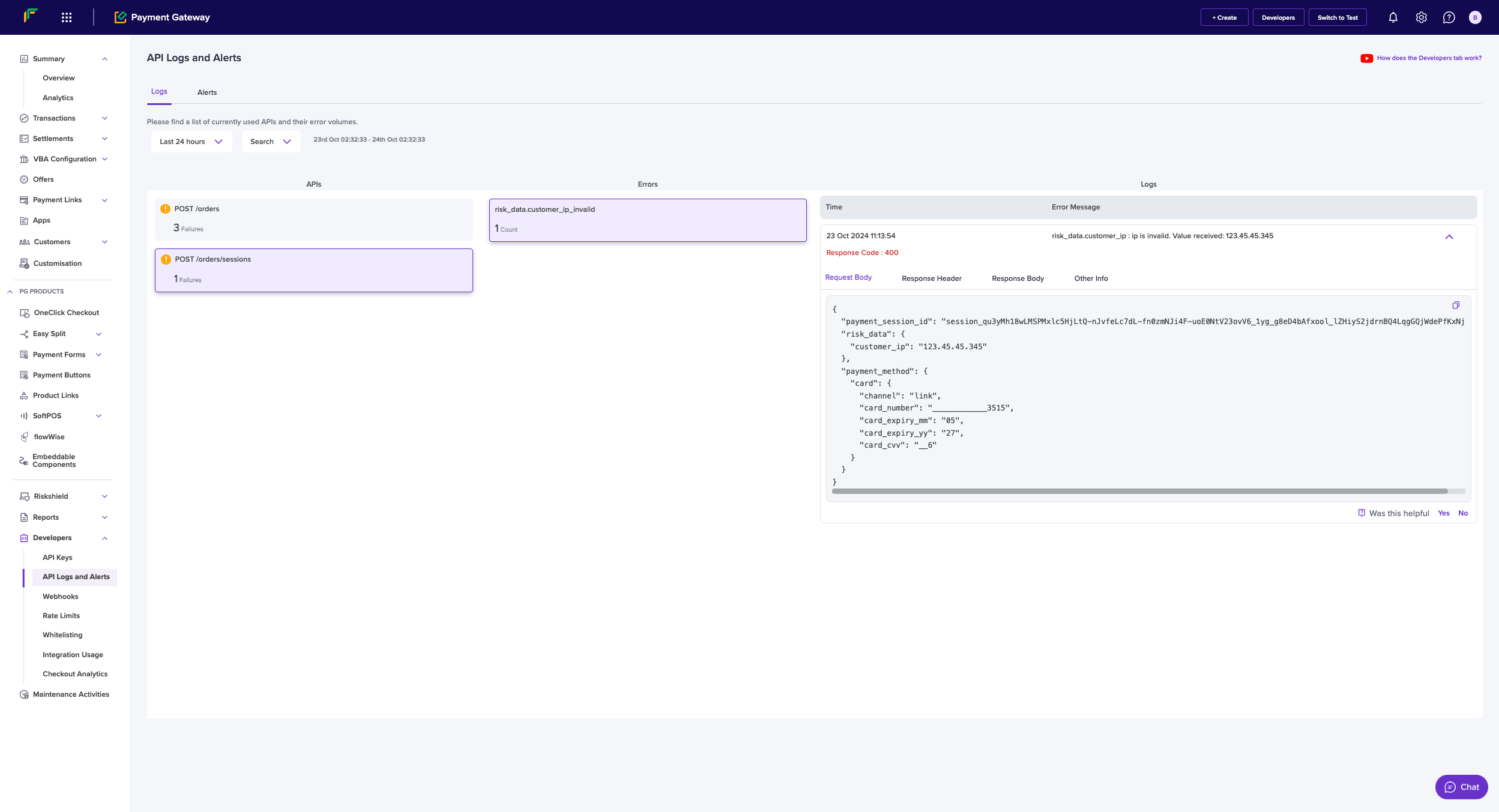
* Errors are categorised by **API Endpoint**
* Each error shows a count of occurrences
* Detailed error messages help identify the root cause
* Example error format: "risk\_data.customer\_ip is Invalid. Value received: 123.45.45.345"
## API alerts
Alerts can be configured to monitor API performance and notify you of potential issues. The alert system helps you proactively manage your integration.
To access:
1. Log in to the [Merchant Dashboard](https://merchant.cashfree.com/auth/login).
2. Select **Payment Gateway** on the home page.
3. Select **API Logs and Alerts** under the **Developers** section.
4. Select the **Alerts** tab.
* **API Alert**: Monitor specific API endpoints
* **Rate Limit Warning**: Track API usage against rate limits
##### Error tracking
* Errors are categorised by **API Endpoint**
* Each error shows a count of occurrences
* Detailed error messages help identify the root cause
* Example error format: "risk\_data.customer\_ip is Invalid. Value received: 123.45.45.345"
## API alerts
Alerts can be configured to monitor API performance and notify you of potential issues. The alert system helps you proactively manage your integration.
To access:
1. Log in to the [Merchant Dashboard](https://merchant.cashfree.com/auth/login).
2. Select **Payment Gateway** on the home page.
3. Select **API Logs and Alerts** under the **Developers** section.
4. Select the **Alerts** tab.
* **API Alert**: Monitor specific API endpoints
* **Rate Limit Warning**: Track API usage against rate limits
 ##### Alert details
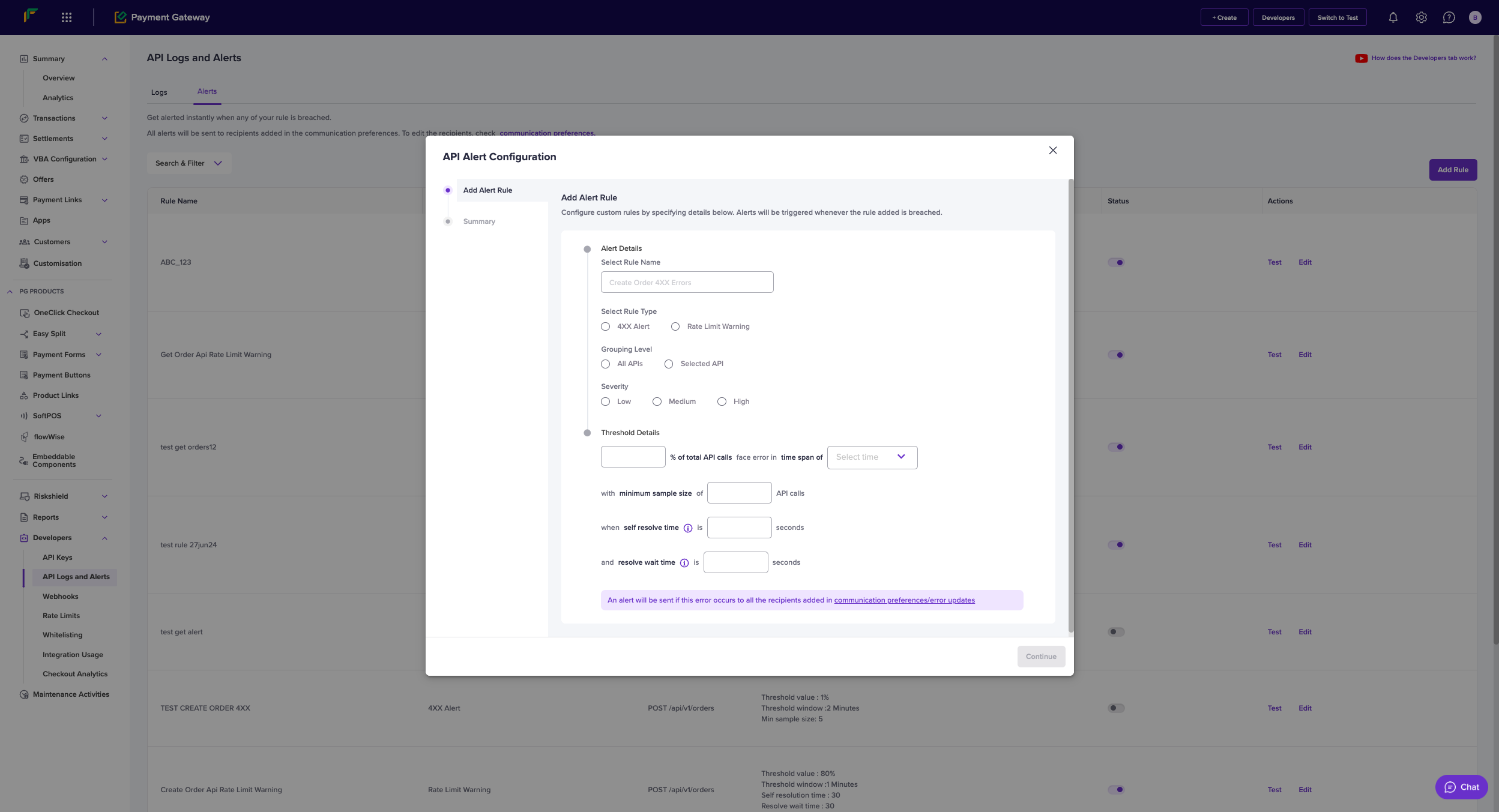
* **Rule Name**: Custom identifier for the alert
* **Rule Type**: Choose between **API Alert** or **Rate Limit Warning**
* **Grouping Level**:
* **All APIs**
* **Selected API**
##### Severity levels
* **Low**
* **Medium**
* High
##### Threshold configuration
* **Error Percentage**: Set the threshold for error rate
* **Time Window**: Select the monitoring period
* **Minimum Sample Size**: Minimum number of API calls required
* **Self Resolve Time**: Duration after which alert auto-resolves
* **Resolve Wait Time**: Waiting period before marking as resolved
##### Alert management
* **Test**: Verify alert configuration
* **Edit**: Modify existing alert rules
* **Status**: Monitor active/inactive state
* **Actions**: Available actions for each alert rule
##### Best practices
1. Set appropriate threshold values based on your business requirements
2. Configure different severity levels for different types of issues
3. Maintain a minimum sample size to avoid false positives
4. Set reasonable self-resolve and wait times
5. Regularly review and update alert configurations
##### Communication
* Alerts are sent to recipients specified in communication preferences
* Multiple recipients can be configured for different alert types
* Alerts include detailed information about the triggering event
##### Alert details
* **Rule Name**: Custom identifier for the alert
* **Rule Type**: Choose between **API Alert** or **Rate Limit Warning**
* **Grouping Level**:
* **All APIs**
* **Selected API**
##### Severity levels
* **Low**
* **Medium**
* High
##### Threshold configuration
* **Error Percentage**: Set the threshold for error rate
* **Time Window**: Select the monitoring period
* **Minimum Sample Size**: Minimum number of API calls required
* **Self Resolve Time**: Duration after which alert auto-resolves
* **Resolve Wait Time**: Waiting period before marking as resolved
##### Alert management
* **Test**: Verify alert configuration
* **Edit**: Modify existing alert rules
* **Status**: Monitor active/inactive state
* **Actions**: Available actions for each alert rule
##### Best practices
1. Set appropriate threshold values based on your business requirements
2. Configure different severity levels for different types of issues
3. Maintain a minimum sample size to avoid false positives
4. Set reasonable self-resolve and wait times
5. Regularly review and update alert configurations
##### Communication
* Alerts are sent to recipients specified in communication preferences
* Multiple recipients can be configured for different alert types
* Alerts include detailed information about the triggering event