> ## Documentation Index
> Fetch the complete documentation index at: https://www.cashfree.com/docs/llms.txt
> Use this file to discover all available pages before exploring further.
# Payment Lifecycle
> Understand how Cashfree orders and payments transition through their lifecycle states so you can track transactions and handle every scenario reliably.
When processing payments through Cashfree Payments, orders and their associated payments progress through various states. Understanding these states helps you track transactions and handle different scenarios effectively.
## Transaction lifecycle
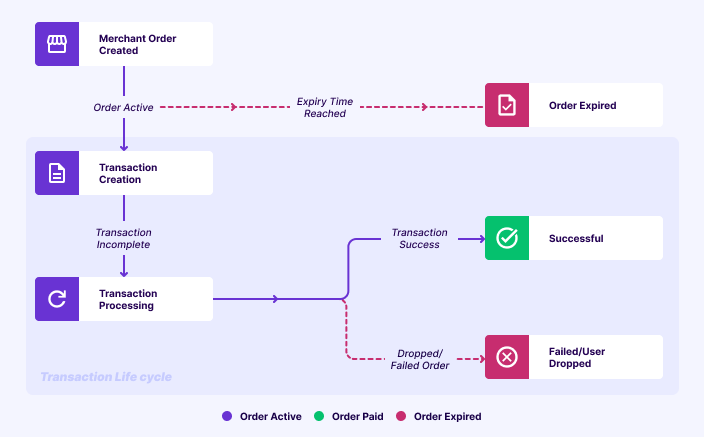
The following diagram shows how transactions progress from order creation to final state:
## Key concepts
Two critical concepts in payment flows are order expiry time and Transaction Time Limit (TTL). Understanding these concepts helps you manage your payment flows effectively.
### Transaction time limit
Transaction Time Limit, also referred to as Transaction Completion Time (TCT), defines the maximum time allowed for a payment attempt.\
During this period, the transaction will reach one of the following final statuses: **SUCCESS**, **FAILED**, or **USER DROPPED**.\
It ensures predictable transaction behaviour and helps minimise financial risk for both merchants and customers.
### Order expiry time
Order expiry time specifies the duration for which an order remains valid and can be used to initiate a new payment attempt.
### Order expiry time vs TTL
| Concept | Starts from | Definition | Behaviour |
| :--------------------- | :------------------------------------------ | :--------------------------------------------------------------------------- | :------------------------------------------------------------------------------------- |
| Order expiry time | Order creation time. | Duration within which a customer must initiate a payment attempt. | Once expired, no new payment attempts can be made. |
| Transaction time limit | When the customer selects a payment method. | Maximum time allowed for the last payment attempt to reach a terminal state. | Even if the order expiry time passes, the last attempt is honoured until the TTL ends. |
### Order finalisation process
The following steps describe how a payment is finalised:
1. **Payment succeeds within TTL** → Order is **PAID**, even if order expiry time passed.
2. An order marked as **EXPIRED** can still move to **PAID** if a payment attempt was started before the expiry and completed successfully within the TTL window, even if the confirmation comes after the expiry time.
3. If payment fails or the user drops → Order remains **EXPIRED**.
4. When TTL ends, any non-terminal payments are automatically closed in a terminal state.
## How order expiry time and TTL work
* **Order creation time**: 10:00 AM
* **Order expiry time**: 15 minutes
* **TTL**: 20 minutes
**Example scenarios**:
1. **No payment attempt**: If the customer does not select any payment method → Order moves from **ACTIVE** to **EXPIRED** at **10:15 AM**
2. **Payment attempt before expiry**:
* Customer selects a payment method at **10:02 AM**
* TTL starts → transaction allowed until **10:22 AM**
* Even though the order expiry time is **10:15 AM**, since a payment attempt is in progress, Cashfree waits until **10:22 AM**
* At **10:15 AM** order moved to **EXPIRED** status.
* If payment succeeds at **10:21 AM** → Order status will change from **EXPIRED** to **PAID**.
* If payment fails or is dropped → Order remains **EXPIRED**.
### Order TTL flowchart
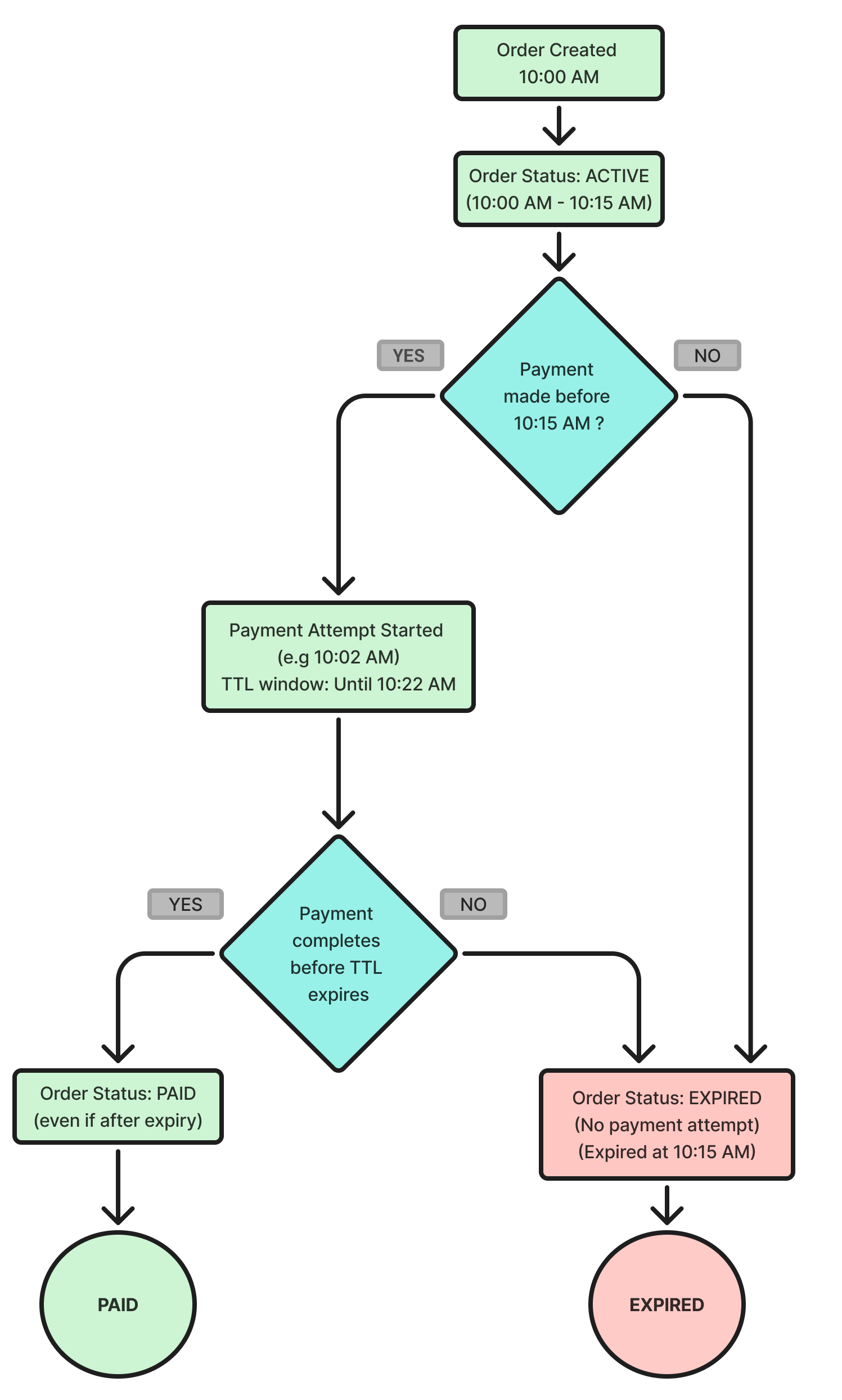
The following flowchart shows how order expiry time and TTL affect an order’s final state:
## Significance of TTL
TTL helps prevent financial loss and ensures a smoother customer experience in scenarios such as:
* Customers initiate payment just before order expiry.
* Banks or Payment Service Providers (PSPs) take additional time to confirm transactions.
If payments that succeed after expiry were rejected, Cashfree would incur financial loss since the bank would still charge for the transaction, but Cashfree would neither settle the funds nor reverse them.
### Use cases
TTL is especially critical for industries where prices fluctuate rapidly, such as stock trading platforms, airline ticket sales, commodities, and flash sales.
**Example**: Flight fares may change every minute. With TTL, once a customer locks a price by initiating payment, Cashfree continues to wait for confirmation even if the order has technically expired, ensuring the transaction is honoured at the locked price.
## Configure order expiry time and TTL
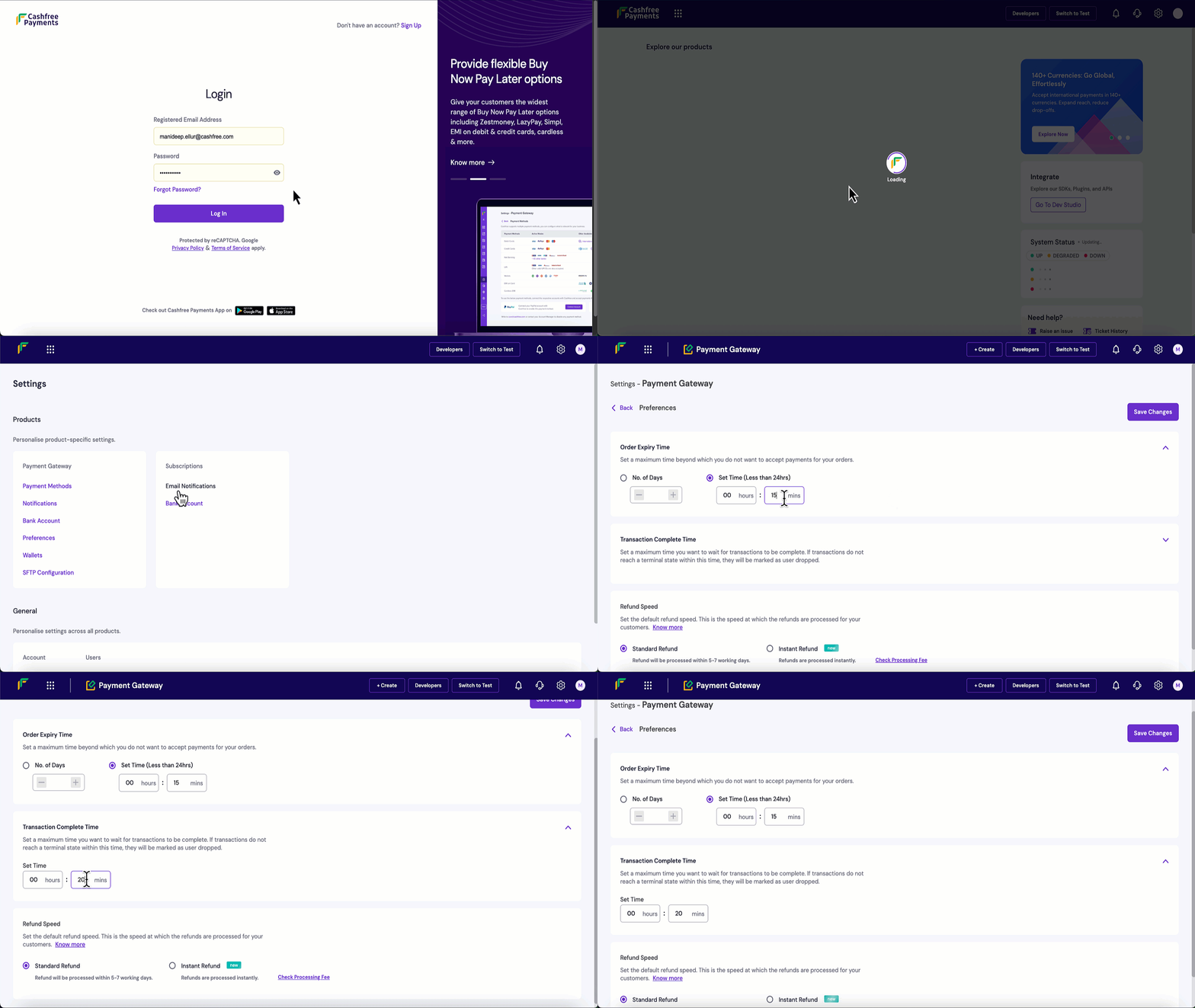
Follow these steps to configure order expiry time and TTL in the Merchant Dashboard:
1. Log in to the [Merchant Dashboard](https://merchant.cashfree.com/auth/login).
2. Navigate to **Settings** > **Preferences**.
3. Set **order expiry time**: Minimum 5 minutes, maximum 30 days.
4. Set **TTL**: Minimum 10 minutes, maximum 24 hours.
5. Select **Save Changes** to apply your updates.
## Order states
| Order State | Description | Remarks |
| :--------------------- | :------------------------------------------------------------------------------------------------------------------- | :---------------------------------------------------------------------------------------------------------------- |
| ACTIVE | Order is created and ready for payment. | Initial state for all newly created orders. |
| PAID | Payment is verified and successful. | Terminal state indicating the order is fully paid. |
| EXPIRED | Order has exceeded the `order_expiry_time` specified during creation. | Further payment attempts are not allowed. |
| TERMINATED | Order is ended using the [Order Termination API](/api-reference/payments/latest/orders/terminate). | Permanent terminal state; customers can no longer pay. |
| TERMINATION\_REQUESTED | Call to the [Order Termination API](/api-reference/payments/latest/orders/terminate) is acknowledged and processing. | If a pending transaction succeeds during this state, the order transitions to **PAID** instead of **TERMINATED**. |
## Payment states
| Payment State | Description | Remarks |
| :------------- | :---------------------------------------------------------------------------------- | :--------------------------------------------------------------- |
| SUCCESS | Transaction is successful and the amount is captured. | Terminal state. Once successful, the order moves to **PAID**. |
| FAILED | Transaction failed due to bank, customer, or system issues. | Terminal state. Customers can initiate a new attempt. |
| NOT\_ATTEMPTED | Transaction is created but acknowledgement from the bank is awaited. | Initial state for a payment attempt. |
| PENDING | Request is sent to the bank and a response is awaited. | Non-terminal state. Do not fulfil orders in this state. |
| FLAGGED | Transaction is identified as high-risk and requires review. | Merchant must manually approve or reject the payment. |
| CANCELLED | Amount is reversed because a success response arrived after the time to live (TTL). | Automatic system reversal for late confirmations. |
| VOID | Transaction amount is not captured by explicit request. | Typically used for pre-authorised card payments or UPI mandates. |
| USER\_DROPPED | Customer abandoned the payment flow before completion. | Includes closing the app or OTP page without attempting payment. |
 ## Key concepts
Two critical concepts in payment flows are order expiry time and Transaction Time Limit (TTL). Understanding these concepts helps you manage your payment flows effectively.
### Transaction time limit
Transaction Time Limit, also referred to as Transaction Completion Time (TCT), defines the maximum time allowed for a payment attempt.\
During this period, the transaction will reach one of the following final statuses: **SUCCESS**, **FAILED**, or **USER DROPPED**.\
It ensures predictable transaction behaviour and helps minimise financial risk for both merchants and customers.
### Order expiry time
Order expiry time specifies the duration for which an order remains valid and can be used to initiate a new payment attempt.
### Order expiry time vs TTL
| Concept | Starts from | Definition | Behaviour |
| :--------------------- | :------------------------------------------ | :--------------------------------------------------------------------------- | :------------------------------------------------------------------------------------- |
| Order expiry time | Order creation time. | Duration within which a customer must initiate a payment attempt. | Once expired, no new payment attempts can be made. |
| Transaction time limit | When the customer selects a payment method. | Maximum time allowed for the last payment attempt to reach a terminal state. | Even if the order expiry time passes, the last attempt is honoured until the TTL ends. |
### Order finalisation process
The following steps describe how a payment is finalised:
1. **Payment succeeds within TTL** → Order is **PAID**, even if order expiry time passed.
2. An order marked as **EXPIRED** can still move to **PAID** if a payment attempt was started before the expiry and completed successfully within the TTL window, even if the confirmation comes after the expiry time.
3. If payment fails or the user drops → Order remains **EXPIRED**.
4. When TTL ends, any non-terminal payments are automatically closed in a terminal state.
## How order expiry time and TTL work
* **Order creation time**: 10:00 AM
* **Order expiry time**: 15 minutes
* **TTL**: 20 minutes
**Example scenarios**:
1. **No payment attempt**: If the customer does not select any payment method → Order moves from **ACTIVE** to **EXPIRED** at **10:15 AM**
2. **Payment attempt before expiry**:
* Customer selects a payment method at **10:02 AM**
* TTL starts → transaction allowed until **10:22 AM**
* Even though the order expiry time is **10:15 AM**, since a payment attempt is in progress, Cashfree waits until **10:22 AM**
* At **10:15 AM** order moved to **EXPIRED** status.
* If payment succeeds at **10:21 AM** → Order status will change from **EXPIRED** to **PAID**.
* If payment fails or is dropped → Order remains **EXPIRED**.
### Order TTL flowchart
The following flowchart shows how order expiry time and TTL affect an order’s final state:
## Key concepts
Two critical concepts in payment flows are order expiry time and Transaction Time Limit (TTL). Understanding these concepts helps you manage your payment flows effectively.
### Transaction time limit
Transaction Time Limit, also referred to as Transaction Completion Time (TCT), defines the maximum time allowed for a payment attempt.\
During this period, the transaction will reach one of the following final statuses: **SUCCESS**, **FAILED**, or **USER DROPPED**.\
It ensures predictable transaction behaviour and helps minimise financial risk for both merchants and customers.
### Order expiry time
Order expiry time specifies the duration for which an order remains valid and can be used to initiate a new payment attempt.
### Order expiry time vs TTL
| Concept | Starts from | Definition | Behaviour |
| :--------------------- | :------------------------------------------ | :--------------------------------------------------------------------------- | :------------------------------------------------------------------------------------- |
| Order expiry time | Order creation time. | Duration within which a customer must initiate a payment attempt. | Once expired, no new payment attempts can be made. |
| Transaction time limit | When the customer selects a payment method. | Maximum time allowed for the last payment attempt to reach a terminal state. | Even if the order expiry time passes, the last attempt is honoured until the TTL ends. |
### Order finalisation process
The following steps describe how a payment is finalised:
1. **Payment succeeds within TTL** → Order is **PAID**, even if order expiry time passed.
2. An order marked as **EXPIRED** can still move to **PAID** if a payment attempt was started before the expiry and completed successfully within the TTL window, even if the confirmation comes after the expiry time.
3. If payment fails or the user drops → Order remains **EXPIRED**.
4. When TTL ends, any non-terminal payments are automatically closed in a terminal state.
## How order expiry time and TTL work
* **Order creation time**: 10:00 AM
* **Order expiry time**: 15 minutes
* **TTL**: 20 minutes
**Example scenarios**:
1. **No payment attempt**: If the customer does not select any payment method → Order moves from **ACTIVE** to **EXPIRED** at **10:15 AM**
2. **Payment attempt before expiry**:
* Customer selects a payment method at **10:02 AM**
* TTL starts → transaction allowed until **10:22 AM**
* Even though the order expiry time is **10:15 AM**, since a payment attempt is in progress, Cashfree waits until **10:22 AM**
* At **10:15 AM** order moved to **EXPIRED** status.
* If payment succeeds at **10:21 AM** → Order status will change from **EXPIRED** to **PAID**.
* If payment fails or is dropped → Order remains **EXPIRED**.
### Order TTL flowchart
The following flowchart shows how order expiry time and TTL affect an order’s final state:
 ## Significance of TTL
TTL helps prevent financial loss and ensures a smoother customer experience in scenarios such as:
* Customers initiate payment just before order expiry.
* Banks or Payment Service Providers (PSPs) take additional time to confirm transactions.
If payments that succeed after expiry were rejected, Cashfree would incur financial loss since the bank would still charge for the transaction, but Cashfree would neither settle the funds nor reverse them.
### Use cases
TTL is especially critical for industries where prices fluctuate rapidly, such as stock trading platforms, airline ticket sales, commodities, and flash sales.
**Example**: Flight fares may change every minute. With TTL, once a customer locks a price by initiating payment, Cashfree continues to wait for confirmation even if the order has technically expired, ensuring the transaction is honoured at the locked price.
## Configure order expiry time and TTL
Follow these steps to configure order expiry time and TTL in the Merchant Dashboard:
1. Log in to the [Merchant Dashboard](https://merchant.cashfree.com/auth/login).
2. Navigate to **Settings** > **Preferences**.
3. Set **order expiry time**: Minimum 5 minutes, maximum 30 days.
4. Set **TTL**: Minimum 10 minutes, maximum 24 hours.
5. Select **Save Changes** to apply your updates.
## Significance of TTL
TTL helps prevent financial loss and ensures a smoother customer experience in scenarios such as:
* Customers initiate payment just before order expiry.
* Banks or Payment Service Providers (PSPs) take additional time to confirm transactions.
If payments that succeed after expiry were rejected, Cashfree would incur financial loss since the bank would still charge for the transaction, but Cashfree would neither settle the funds nor reverse them.
### Use cases
TTL is especially critical for industries where prices fluctuate rapidly, such as stock trading platforms, airline ticket sales, commodities, and flash sales.
**Example**: Flight fares may change every minute. With TTL, once a customer locks a price by initiating payment, Cashfree continues to wait for confirmation even if the order has technically expired, ensuring the transaction is honoured at the locked price.
## Configure order expiry time and TTL
Follow these steps to configure order expiry time and TTL in the Merchant Dashboard:
1. Log in to the [Merchant Dashboard](https://merchant.cashfree.com/auth/login).
2. Navigate to **Settings** > **Preferences**.
3. Set **order expiry time**: Minimum 5 minutes, maximum 30 days.
4. Set **TTL**: Minimum 10 minutes, maximum 24 hours.
5. Select **Save Changes** to apply your updates.
 ## Order states
| Order State | Description | Remarks |
| :--------------------- | :------------------------------------------------------------------------------------------------------------------- | :---------------------------------------------------------------------------------------------------------------- |
| ACTIVE | Order is created and ready for payment. | Initial state for all newly created orders. |
| PAID | Payment is verified and successful. | Terminal state indicating the order is fully paid. |
| EXPIRED | Order has exceeded the `order_expiry_time` specified during creation. | Further payment attempts are not allowed. |
| TERMINATED | Order is ended using the [Order Termination API](/api-reference/payments/latest/orders/terminate). | Permanent terminal state; customers can no longer pay. |
| TERMINATION\_REQUESTED | Call to the [Order Termination API](/api-reference/payments/latest/orders/terminate) is acknowledged and processing. | If a pending transaction succeeds during this state, the order transitions to **PAID** instead of **TERMINATED**. |
## Payment states
| Payment State | Description | Remarks |
| :------------- | :---------------------------------------------------------------------------------- | :--------------------------------------------------------------- |
| SUCCESS | Transaction is successful and the amount is captured. | Terminal state. Once successful, the order moves to **PAID**. |
| FAILED | Transaction failed due to bank, customer, or system issues. | Terminal state. Customers can initiate a new attempt. |
| NOT\_ATTEMPTED | Transaction is created but acknowledgement from the bank is awaited. | Initial state for a payment attempt. |
| PENDING | Request is sent to the bank and a response is awaited. | Non-terminal state. Do not fulfil orders in this state. |
| FLAGGED | Transaction is identified as high-risk and requires review. | Merchant must manually approve or reject the payment. |
| CANCELLED | Amount is reversed because a success response arrived after the time to live (TTL). | Automatic system reversal for late confirmations. |
| VOID | Transaction amount is not captured by explicit request. | Typically used for pre-authorised card payments or UPI mandates. |
| USER\_DROPPED | Customer abandoned the payment flow before completion. | Includes closing the app or OTP page without attempting payment. |
## Order states
| Order State | Description | Remarks |
| :--------------------- | :------------------------------------------------------------------------------------------------------------------- | :---------------------------------------------------------------------------------------------------------------- |
| ACTIVE | Order is created and ready for payment. | Initial state for all newly created orders. |
| PAID | Payment is verified and successful. | Terminal state indicating the order is fully paid. |
| EXPIRED | Order has exceeded the `order_expiry_time` specified during creation. | Further payment attempts are not allowed. |
| TERMINATED | Order is ended using the [Order Termination API](/api-reference/payments/latest/orders/terminate). | Permanent terminal state; customers can no longer pay. |
| TERMINATION\_REQUESTED | Call to the [Order Termination API](/api-reference/payments/latest/orders/terminate) is acknowledged and processing. | If a pending transaction succeeds during this state, the order transitions to **PAID** instead of **TERMINATED**. |
## Payment states
| Payment State | Description | Remarks |
| :------------- | :---------------------------------------------------------------------------------- | :--------------------------------------------------------------- |
| SUCCESS | Transaction is successful and the amount is captured. | Terminal state. Once successful, the order moves to **PAID**. |
| FAILED | Transaction failed due to bank, customer, or system issues. | Terminal state. Customers can initiate a new attempt. |
| NOT\_ATTEMPTED | Transaction is created but acknowledgement from the bank is awaited. | Initial state for a payment attempt. |
| PENDING | Request is sent to the bank and a response is awaited. | Non-terminal state. Do not fulfil orders in this state. |
| FLAGGED | Transaction is identified as high-risk and requires review. | Merchant must manually approve or reject the payment. |
| CANCELLED | Amount is reversed because a success response arrived after the time to live (TTL). | Automatic system reversal for late confirmations. |
| VOID | Transaction amount is not captured by explicit request. | Typically used for pre-authorised card payments or UPI mandates. |
| USER\_DROPPED | Customer abandoned the payment flow before completion. | Includes closing the app or OTP page without attempting payment. |