> ## Documentation Index
> Fetch the complete documentation index at: https://www.cashfree.com/docs/llms.txt
> Use this file to discover all available pages before exploring further.
# Wix Payment Plugin
> Add the Cashfree Payments plugin to your Wix website to accept Indian payment methods like cards, UPI, netbanking, and wallets without writing any custom code.
Wix is a leading cloud-based development platform that empowers you to create, design, and run your business online. Integrate Wix with Cashfree Payment Gateway easily without any code and start accepting payments from customers.
All major payment methods such as debit card, credit card, UPI, net banking, wallets are supported to accept payments on Wix. This is one of the most important features of your Wix payment gateway in India.
Note that WIX cannot be integrated in the test environment.
### Steps to integrate Cashfree Payments with Wix
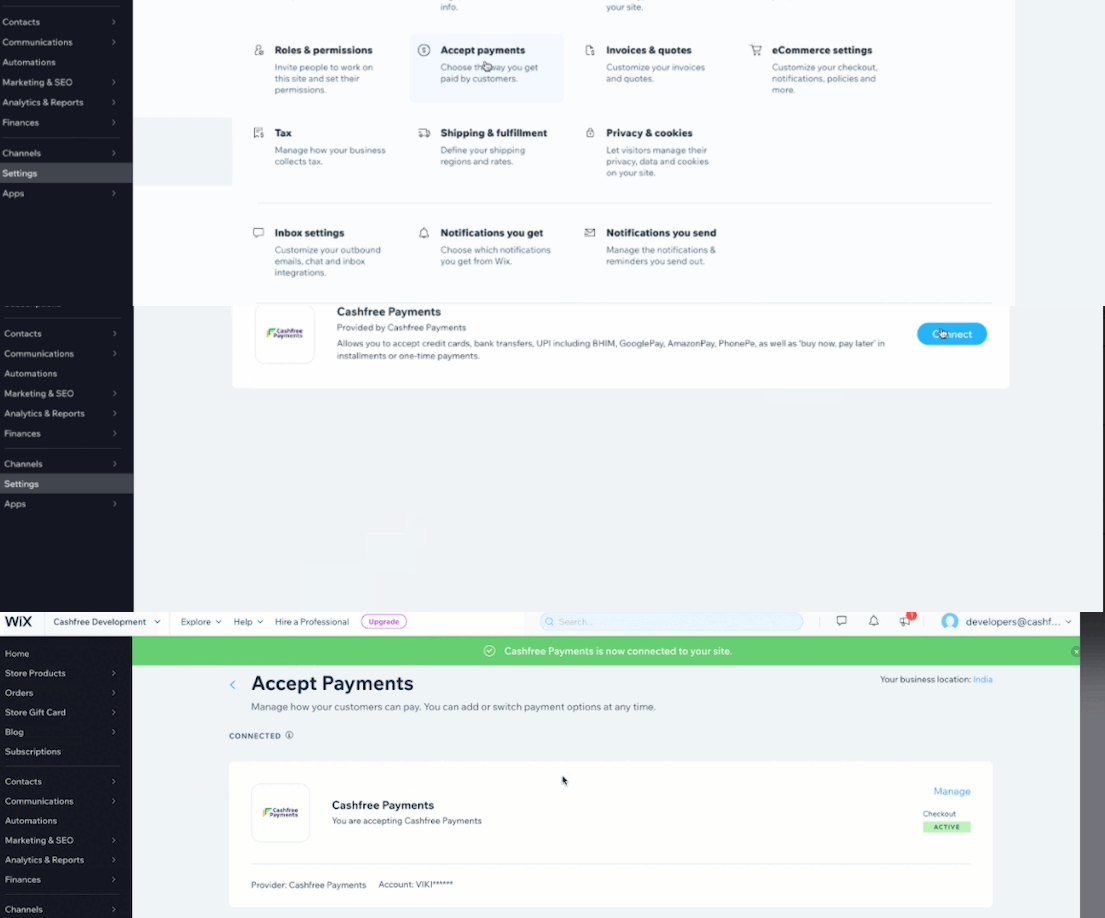
To integrate Wix with Cashfree Payments,
1. Log in to your Wix account and click **Settings**.
2. In the **Settings** page select **Accept Payments**.
3. In the Accept Payments screen, scroll down and click **See More Payment Options**.
4. Select Cashfree Payments and click **Connect**.
5. Enter your **App ID** and **Secret Key** of your Cashfree Account. Follow the steps given in [this](/api-reference/authentication#generate-api-keys) link to get API keys.
6. Click **Connect** to integrate Cashfree Payment with your Wix account.
Now, you can accept payments through your Wix payment gateway in India.
Read about [whitelisting your store url](/payments/online/go-live/whitelist)
before you can accept payments on your store.