> ## Documentation Index
> Fetch the complete documentation index at: https://www.cashfree.com/docs/llms.txt
> Use this file to discover all available pages before exploring further.
# Blacklists
> Add untrusted customers to your Cashfree RiskShield blacklist using card, phone, email, IP, or device data to block risky transactions automatically.
We offer you to create your blacklist who might be regarded as unacceptable or untrustworthy. Once added in the blacklist, the transaction is blocked by RiskShield. You can block a transaction based on customer details such as:
* [Mobile Number](/payments/risk-shield/my-blacklists#mobile-number)
* [Email ID](/payments/risk-shield/my-blacklists#email-id)
* [UPI Handle](/payments/risk-shield/my-blacklists#upi-handle)
* [Cities ](/payments/risk-shield/my-blacklists#cities-indian)
* [IP Address](/payments/risk-shield/my-blacklists#ip-address)
* Card BIN (Contact your account manager to block transactions from a specific card BIN)
**Disputes**
You can also add a customer information from **Disputes Details** to your blacklist. This will block future transactions from the respective customer.
## Mobile number
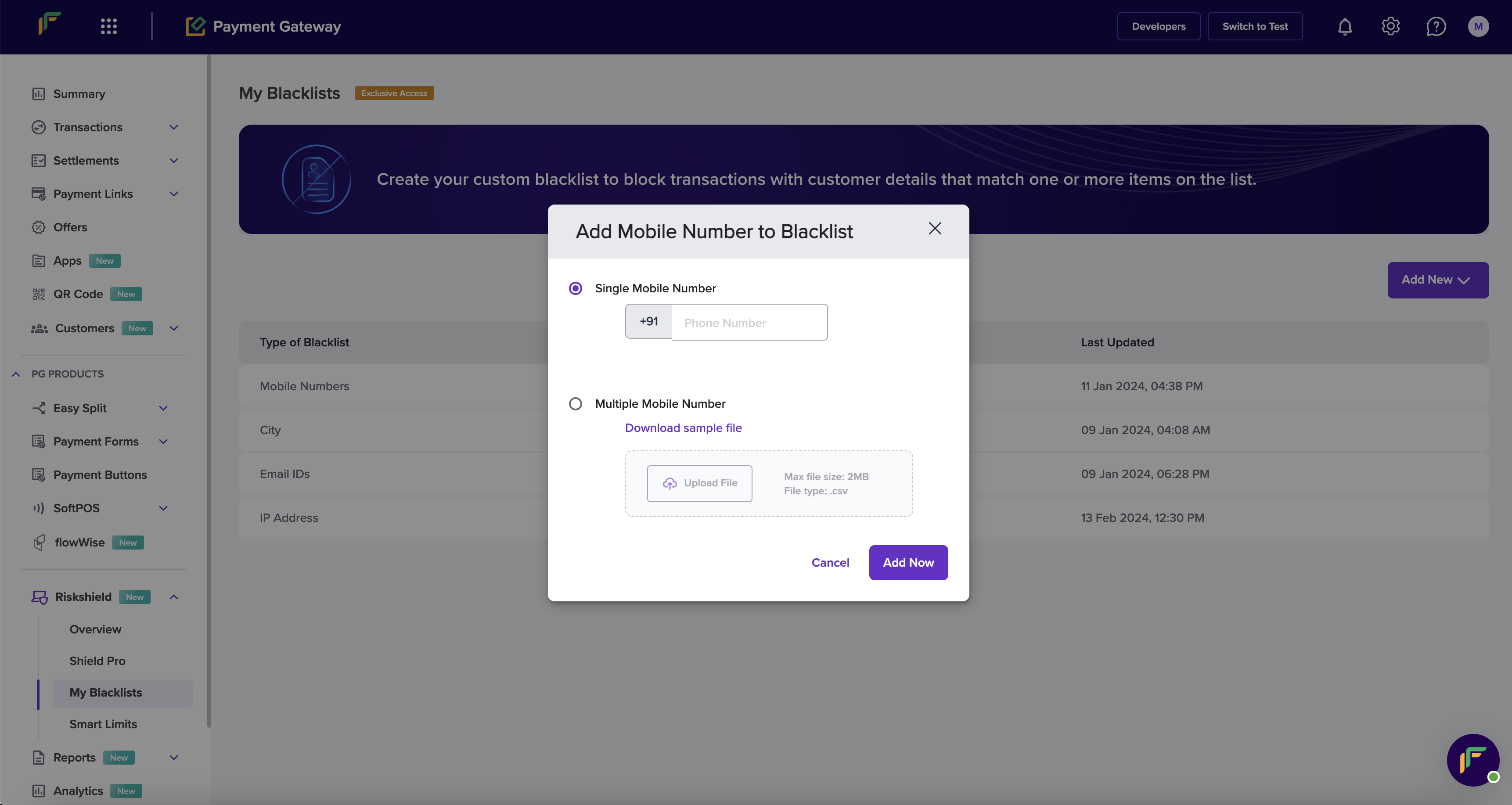
For your security and fraud prevention, you can block a mobile number from processing transactions. The individual cannot process a transaction from using the blocked mobile number. If you think there are indications of fraudulent activity associated with a mobile number, follow the instructions below to block that mobile number:
1. From the *My Blacklists* screen, click **Add New** > **Mobile Number**.
2. In the *Add Mobile Number to Blacklist* popup, enter the following information:
* **Single Mobile Number**: Enter the mobile number in this field.
* **Multiple Mobile Number**: Download the sample file, enter the mobile numbers as per the format, and upload the file.
3. Click **Show Impact Analysis**.
 ## Email ID
There may be instances when fraudsters use the same email ID to process transactions. In such cases, you can block the respective email ID from making transactions in the future. Follow the instructions below to add the email ID to your blacklist:
1. From the *My Blacklists* screen, click **Add New** > **Email ID**.
2. In the *Add Email ID to Blacklist* popup, enter the following information:
* **Single Email ID**: Enter the email ID in this field.
* **Multiple Email ID**: Download the sample file, enter the email IDs as per the format, and upload the file.
3. Click **Show Impact Analysis**.
## Cities (Indian)
High and medium-risk cities for transactions typically refer to locations where there is a higher likelihood of fraudulent financial activities. They may have higher rates of identity theft, credit card fraud, or other financial crimes.
| City | State | Risk status |
| :-------------- | :---------------- | :---------- |
| Jamtara | Jharkhand | High |
| Nuh | Haryana | High |
| Jodhpur | Rajasthan | High |
| Sri Ganganagar | Rajasthan | High |
| Khokha Ki Dhani | Rajasthan | High |
| Begusarai | Bihar | High |
| Siwana | Rajasthan | High |
| Samdari | Rajasthan | High |
| Hanumangarh | Rajasthan | High |
| Jamshedpur | Jharkhand | High |
| Revelganj | Bihar | High |
| Ara | Bihar | High |
| Jasidih | Jharkhand | High |
| Gaya | Bihar | High |
| Buxar | Bihar | High |
| Banswara | Rajasthan | High |
| Raipur | Chhattisgarh | High |
| Vapi | Gujarat | High |
| Muzzaffarpur | Bihar | High |
| Miran | Rajasthan | High |
| Chunawadh | Rajasthan | High |
| Munger | Bihar | High |
| Sitamarhi | Bihar | High |
| Phulan | Rajasthan | High |
| Koelwar | Bihar | High |
| Durg | Chhattisgarh | High |
| Pundri | Haryana | High |
| Chas | Jharkhand | High |
| Dhanbad | Jharkhand | High |
| Rusera | Bihar | High |
| Srinagar | Jammu and Kashmir | High |
| Pupri | Bihar | Medium |
| Shahpur | Bihar | Medium |
| Bakhtiyarpur | Bihar | Medium |
| Jhanjarpur | Bihar | Medium |
| Maner | Bihar | Medium |
| Tekari | Bihar | Medium |
| Madhupur | Jharkhand | Medium |
| Baruni | Bihar | Medium |
| Bhagalpur | Bihar | Medium |
| Muri | Jharkhand | Medium |
| Dalkola | Bihar | Medium |
| Hazaribagh | Jharkhand | Medium |
| Satbarwa | Jharkhand | Medium |
| Jugsalai | Jharkhand | Medium |
| Chakulia | Jharkhand | Medium |
| Sarawan | Jharkhand | Medium |
| Chaibasa | Jharkhand | Medium |
| Sarath | Jharkhand | Medium |
| Dumka | Jharkhand | Medium |
| Ray | Jharkhand | Medium |
| Patamda | Jharkhand | Medium |
| Patna | Bihar | Medium |
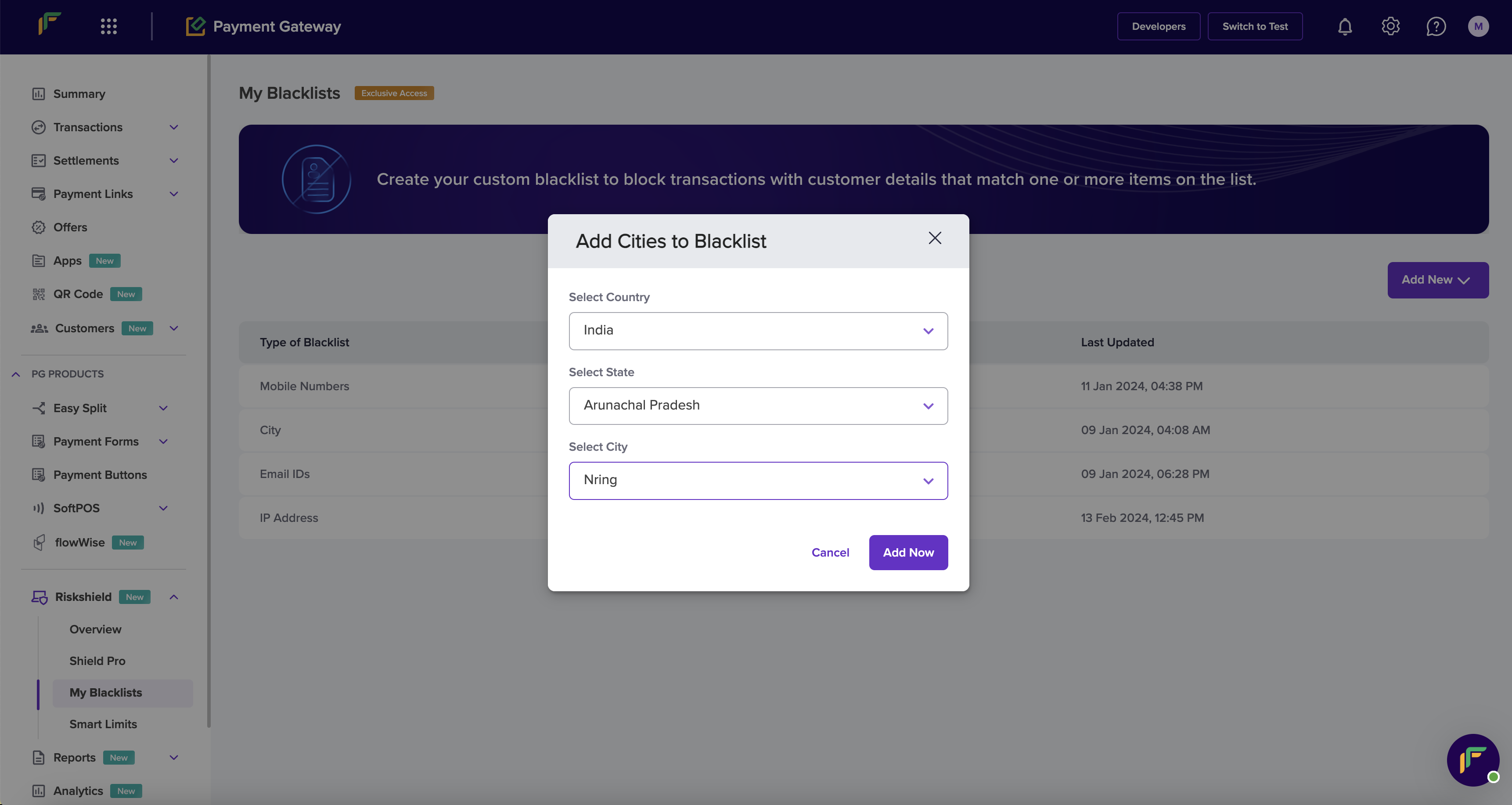
Follow the instructions below to block a transaction based on Indian cities:
1. From the *My Blacklists* screen, click **Add New** > **Cities**.
2. In the *Add Cities to Blacklist* popup, enter the following information:
* **Select Country** - **India** is selected by default.
* \*\*Select State \*\*: Click this dropdown menu to choose a state.
* **Select City**: Click this dropdown menu to choose a city.
3. Click **Add Now**. Repeat the process to add more cities to the blacklist.
## Email ID
There may be instances when fraudsters use the same email ID to process transactions. In such cases, you can block the respective email ID from making transactions in the future. Follow the instructions below to add the email ID to your blacklist:
1. From the *My Blacklists* screen, click **Add New** > **Email ID**.
2. In the *Add Email ID to Blacklist* popup, enter the following information:
* **Single Email ID**: Enter the email ID in this field.
* **Multiple Email ID**: Download the sample file, enter the email IDs as per the format, and upload the file.
3. Click **Show Impact Analysis**.
## Cities (Indian)
High and medium-risk cities for transactions typically refer to locations where there is a higher likelihood of fraudulent financial activities. They may have higher rates of identity theft, credit card fraud, or other financial crimes.
| City | State | Risk status |
| :-------------- | :---------------- | :---------- |
| Jamtara | Jharkhand | High |
| Nuh | Haryana | High |
| Jodhpur | Rajasthan | High |
| Sri Ganganagar | Rajasthan | High |
| Khokha Ki Dhani | Rajasthan | High |
| Begusarai | Bihar | High |
| Siwana | Rajasthan | High |
| Samdari | Rajasthan | High |
| Hanumangarh | Rajasthan | High |
| Jamshedpur | Jharkhand | High |
| Revelganj | Bihar | High |
| Ara | Bihar | High |
| Jasidih | Jharkhand | High |
| Gaya | Bihar | High |
| Buxar | Bihar | High |
| Banswara | Rajasthan | High |
| Raipur | Chhattisgarh | High |
| Vapi | Gujarat | High |
| Muzzaffarpur | Bihar | High |
| Miran | Rajasthan | High |
| Chunawadh | Rajasthan | High |
| Munger | Bihar | High |
| Sitamarhi | Bihar | High |
| Phulan | Rajasthan | High |
| Koelwar | Bihar | High |
| Durg | Chhattisgarh | High |
| Pundri | Haryana | High |
| Chas | Jharkhand | High |
| Dhanbad | Jharkhand | High |
| Rusera | Bihar | High |
| Srinagar | Jammu and Kashmir | High |
| Pupri | Bihar | Medium |
| Shahpur | Bihar | Medium |
| Bakhtiyarpur | Bihar | Medium |
| Jhanjarpur | Bihar | Medium |
| Maner | Bihar | Medium |
| Tekari | Bihar | Medium |
| Madhupur | Jharkhand | Medium |
| Baruni | Bihar | Medium |
| Bhagalpur | Bihar | Medium |
| Muri | Jharkhand | Medium |
| Dalkola | Bihar | Medium |
| Hazaribagh | Jharkhand | Medium |
| Satbarwa | Jharkhand | Medium |
| Jugsalai | Jharkhand | Medium |
| Chakulia | Jharkhand | Medium |
| Sarawan | Jharkhand | Medium |
| Chaibasa | Jharkhand | Medium |
| Sarath | Jharkhand | Medium |
| Dumka | Jharkhand | Medium |
| Ray | Jharkhand | Medium |
| Patamda | Jharkhand | Medium |
| Patna | Bihar | Medium |
Follow the instructions below to block a transaction based on Indian cities:
1. From the *My Blacklists* screen, click **Add New** > **Cities**.
2. In the *Add Cities to Blacklist* popup, enter the following information:
* **Select Country** - **India** is selected by default.
* \*\*Select State \*\*: Click this dropdown menu to choose a state.
* **Select City**: Click this dropdown menu to choose a city.
3. Click **Add Now**. Repeat the process to add more cities to the blacklist.
 ## UPI handle
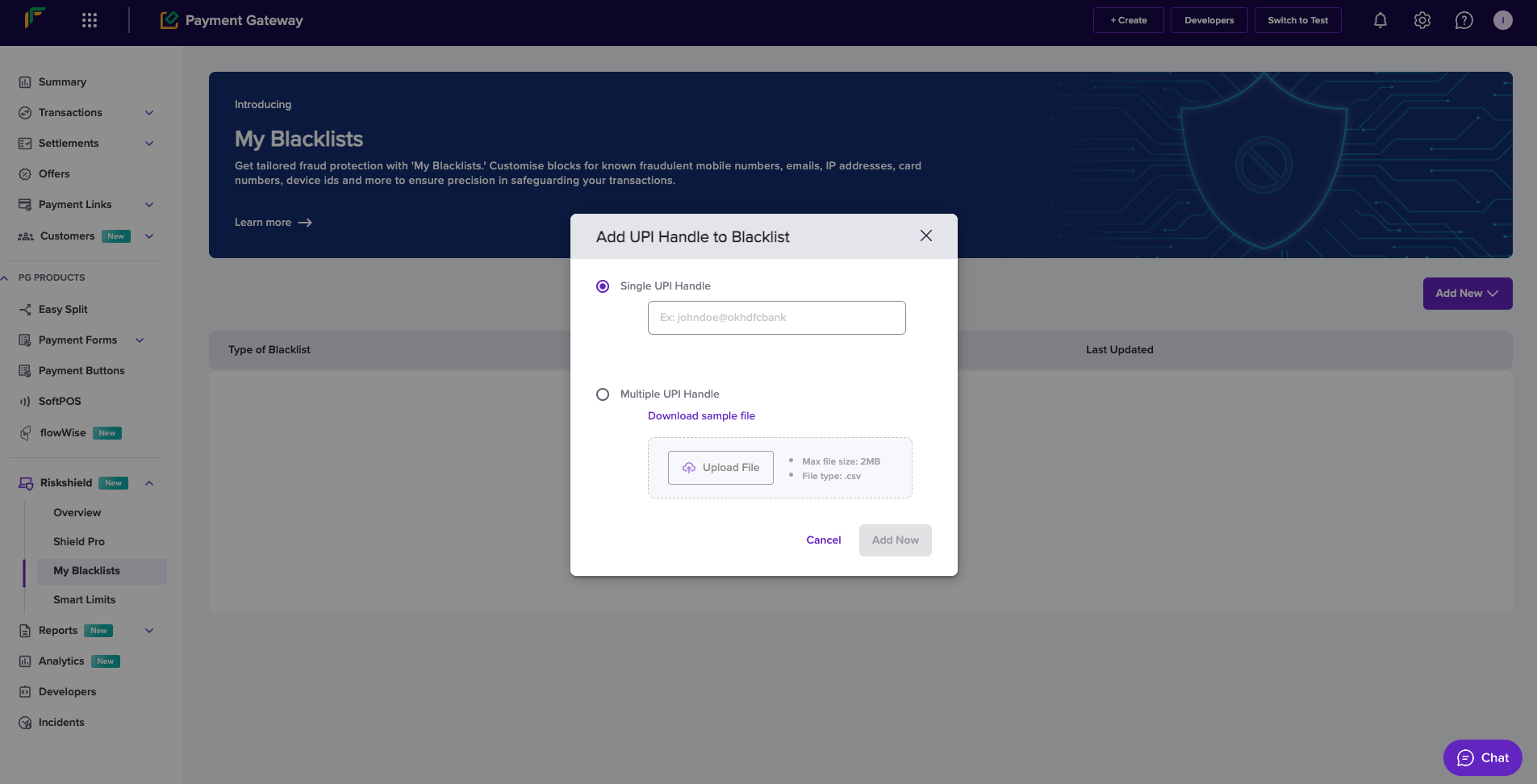
You can block UPI VPA information to prevent any financial harm. Follow the instructions below to add a UPI handle to the blacklist:
1. From the *My Blacklists* screen, click **Add New** > **UPI Handle**.
2. In the *Add UPI Handle to Blacklist* popup, enter the following information:
* **Single UPI Handle**: If you want to block a single UPI handle, select this option and enter the UPI VPA in this field.
* **Multiple UPI Handle**: If you want to block multiple UPI handles, select this option, use **Download sample file** and enter UPI VPA information as per the format in the file, and upload the file using **Upload File**.
3. Click **Show Impact Analysis**.
## UPI handle
You can block UPI VPA information to prevent any financial harm. Follow the instructions below to add a UPI handle to the blacklist:
1. From the *My Blacklists* screen, click **Add New** > **UPI Handle**.
2. In the *Add UPI Handle to Blacklist* popup, enter the following information:
* **Single UPI Handle**: If you want to block a single UPI handle, select this option and enter the UPI VPA in this field.
* **Multiple UPI Handle**: If you want to block multiple UPI handles, select this option, use **Download sample file** and enter UPI VPA information as per the format in the file, and upload the file using **Upload File**.
3. Click **Show Impact Analysis**.
 ## IP address
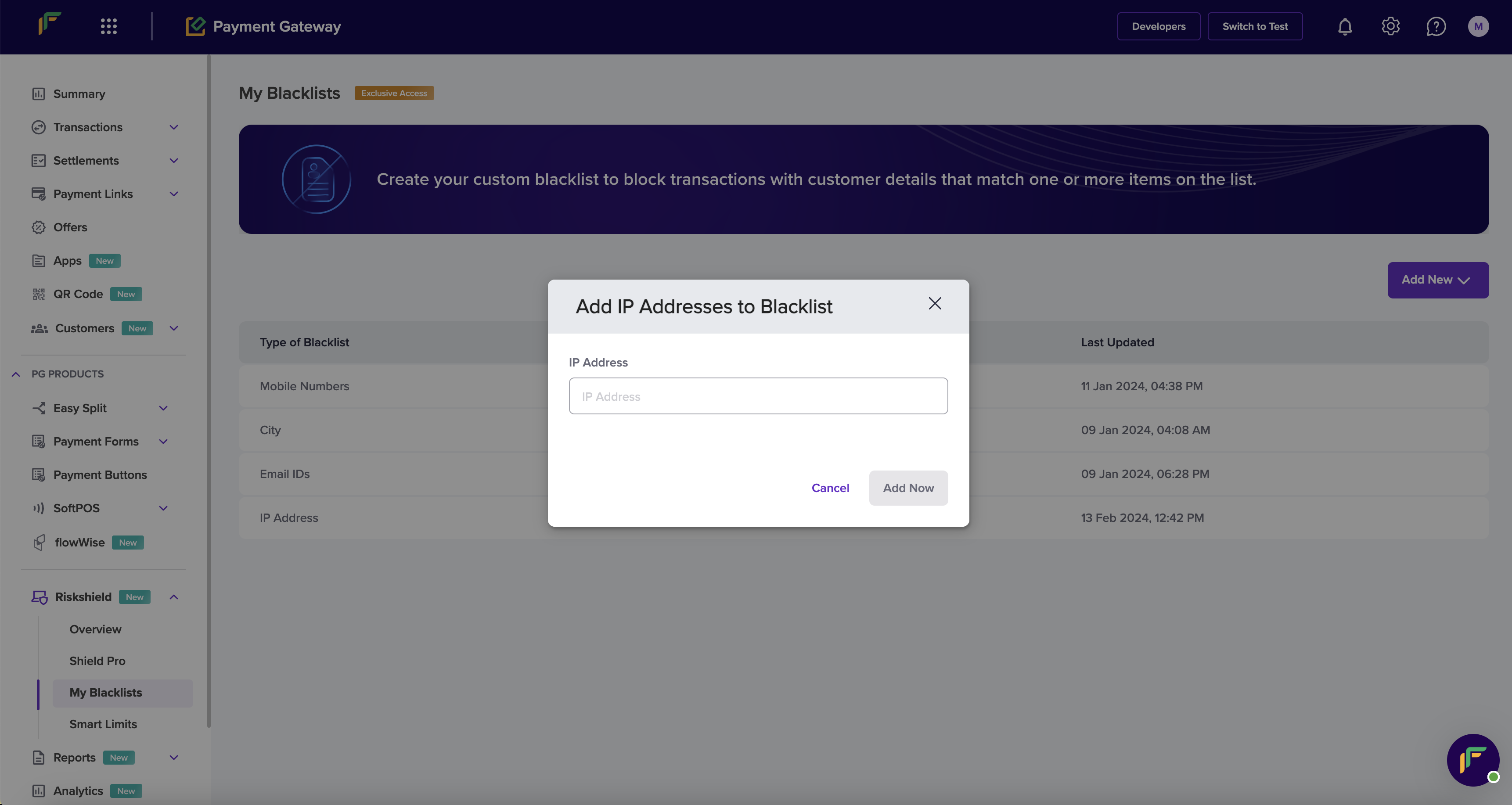
To tighten your security, you can block an IP address that is prone to suspicious or fraudulent activities. When you add an IP address to the blacklist, we will block any attempts to initiate transactions from the IP address. Follow the instructions below to add an IP address to the blacklist:
1. From the *My Blacklists* screen, click **Add New** > **IP Address**.
2. In the *Add IP Addresses to Blacklist* popup, enter the following information:
* **IP Address**: Enter the IP address in the field.
3. Click **Show Impact Analysis**.
## IP address
To tighten your security, you can block an IP address that is prone to suspicious or fraudulent activities. When you add an IP address to the blacklist, we will block any attempts to initiate transactions from the IP address. Follow the instructions below to add an IP address to the blacklist:
1. From the *My Blacklists* screen, click **Add New** > **IP Address**.
2. In the *Add IP Addresses to Blacklist* popup, enter the following information:
* **IP Address**: Enter the IP address in the field.
3. Click **Show Impact Analysis**.