> ## Documentation Index
> Fetch the complete documentation index at: https://www.cashfree.com/docs/llms.txt
> Use this file to discover all available pages before exploring further.
# Smart Rules
> Use Cashfree Risk Shield Smart Rules to block or flag transactions automatically with When–Then logic, velocity checks, and AND/OR conditions.
Smart Rules allow merchants to create multi-condition fraud prevention systems across industries such as e-commerce, digital goods, travel, jewellery, utilities, and more.
The rule engine evaluates parameters, including transaction details, device signals, geographic data, payment modes, and other factors, to block fraudulent activity while allowing legitimate transactions to process seamlessly.
## Why choose smart rules
Smart Rules offer the following benefits:
* **Comprehensive coverage**: Over 30 risk parameters are evaluated in real time across devices, locations, identities, payments, and user behaviours to support advanced fraud detection strategies.
* **Flexible logic engine**: Supports advanced operators such as range-based filtering, multi-value matching, and nested AND/OR conditions, enabling precise and customisable rule creation.
* **Business-friendly interface**: Provides a visual rule builder with plain-language explanations and a pre-built rule library, enabling quick deployment without technical expertise.
* **Adaptive risk management**: Rules can be updated and refined in real time based on emerging fraud patterns, ensuring continuous protection without disrupting legitimate transactions.
* **Scalability**: Handles high transaction volumes without performance degradation, making it suitable for fast-growing or high-risk businesses.
## Use cases
You can apply Smart Rules to the following scenarios for threat protection:
| **Use case** | **Description** |
| -------------------------------- | ------------------------------------------------------------------------------------------------------------------------------------------------------------------------------------------------------------ |
| New user deposit limits | Restricts high-value deposits for first-time users by enforcing a maximum limit of ₹1,00,000 when using credit cards. |
| Payment method restrictions | Limits the number of transactions by payment type. For example, restrict customers to a maximum of three Cash on Delivery (COD) orders per day. |
| Bank-specific transaction limits | Define transaction limits based on the issuing bank, particularly for non-3DS transactions. |
| Multi-condition risk assessment | Combine multiple risk factors, such as new user, VPA/TOR Transaction, high number of unique credit card usage, and unusually high transaction value, to create advanced rules for enhanced fraud protection. |
| High failure rate prevention | Blocks users with excessive failed transaction attempts. |
| IPG transaction-specific rules | Apply country-specific transaction limits, such as setting lower deposit caps for high-risk regions. |
| Velocity-based fraud prevention | Flags transactions when frequency and value thresholds are exceeded. |
## Smart rule logic and configuration parameters
Smart Rules are built using a simple **When–Then** logic structure, where conditions are defined under **When** and corresponding actions are executed under **Then**.
There are two types of Smart Rules:
## Conditional rules
These rules are executed in real time, based on specific conditions and fixed parameters.
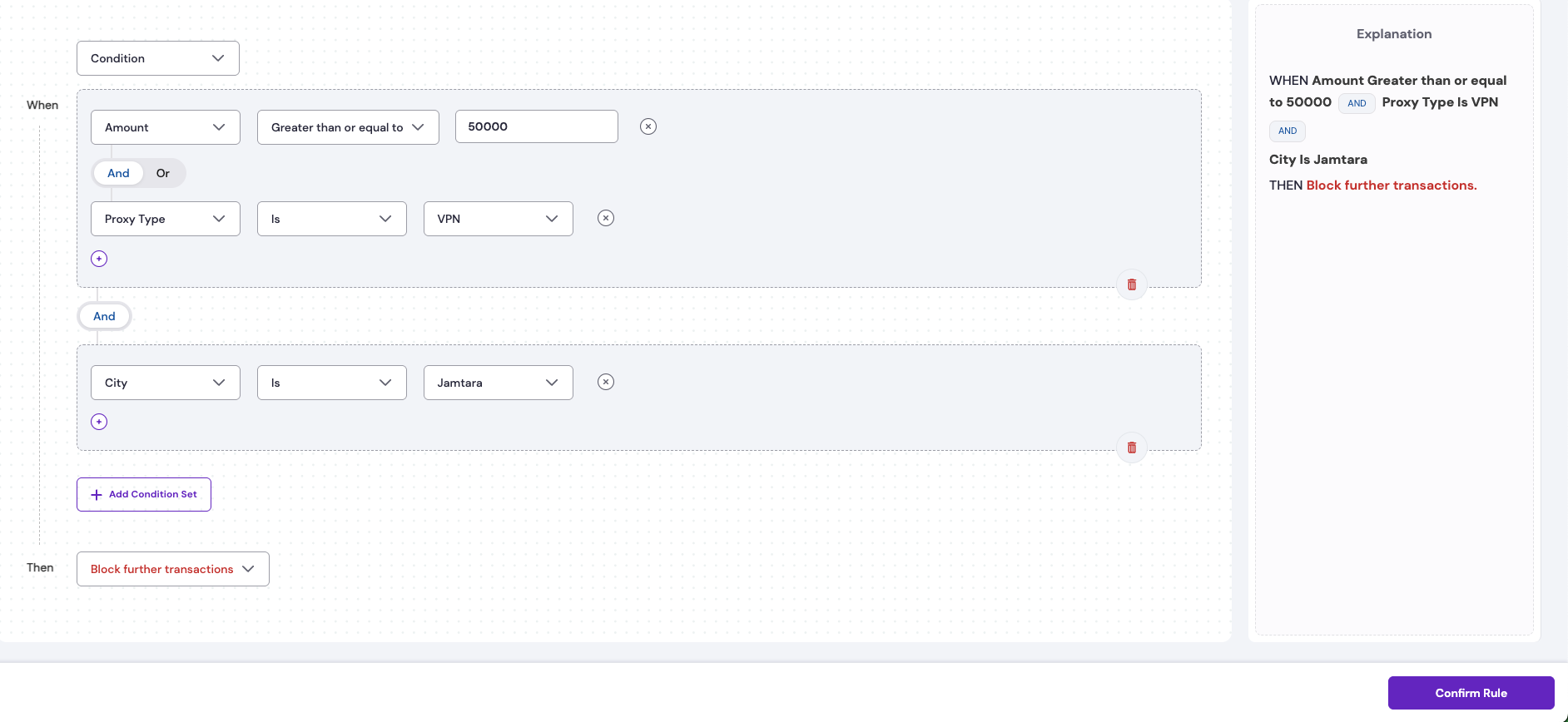
**Example 1**: If the transaction amount is ≥ ₹50,000 AND the proxy type is VPN AND the city is Jamtara, then block further transactions.
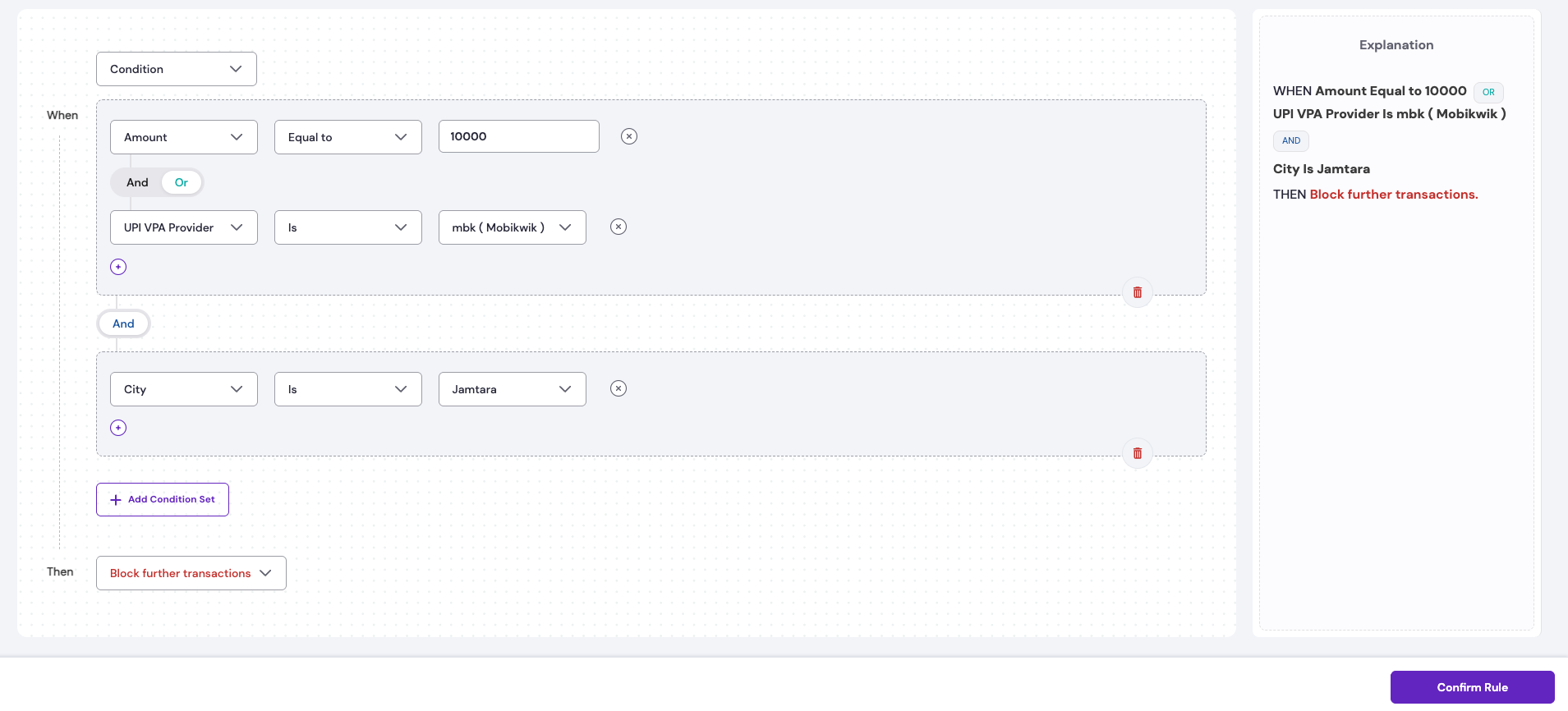
 **Example 2**: If the transaction amount equals ₹10,000 OR the UPI VPA provider is Mobikwik, AND the city is Jamtara, then the system blocks further transactions to prevent potential fraud.
 ### Conditional rule explanation
The above rule is designed to block transactions when specific high-risk conditions are met.
**WHEN**
* **Amount** = 10,000
OR
* **UPI VPA Provider** = Mobikwik
AND
* **City** = Jamtara
**THEN**
* **Block further transactions**.
* The user will be unable to complete this transaction or any other transaction that meets these conditions.
* No debit occurs from the user’s account.
The system checks if either the transaction amount is exactly ₹10,000 or the UPI VPA provider is Mobikwik. If this is true, and at the same time the transaction originates from the city of Jamtara, then the transaction is blocked, meaning the user cannot complete it.
## Aggregate rules
These are aggregated rules that consider a user's past transactions before triggering actions. They combine velocity checks with multiple conditions to create optimised, comprehensive rules.
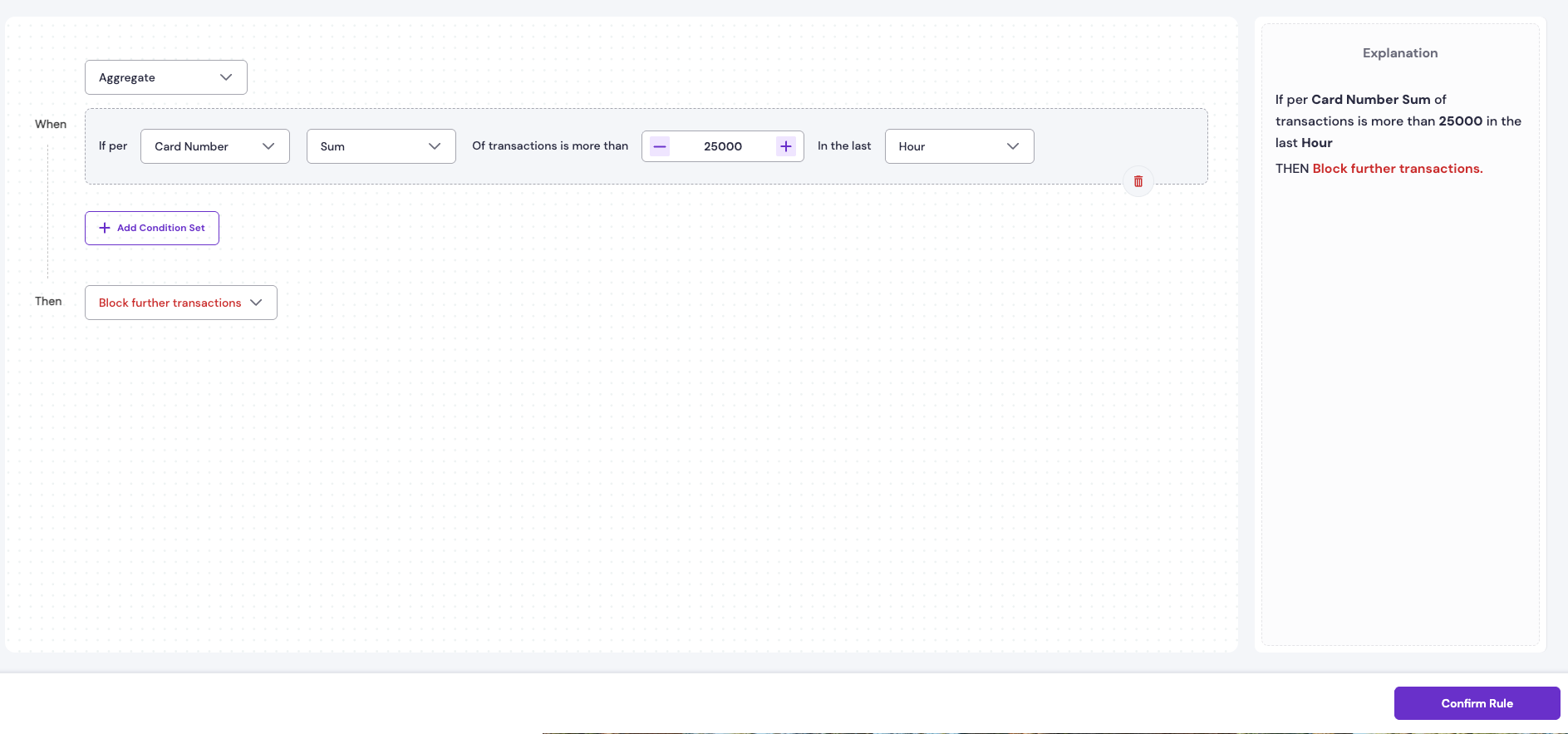
**Example 1**: Limit the total successful transaction amount to ₹25,000 per card per hour.
### Conditional rule explanation
The above rule is designed to block transactions when specific high-risk conditions are met.
**WHEN**
* **Amount** = 10,000
OR
* **UPI VPA Provider** = Mobikwik
AND
* **City** = Jamtara
**THEN**
* **Block further transactions**.
* The user will be unable to complete this transaction or any other transaction that meets these conditions.
* No debit occurs from the user’s account.
The system checks if either the transaction amount is exactly ₹10,000 or the UPI VPA provider is Mobikwik. If this is true, and at the same time the transaction originates from the city of Jamtara, then the transaction is blocked, meaning the user cannot complete it.
## Aggregate rules
These are aggregated rules that consider a user's past transactions before triggering actions. They combine velocity checks with multiple conditions to create optimised, comprehensive rules.
**Example 1**: Limit the total successful transaction amount to ₹25,000 per card per hour.
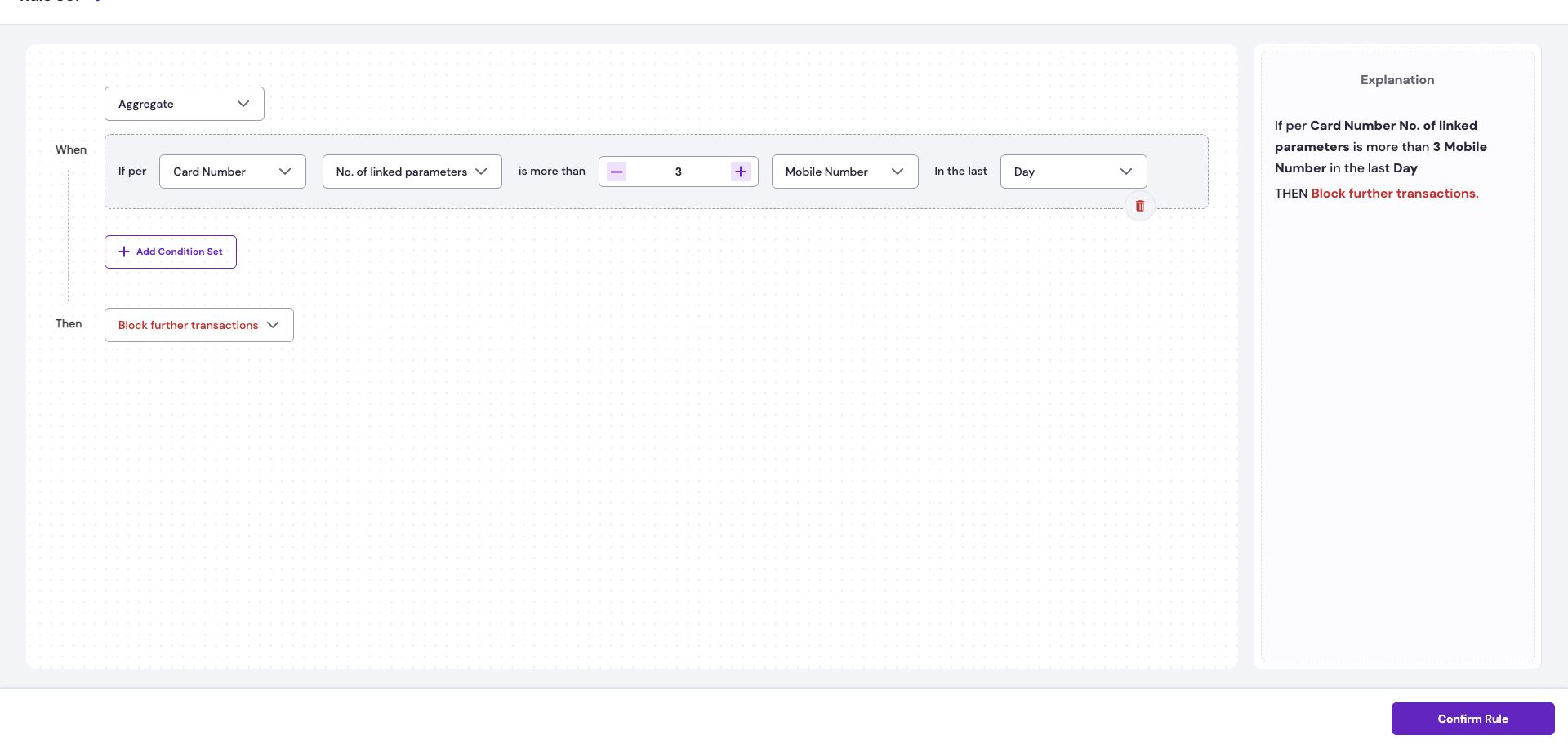
 **Example 2**: If a single card number is linked to more than three mobile numbers in the past 24 hours, the system blocks further transactions to prevent potential fraud.
 ### Aggregate rule explanation
The above rule is designed to prevent card sharing among users by preventing more than three mobile numbers from being linked to the same card for payment in a given day.
**WHEN**
* For each **Card Number**, the Number of linked parameters i.e **Mobile Number** is more than 3 within the last **Day**.
**THEN**
* **Block further transactions**.
* Prevents linking a fourth or additional mobile number to the same card for payments in that time period.
**By default, all rules follow the logic of successful transactions.**
For example, if the rule is *Do not allow more than ₹25,000 per card per day,* it is interpreted as applying only to successful transactions. In other words, the rule prevents more than ₹25,000 in total successful GMV per card per day.
## Rule outcomes
The two Smart Rule outcomes are:
* **Block further transactions**: Prevents any new transactions from being processed. Users will not be able to complete a transaction, and no debit will occur. In UPI Intent cases, a debit may still happen but is immediately refunded. All such attempts are marked as **FAILED** in Cashfree’s system.
* **Flag further transactions**: The transaction is processed like any regular transaction, and the merchant receives settlement as usual. However, the transaction is highlighted in the **Risky Transactions** section of RiskShield for monitoring and review.
## Smart rule parameters
Smart Rules evaluate transactions using the following parameter types to identify and prevent potential fraud attempts:
| **Parameter categories** | **Parameter name** |
| ------------------------- | --------------------------------------------------------------------------------------------------------------------------------------------------------------------------------------------------------------------------------------------------------- |
| Transaction parameters | Amount |
| Payment status parameters | **Successful**: Transactions with status as `SUCCESS`.
### Aggregate rule explanation
The above rule is designed to prevent card sharing among users by preventing more than three mobile numbers from being linked to the same card for payment in a given day.
**WHEN**
* For each **Card Number**, the Number of linked parameters i.e **Mobile Number** is more than 3 within the last **Day**.
**THEN**
* **Block further transactions**.
* Prevents linking a fourth or additional mobile number to the same card for payments in that time period.
**By default, all rules follow the logic of successful transactions.**
For example, if the rule is *Do not allow more than ₹25,000 per card per day,* it is interpreted as applying only to successful transactions. In other words, the rule prevents more than ₹25,000 in total successful GMV per card per day.
## Rule outcomes
The two Smart Rule outcomes are:
* **Block further transactions**: Prevents any new transactions from being processed. Users will not be able to complete a transaction, and no debit will occur. In UPI Intent cases, a debit may still happen but is immediately refunded. All such attempts are marked as **FAILED** in Cashfree’s system.
* **Flag further transactions**: The transaction is processed like any regular transaction, and the merchant receives settlement as usual. However, the transaction is highlighted in the **Risky Transactions** section of RiskShield for monitoring and review.
## Smart rule parameters
Smart Rules evaluate transactions using the following parameter types to identify and prevent potential fraud attempts:
| **Parameter categories** | **Parameter name** |
| ------------------------- | --------------------------------------------------------------------------------------------------------------------------------------------------------------------------------------------------------------------------------------------------------- |
| Transaction parameters | Amount |
| Payment status parameters | **Successful**: Transactions with status as `SUCCESS`.
**Attempted**: Total attempted transactions including `SUCCESS`, `FAILED`, `ABANDONED`, and all other transaction statuses.
**Failed**: Transactions with a terminal status of `FAILED`. |
| User parameters | Mobile number, Email address, UPI VPA, Payment mode, IP address, Card country, Card BIN, UPI VPA provider. |
| Location parameters | Country, State, City, Proxy type. |
## Conditional rule parameters
The following table lists the parameters available for creating conditional rules:
| **Parameter category** | **Parameter name** | **Type** | **Description** | **Examples** |
| ---------------------- | ------------------ | ------------------- | ---------------------------------------------------------- | --------------------------------------------------------- |
| Transaction parameters | Amount | Numerical | Exact transaction amount in INR. | 1,000; 25,000; 20,00,000 |
| User parameters | Mobile Number | Numerical or String | Mobile number of the customer used for the transaction. | 9876543210 |
| | Email Address | String | Email address of the customer. | [user-email@example.com](mailto:user-email@example.com) |
| | UPI VPA | String | UPI Virtual Payment Address. | user\@okhdfcbank; name\@paytm |
| | Payment Method | Categorical | Type of payment method used. | Net Banking; Credit Card; Debit Card; UPI; COD; Pay later |
| | UPI VPA Provider | Categorical | Provider associated with the UPI VPA. | Freecharge; Mobikwik |
| | IP Address | Numerical or String | Static IP address of the customer’s device or network. | 192.168.1.1; 103.45.67.89 |
| | Card Country | Categorical | Country where the card was issued. | Russia; USA; Australia |
| | Card BIN | Numerical | First 6–8 digits of the card (Bank Identification Number). | 411111; 51234567 |
| Location parameters | Country | Categorical | Country from which the transaction is initiated. | USA; UK; Singapore |
| | State | Categorical | State of the transaction origin. | Maharashtra; Karnataka; Delhi |
| | City | Categorical | City of the transaction origin. | Mumbai; Bengaluru; Delhi |
| | Proxy Type | Categorical | Type of proxy detected for the transaction. | VPN; TOR; DCH; None |
## Aggregate rule parameters
The following tables lists the parameters available for creating aggregate rules:
### Aggregation setup parameters
| **Parameter category** | **Type** | **Description** | **Possible values** |
| ---------------------- | ----------- | --------------------------------------------------------- | ------------------------------------------------------------ |
| Base parameter | Categorical | Primary entity used for aggregation. | Card Number, Mobile Number, Email ID, UPI Handle, IP Address |
| Aggregation type | Categorical | Metric used to aggregate. | Count, Sum, Number of Linked Parameters |
| Linked parameter | Categorical | Used only when “Number of Linked Parameters” is selected. | Card Number, Mobile Number, Email ID, UPI Handle, IP Address |
| Duration | Categorical | Time range for aggregation. | 5 min, 1 hour, 1 day, 7 days, 15 days, 30 days |
### Filter criteria parameters
| **Parameter category** | **Parameter name** | **Type** | **Description** | **Examples** |
| ------------------------- | ------------------ | ----------- | -------------------------------------------------------------------------------- | -------------------------- |
| Transaction parameters | Amount | Numerical | Filters transactions within or above a specified value range before aggregation. | 1,000; 25,000; 20,00,000 |
| User parameters | Card Country | Categorical | Restricts aggregation to specific card-issuing countries. | Ethiopia; Yemen; Pakistan |
| Payment status parameters | Transaction Status | Categorical | Filters transactions by outcome. | Success; Failed; Attempted |
## Create a smart rule
Follow these steps to build a Smart Rule based on transaction criteria:
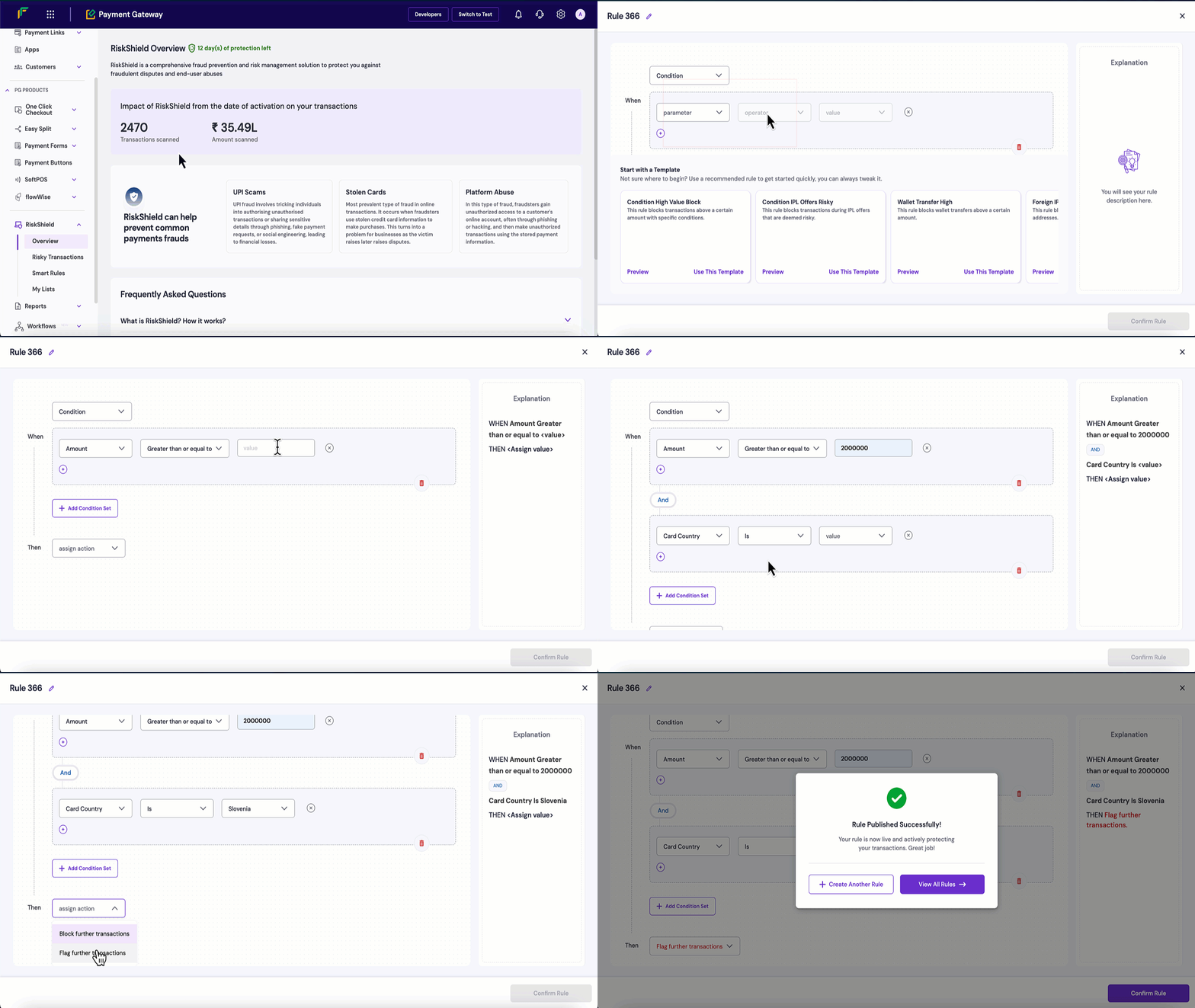
1. Log in to the [Merchant Dashboard](https://merchant.cashfree.com/auth/login).
2. Navigate to **RiskShield** > **Smart Rules**.
3. Click **Create Smart Rule**.
4. Enter a descriptive **Rule Name**.
5. Configure the **When** conditions:
1. Select the type of filtering from the dropdown menu, such as **Condition** or **Aggregate** based.
2. Select the parameter used to evaluate transactions on.
3. Select the specific operator based on the chosen parameter.
4. Enter the comparison value(s).
5. Click **Add Condition Set** for additional conditions with AND/OR logic.
6. Configure the **Then** outcome: **Block** or **Flag further transactions**.
7. Review the auto-generated rule **Explanation** in English for verification.
8. Click **Confirm Rule** to create the new rule.
 ## Managing existing smart rules
Once created, all configured Smart Rules appear in a comprehensive dashboard table under the Smart Rules section, providing complete visibility and control over your fraud prevention system.
### Rule dashboard overview
The Smart Rules dashboard displays three main categories:
* **All Rules**: Complete list of all configured rules which includes activated and deactivated rules.
* **Active Rules**: Currently enabled and executing rules.
* **Recommended**: Pre-configured rules suggested by Cashfree for fraud prevention use.
The rule status indicators available are:
* **Active**: The rule is currently enabled and actively monitoring transactions.
* **Inactive**: The rule is disabled and not monitoring transactions.
* **Recommended**: The rule is suggested by Cashfree based on transaction patterns and risk factors.
| **Field** | **Description** |
| --------------- | ---------------------------------------------------------------------------------------------------------------- |
| Rule Name | A descriptive name is assigned to the rule for easy identification. |
| Rule Actions | Action type configured for each rule is: Block or Flag for Review. |
| Triggers | Number of times the rule was triggered. |
| Amount Impacted | Total monetary value saved through fraud prevention which includes both blocked and flagged transaction amounts. |
| Created On | Date and time when the rule was initially created. |
| Status | Current rule statuses are: Active or Inactive. |
| Actions | Available rule management options are: Edit, Delete, Activate, Deactivate. |
## Scenario examples
The following examples show practical Smart Rule configurations with real-world scenarios. Each example illustrates the conditions, actions, and outcomes to guide effective fraud-prevention strategy setup.
### Conditional rule-based scenarios
The following scenarios illustrate common situations where conditional rule-based filtering enhances fraud detection and transaction control.
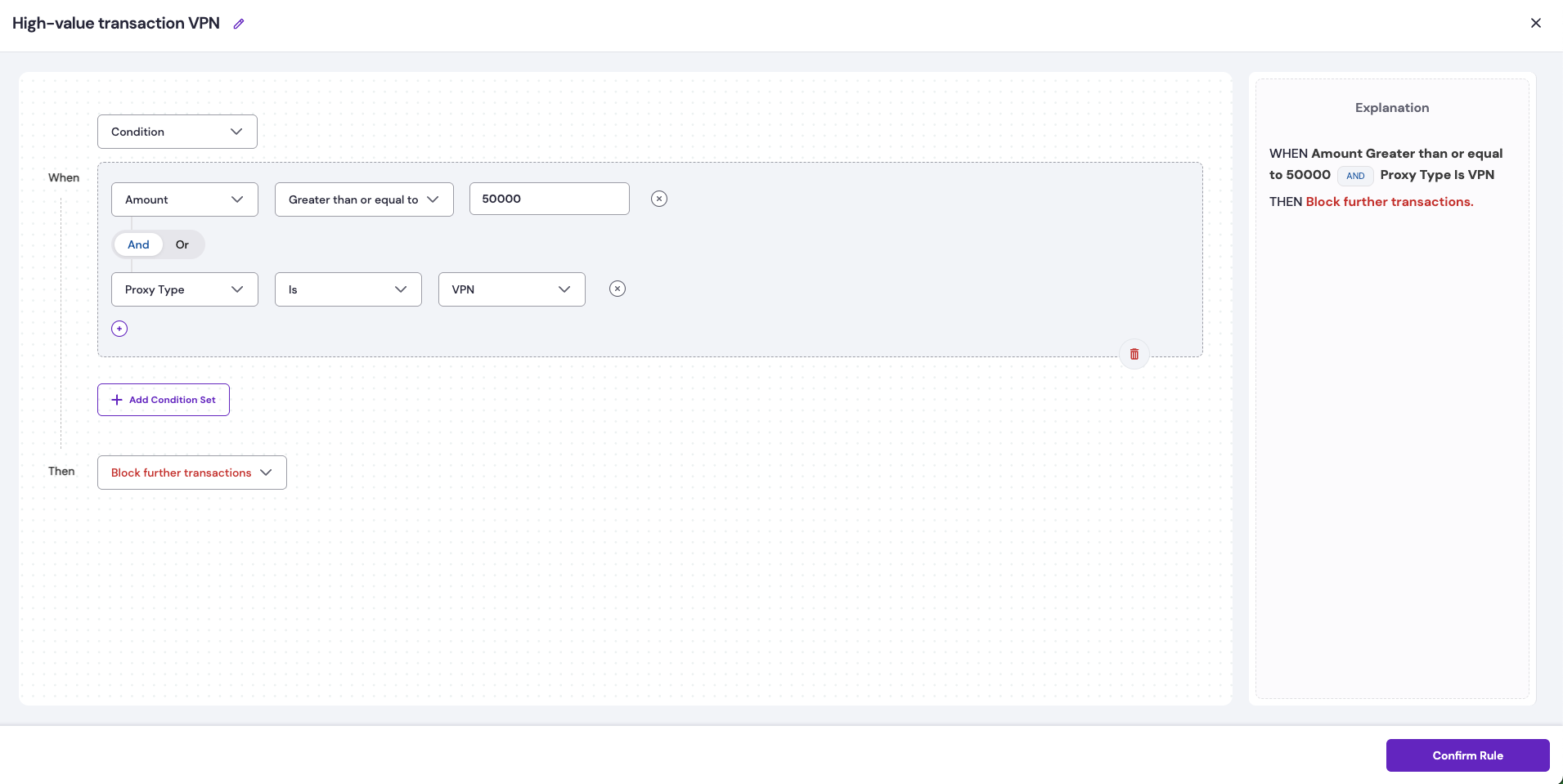
**Scenario**: High-value transaction from VPN.\
**Objective**: Detect and block transactions over 50,000 initiated from VPN connections to mitigate fraud risk.\
**Rule configuration**: Amount >= 50,000 and Proxy Type Is = VPN.\\
## Managing existing smart rules
Once created, all configured Smart Rules appear in a comprehensive dashboard table under the Smart Rules section, providing complete visibility and control over your fraud prevention system.
### Rule dashboard overview
The Smart Rules dashboard displays three main categories:
* **All Rules**: Complete list of all configured rules which includes activated and deactivated rules.
* **Active Rules**: Currently enabled and executing rules.
* **Recommended**: Pre-configured rules suggested by Cashfree for fraud prevention use.
The rule status indicators available are:
* **Active**: The rule is currently enabled and actively monitoring transactions.
* **Inactive**: The rule is disabled and not monitoring transactions.
* **Recommended**: The rule is suggested by Cashfree based on transaction patterns and risk factors.
| **Field** | **Description** |
| --------------- | ---------------------------------------------------------------------------------------------------------------- |
| Rule Name | A descriptive name is assigned to the rule for easy identification. |
| Rule Actions | Action type configured for each rule is: Block or Flag for Review. |
| Triggers | Number of times the rule was triggered. |
| Amount Impacted | Total monetary value saved through fraud prevention which includes both blocked and flagged transaction amounts. |
| Created On | Date and time when the rule was initially created. |
| Status | Current rule statuses are: Active or Inactive. |
| Actions | Available rule management options are: Edit, Delete, Activate, Deactivate. |
## Scenario examples
The following examples show practical Smart Rule configurations with real-world scenarios. Each example illustrates the conditions, actions, and outcomes to guide effective fraud-prevention strategy setup.
### Conditional rule-based scenarios
The following scenarios illustrate common situations where conditional rule-based filtering enhances fraud detection and transaction control.
**Scenario**: High-value transaction from VPN.\
**Objective**: Detect and block transactions over 50,000 initiated from VPN connections to mitigate fraud risk.\
**Rule configuration**: Amount >= 50,000 and Proxy Type Is = VPN.\\
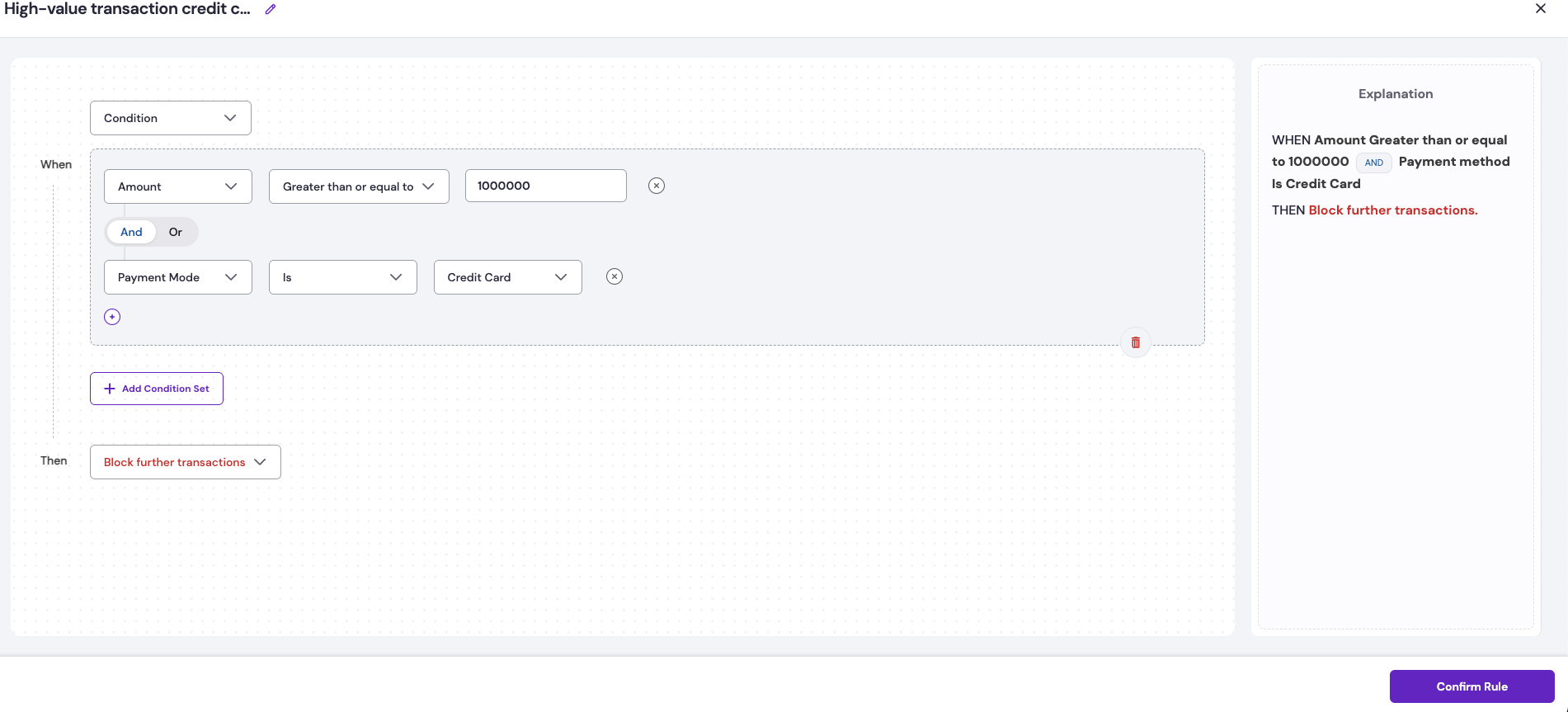
 **Scenario**: High-value transaction via credit card.\
**Objective**: Identify and block transactions exceeding 100,000 made through credit card payments to prevent potential fraud.\
**Rule configuration**: Amount > 100,000 and Payment Mode Is = Credit Card.\\
**Scenario**: High-value transaction via credit card.\
**Objective**: Identify and block transactions exceeding 100,000 made through credit card payments to prevent potential fraud.\
**Rule configuration**: Amount > 100,000 and Payment Mode Is = Credit Card.\\
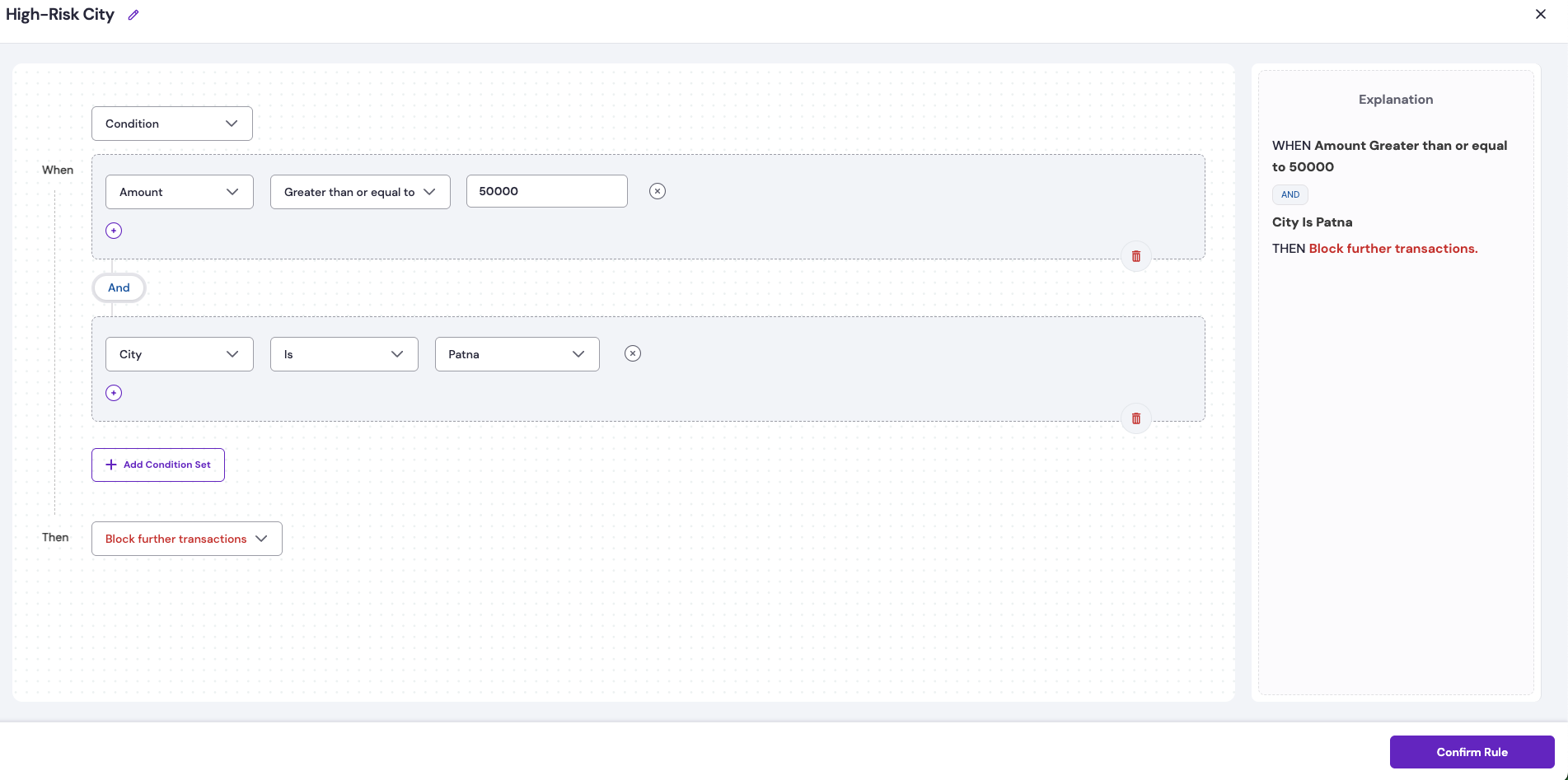
 **Scenario**: High-value transactions from high-risk cities.\
**Objective**: Detect and flag transactions over 50,000 originating from high-risk locations such as Patna to prevent fraudulent activity.\
**Rule configuration**: Amount > 50,000 and City Is = Patna.
**Scenario**: High-value transactions from high-risk cities.\
**Objective**: Detect and flag transactions over 50,000 originating from high-risk locations such as Patna to prevent fraudulent activity.\
**Rule configuration**: Amount > 50,000 and City Is = Patna.
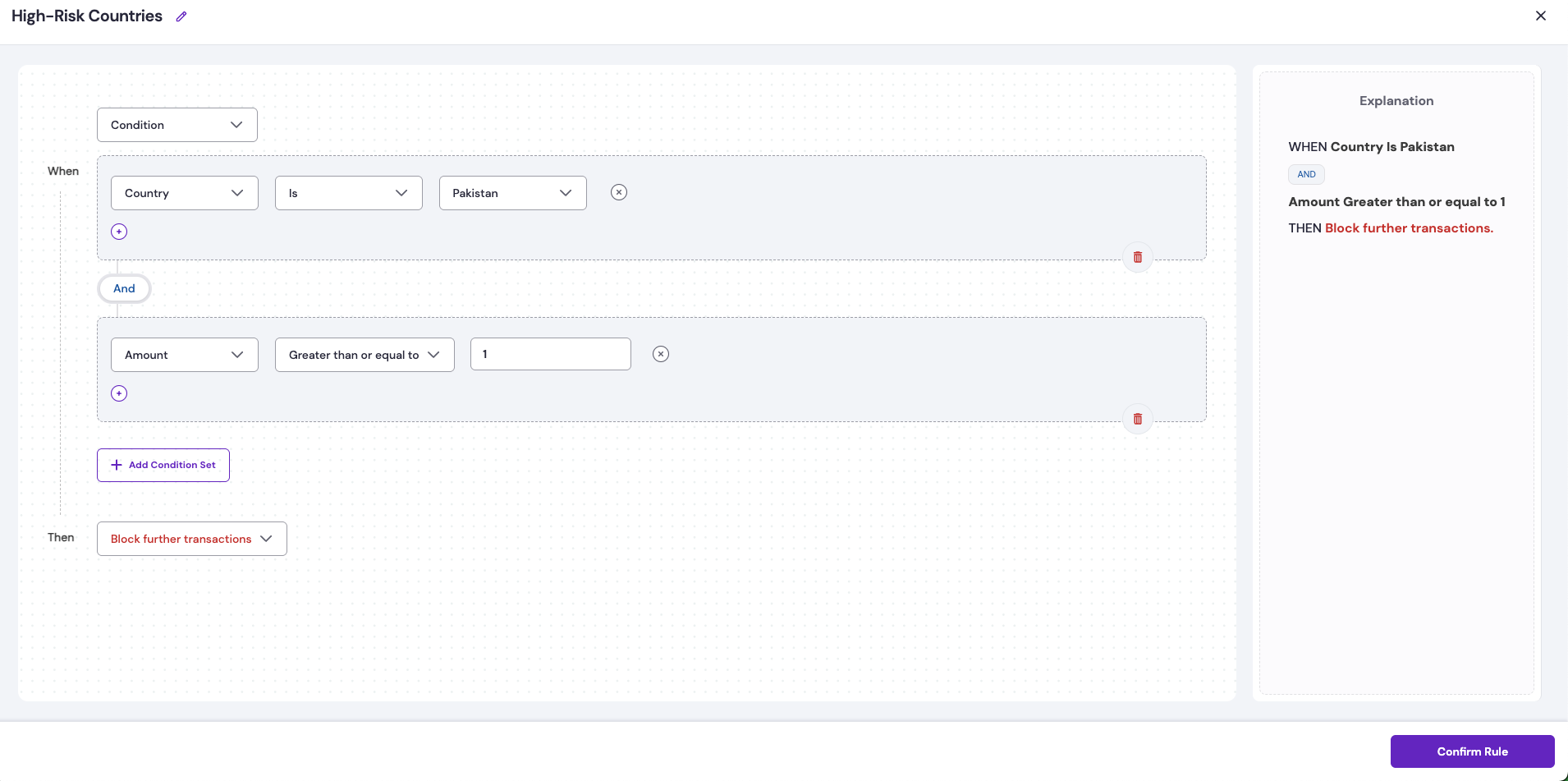
 **Scenario**: Payments from high-risk countries.\
**Objective**: Block further transactions originating from high-risk countries such as Pakistan when any transaction exceeds 1 in value.\
**Rule configuration**: IP Country = Pakistan and Transaction Amount > 1.
**Scenario**: Payments from high-risk countries.\
**Objective**: Block further transactions originating from high-risk countries such as Pakistan when any transaction exceeds 1 in value.\
**Rule configuration**: IP Country = Pakistan and Transaction Amount > 1.
 ### Aggregated rule-based scenarios
The following scenarios highlight common use cases where aggregate rule-based monitoring helps detect abnormal patterns and prevent fraudulent activity.
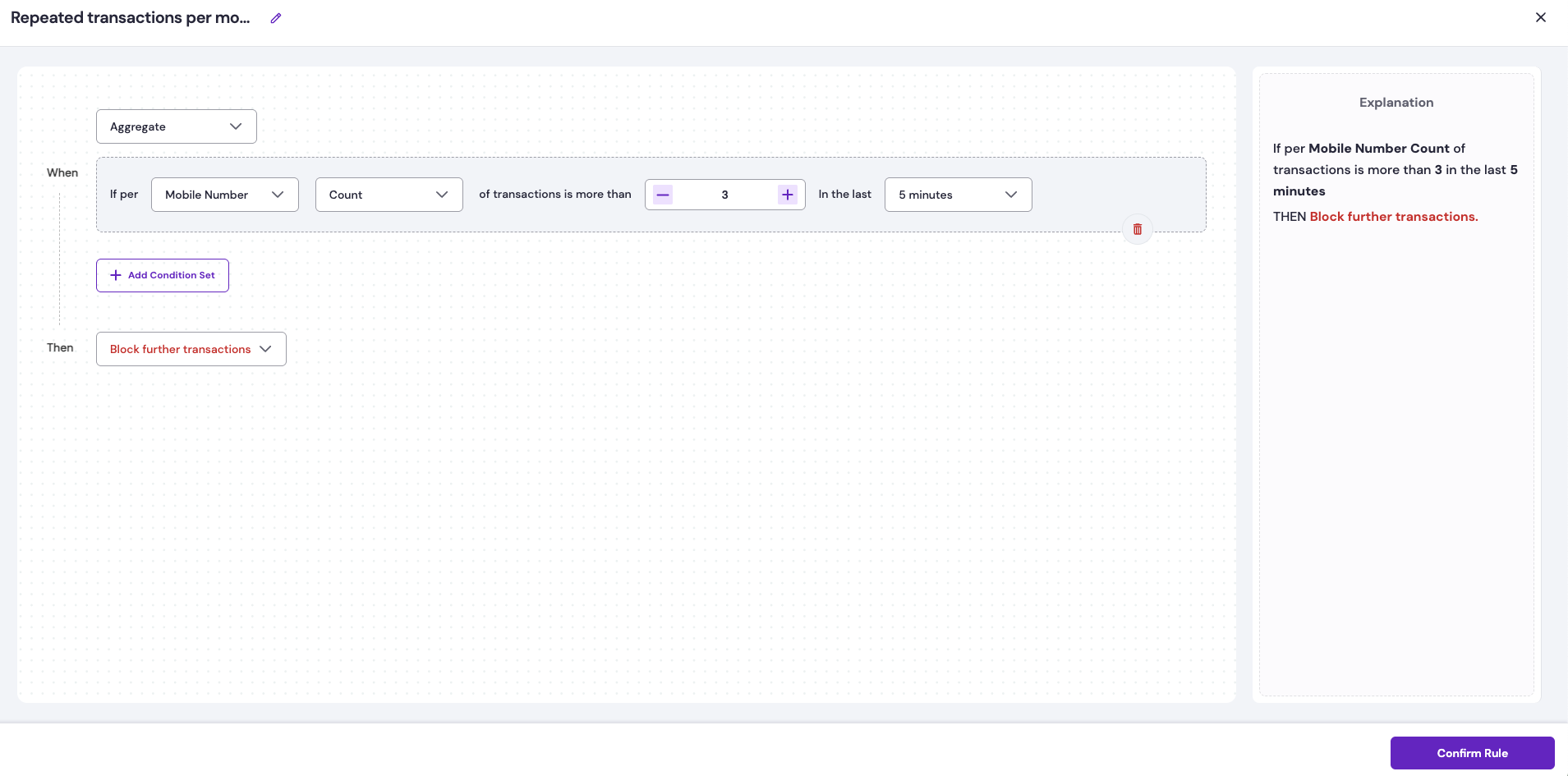
**Scenario**: Multiple successful transactions per mobile in short interval.\
**Objective**: Block cases where a single mobile number completes more than three successful transactions within five minutes to prevent rapid fraud attempts.\
**Rule configuration**: Base parameter = Mobile Number, aggregation type = Count, duration = 5 minutes, condition = Count > 3.\\
### Aggregated rule-based scenarios
The following scenarios highlight common use cases where aggregate rule-based monitoring helps detect abnormal patterns and prevent fraudulent activity.
**Scenario**: Multiple successful transactions per mobile in short interval.\
**Objective**: Block cases where a single mobile number completes more than three successful transactions within five minutes to prevent rapid fraud attempts.\
**Rule configuration**: Base parameter = Mobile Number, aggregation type = Count, duration = 5 minutes, condition = Count > 3.\\
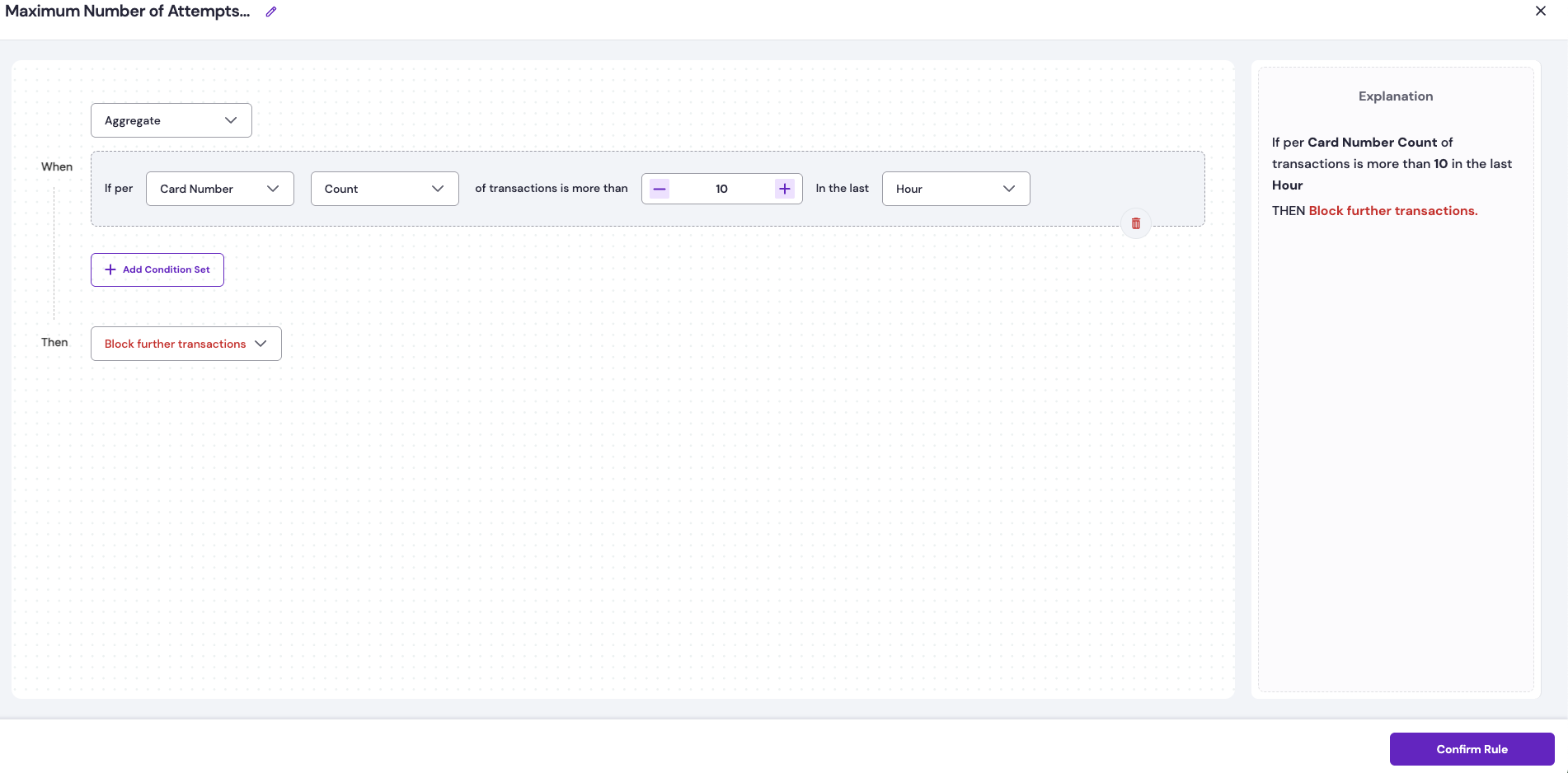
 **Scenario**: Maximum number of attempts per card.\
**Objective**: Prevent excessive transaction attempts by blocking any card with more than ten attempts within one hour to reduce brute-force or testing attacks.\
**Rule configuration**: Base parameter = Card Number, aggregation type = Count, duration = 1 hour, condition = Count > 10.
**Scenario**: Maximum number of attempts per card.\
**Objective**: Prevent excessive transaction attempts by blocking any card with more than ten attempts within one hour to reduce brute-force or testing attacks.\
**Rule configuration**: Base parameter = Card Number, aggregation type = Count, duration = 1 hour, condition = Count > 10.
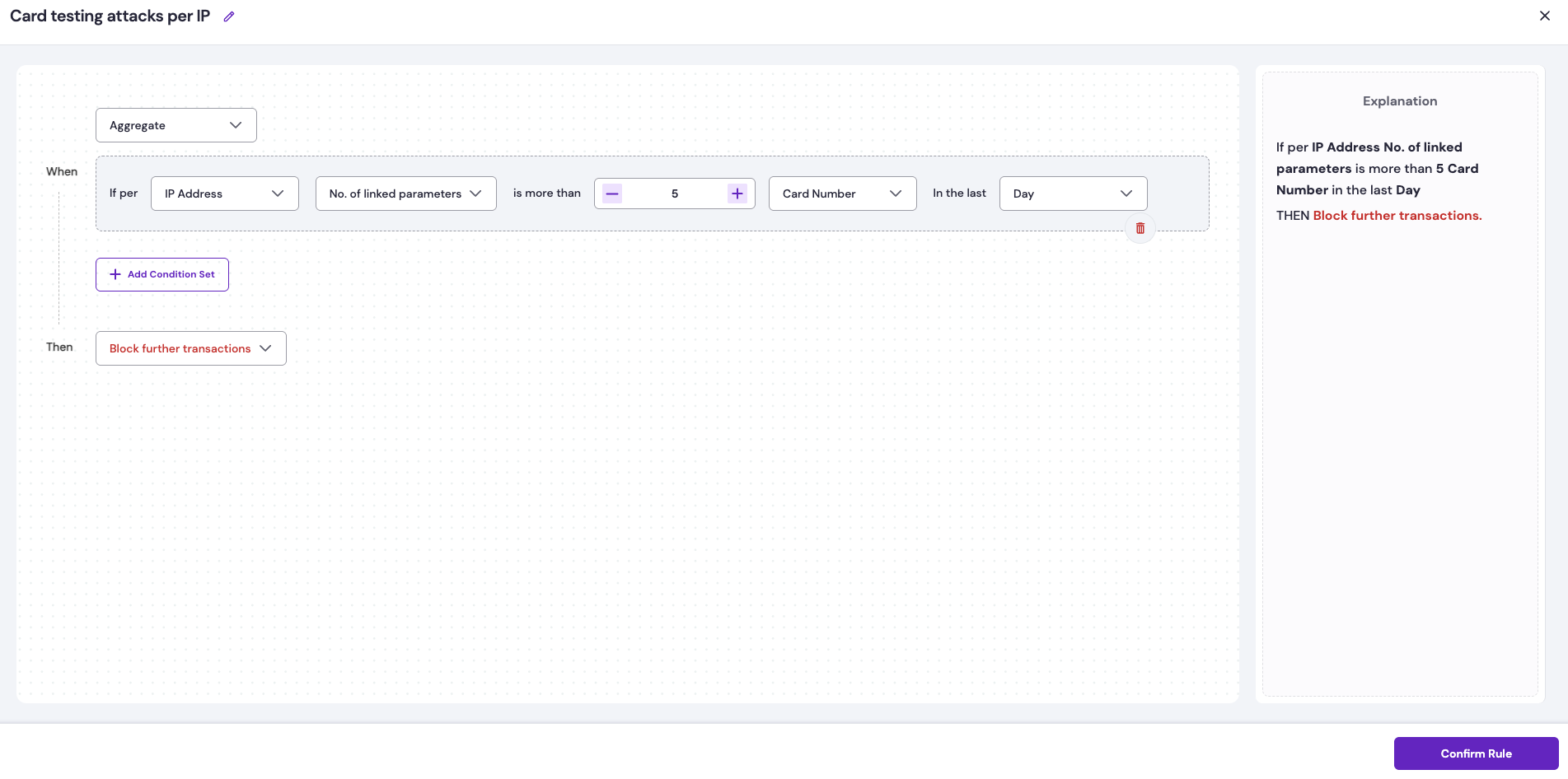
 **Scenario**: Multiple card testing per IP address.\
**Objective**: Block IP addresses that attempt transactions with more than 5 unique cards in a 1-day period to stop card-testing attacks.\
**Rule configuration**: Base parameter = IP Address, aggregation type = Number of Linked Parameters, linked parameter = Card Number, duration = 1 day, condition = Number of Linked Parameters > 5.\\
**Scenario**: Multiple card testing per IP address.\
**Objective**: Block IP addresses that attempt transactions with more than 5 unique cards in a 1-day period to stop card-testing attacks.\
**Rule configuration**: Base parameter = IP Address, aggregation type = Number of Linked Parameters, linked parameter = Card Number, duration = 1 day, condition = Number of Linked Parameters > 5.\\
 **Scenario**: Multiple mobile numbers linked to the same card.\
**Objective**: Block transactions when more than three distinct mobile numbers are linked to a single card within a 1-day period to prevent account misuse or credential sharing.\
**Rule configuration**: Base parameter = Card Number, aggregation type = Number of Linked Parameters, linked parameter = Mobile Number, duration = 1 day, condition = Number of Linked Parameters > 3.
**Scenario**: Multiple mobile numbers linked to the same card.\
**Objective**: Block transactions when more than three distinct mobile numbers are linked to a single card within a 1-day period to prevent account misuse or credential sharing.\
**Rule configuration**: Base parameter = Card Number, aggregation type = Number of Linked Parameters, linked parameter = Mobile Number, duration = 1 day, condition = Number of Linked Parameters > 3.