> ## Documentation Index
> Fetch the complete documentation index at: https://www.cashfree.com/docs/llms.txt
> Use this file to discover all available pages before exploring further.
# Adjust Vendor Balance
> Adjust Cashfree Easy Split vendor balances from the dashboard or API to record corrections, manual debits, or credits without touching settled orders.
You can make credit and debit adjustments to the vendor account using the **Adjust Balance** feature in the product dashboard. You can also do the same using the [Transfer Vendor Balance](/api-reference/payments/latest/split/settlements/on-demand-transfer) API.
You can adjust balances in scenarios when,
* Refunds are not processed due to insufficient balance in the vendor's account, you can credit the vendor account to process the refund and later adjust the balance.
* The total amount is credited to your account, and you can later make credit adjustments to the vendor account.
* To manage differences in the vendor split percentages.
* If you want to discontinue business with a vendor you can make credit or debit adjustments to the vendor account before you delete the account.
To adjust vendor balance,
1. Go to **Payment Gateway Dashboard** > **Easy Split** > **Adjustments**. Click the **Adjust Balance** option.
2. From the Initiate Adjustments pop-up window, enter the **Vendor ID** you want to make adjustments to.
3. Select the **Adjustment Type** - **Debit** or **Credit**. Select **Debit** if you have to make a debit adjustment, and select credit if you have to make a credit adjustment to the vendor.
4. Enter the **Transfer Amount**, and provide **Remarks** if any. Once done, click **Ok** to initiate the adjustment.
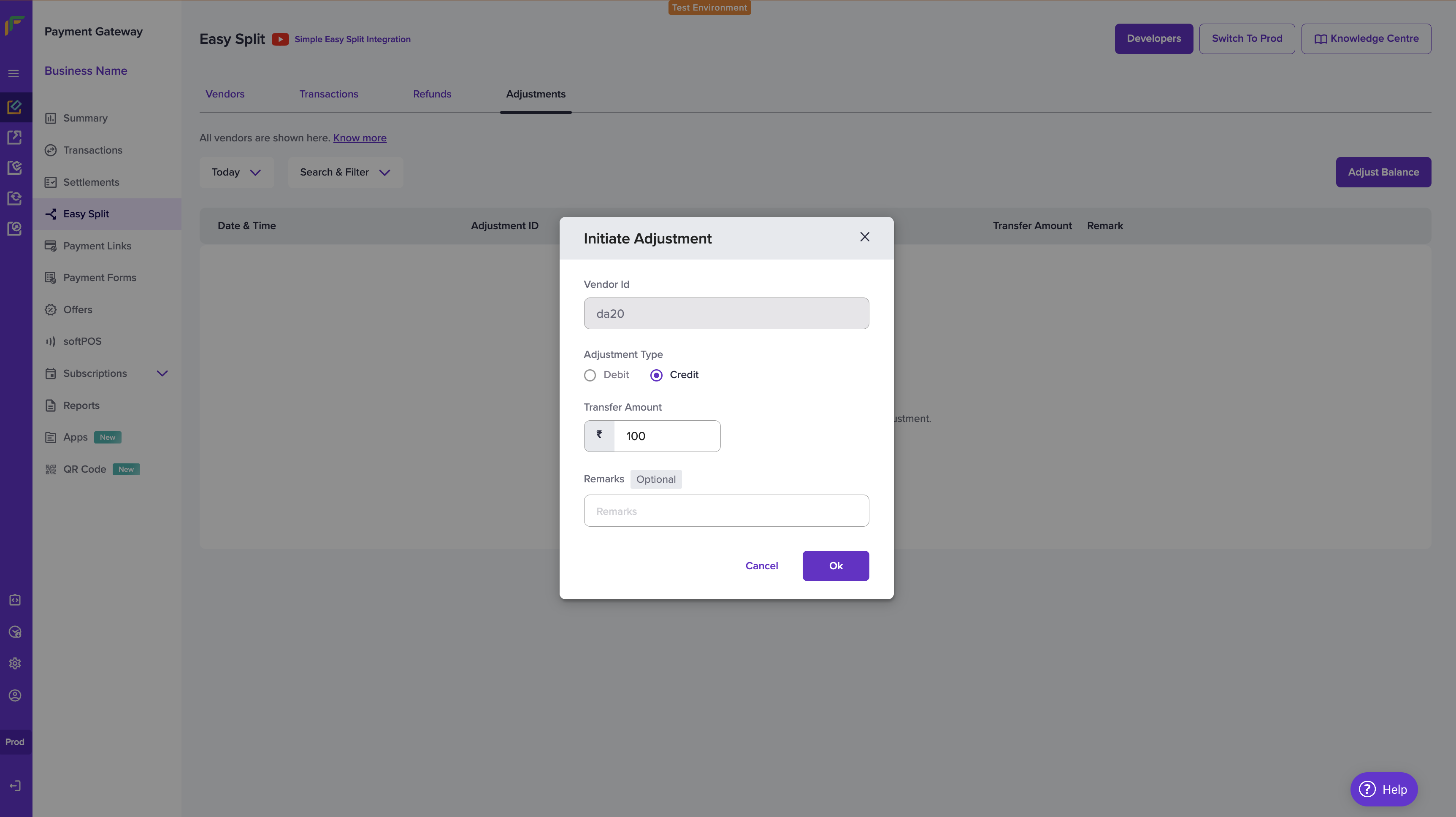 The transfer amount should be less than equal to the unsettled balance.