> ## Documentation Index
> Fetch the complete documentation index at: https://www.cashfree.com/docs/llms.txt
> Use this file to discover all available pages before exploring further.
# Cashgram Integration
> Integrate Cashfree Cashgram to send instant payouts to beneficiaries via shareable links, including creating Cashgrams and fetching their status via API.
Cashgram is a sub-service of payouts offered by Cashfree that enables you to send money to your clients instantly. This topic will help you to integrate with Cashgram. It includes creating a Cashgram and fetching the Cashgram status.
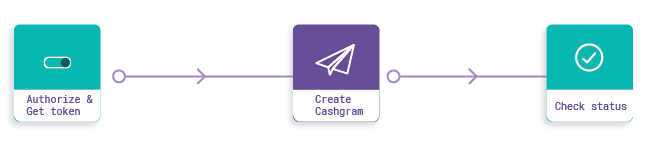 **Steps**
1. Setup
2. Initialisation and Authorisation
3. Create Cashgram
4. Get Cashgram Status
## Step 1: Setup
Get your corresponding clientId and clientSecret from your payout dashboard and ensure that your IP is whitelisted. Check our development quickstart here.
**Host URL**: Use the following URL for PROD and TEST, respectively:
* For the **production** environment: [https://payout-api.cashfree.com](https://payout-api.cashfree.com)
* For the **test** environment: [https://payout-gamma.cashfree.com](https://payout-gamma.cashfree.com)
## Step 2: Initialisation and authorisation
Call the authenticate API to Cashfree's system/server to obtain an Authorization Bearer token. All other API calls must have this token as Authorization header in the format 'Bearer \' (without quotes) to get processed.
```bash cURL theme={"dark"}
curl -X POST \
'http://{{Host%20Url}}/payout/v1/authorize' \
-H 'X-Client-Id: {{client id}}' \
-H 'X-Client-Secret: {{client secret}}' \
-H 'cache-control: no-cache'
```
```javascript Node theme={"dark"}
//require CashfreeSDK
const cfSdk = require("cashfree-sdk");
//access the PayoutsSdk from CashfreeSDK
const { Payouts } = cfSdk;
// Instantiate Cashfree Payouts
const payoutsInstance = new Payouts({
env: "TEST",
clientId: "",
clientSecret: "",
});
```
```python Python theme={"dark"}
from cashfree_sdk.payouts import Payouts
from cashfree_sdk.payouts.cashgram import Cashgram
clientId = "your_client_id"
clientSecret = "your_client_secret"
env = "TEST"
Payouts.init(clientId, clientSecret, env)
```
```java Java theme={"dark"}
import com.cashfree.lib.clients.Payouts;
import com.cashfree.lib.constants.Constants.Environment;
public static void main() {
Payouts payouts = Payouts.getInstance(
Environment.PRODUCTION, "", "");
payouts.init();
}
```
**Sample Response**
```json theme={"dark"}
{
"status": "SUCCESS",
"message": "Token generated",
"subCode": "200",
"data": { "token": "eyJ0eXA...fWStg", "expiry": 1564130052 }
}
```
## Step 3: Create cashgram
Create a Cashgram that can be sent directly to your end customer by passing their relevant information.
```bash cURL theme={"dark"}
curl -X POST \
'https://{{Host%20Url}}/payout/v1/payout/v1/createCashgram' \
-H 'Accept: */*' \
-H 'Authorization: Bearer {{token}}' \
-H 'Content-Type: application/json' \
-d '{
"cashgramId": "cf6",
"amount": "1.00",
"name": "sameera",
"email": "beneficiary@example.com",
"phone": "9000000001",
"linkExpiry": "2019/11/9",
"remarks": "sample cashgram",
"notifyCustomer": 1
}'
```
```javascript Node theme={"dark"}
//create cashgram
const response = await payoutsInstance.cashgram.create({
cashgramId: "cf11",
amount: "1.00",
name: "sameera",
email: "beneficiary@example.com",
phone: "9000000001",
linkExpiry: "2020/01/12",
remarks: "sample cashgram",
notifyCustomer: 1,
});
```
```python Python theme={"dark"}
#create cashgram
create_cashgram_response = Cashgram.create_cashgram(
cashgramId = "cf11",
amount = "1.00",
name = "sameera",
email = "beneficiary@example.com",
phone = "9000000001",
linkExpiry = "2020/01/19",
remarks = "sample cashgram",
notifyCustomer = 1
)
```
```java Java theme={"dark"}
import com.cashfree.lib.clients.Payouts;
import com.cashfree.lib.clients.Cashgram;
import com.cashfree.lib.domains.CashgramDetails
Payouts payouts = Payouts.getInstance(
Environment.PRODUCTION, "", "");
payouts.init();
Cashgram cashgram = new Cashgram(payouts);
CashgramDetails cashgramDetails = new CashgramDetails()
.setCashgramId("javasdk-test2")
.setAmount(new BigDecimal("1.00"))
.setName("John Doe")
.setEmail("johndoe@cashfree.com")
.setPhone("9876543210")
.setLinkExpiry(LocalDateTime.now().plusMinutes(0))
.setRemarks("api")
.setNotifyCustomer(1);
cashgram.createCashgram(cashgramDetails);
}
```
notifyCustomer field is an optional field when set to 1 it sends the Cashgram to your end customer phone and email.
**Sample Response**
```json theme={"dark"}
{
"status": "SUCCESS",
"subCode": "200",
"message": "Cashgram Created",
"data": { "referenceId": 3645, "cashgramLink": "http://bit.ly/2xxnGm8" }
}
```
## Step 4: Get cashgram status
Get the status of the created Cashgram by passing the cashgramId.
```bash theme={"dark"}
curl -X GET \
'https://{{Host%20Url}}/payout/v1/getCashgramStatus?cashgramId=JOHaN10' \
-H 'Accept: */*' \
-H 'Authorization: Bearer {{token}}' \
-H 'Content-Type: application/json' \
```
```javascript Node theme={"dark"}
//get cashgram status
payoutsInstance.cashgram.getStatus({
cashgramId: cashgram.cashgramId,
});
```
```python Python theme={"dark"}
get_cashgram_status_response = Cashgram.get_cashgram_status("cf11")
```
```java Java theme={"dark"}
import com.cashfree.lib.clients.Payouts;
import com.cashfree.lib.clients.Cashgram;
import com.cashfree.lib.domains.CashgramDetails
Payouts payouts = Payouts.getInstance(
Environment.PRODUCTION, "", "");
payouts.init();
Cashgram cashgram = new Cashgram(payouts);
cashgram.getCashgramStatus("javasdk-test2");
}
```
**Sample Response**
```json theme={"dark"}
{
"status": "SUCCESS",
"subCode": "200",
"message": "Cashgram details retrieved",
"data": {
"cashgramStatus": "ACTIVE",
"referenceId": 123456,
"cashgramId": "JOHaN10",
"cashgramLink": "http://csgr.am/abcdefg"
}
}
```
You now have a complete Cashgram integration for payouts. Cashfree will send webhooks in the case of certain events. Webhooks are events that send you notifications. Learn more in the [Cashgram webhooks documentation](/payouts/cashgram/integration/webhooks).
When testing the integration with your test API key, you can use test numbers to ensure that it works correctly.
**Steps**
1. Setup
2. Initialisation and Authorisation
3. Create Cashgram
4. Get Cashgram Status
## Step 1: Setup
Get your corresponding clientId and clientSecret from your payout dashboard and ensure that your IP is whitelisted. Check our development quickstart here.
**Host URL**: Use the following URL for PROD and TEST, respectively:
* For the **production** environment: [https://payout-api.cashfree.com](https://payout-api.cashfree.com)
* For the **test** environment: [https://payout-gamma.cashfree.com](https://payout-gamma.cashfree.com)
## Step 2: Initialisation and authorisation
Call the authenticate API to Cashfree's system/server to obtain an Authorization Bearer token. All other API calls must have this token as Authorization header in the format 'Bearer \' (without quotes) to get processed.
```bash cURL theme={"dark"}
curl -X POST \
'http://{{Host%20Url}}/payout/v1/authorize' \
-H 'X-Client-Id: {{client id}}' \
-H 'X-Client-Secret: {{client secret}}' \
-H 'cache-control: no-cache'
```
```javascript Node theme={"dark"}
//require CashfreeSDK
const cfSdk = require("cashfree-sdk");
//access the PayoutsSdk from CashfreeSDK
const { Payouts } = cfSdk;
// Instantiate Cashfree Payouts
const payoutsInstance = new Payouts({
env: "TEST",
clientId: "",
clientSecret: "",
});
```
```python Python theme={"dark"}
from cashfree_sdk.payouts import Payouts
from cashfree_sdk.payouts.cashgram import Cashgram
clientId = "your_client_id"
clientSecret = "your_client_secret"
env = "TEST"
Payouts.init(clientId, clientSecret, env)
```
```java Java theme={"dark"}
import com.cashfree.lib.clients.Payouts;
import com.cashfree.lib.constants.Constants.Environment;
public static void main() {
Payouts payouts = Payouts.getInstance(
Environment.PRODUCTION, "", "");
payouts.init();
}
```
**Sample Response**
```json theme={"dark"}
{
"status": "SUCCESS",
"message": "Token generated",
"subCode": "200",
"data": { "token": "eyJ0eXA...fWStg", "expiry": 1564130052 }
}
```
## Step 3: Create cashgram
Create a Cashgram that can be sent directly to your end customer by passing their relevant information.
```bash cURL theme={"dark"}
curl -X POST \
'https://{{Host%20Url}}/payout/v1/payout/v1/createCashgram' \
-H 'Accept: */*' \
-H 'Authorization: Bearer {{token}}' \
-H 'Content-Type: application/json' \
-d '{
"cashgramId": "cf6",
"amount": "1.00",
"name": "sameera",
"email": "beneficiary@example.com",
"phone": "9000000001",
"linkExpiry": "2019/11/9",
"remarks": "sample cashgram",
"notifyCustomer": 1
}'
```
```javascript Node theme={"dark"}
//create cashgram
const response = await payoutsInstance.cashgram.create({
cashgramId: "cf11",
amount: "1.00",
name: "sameera",
email: "beneficiary@example.com",
phone: "9000000001",
linkExpiry: "2020/01/12",
remarks: "sample cashgram",
notifyCustomer: 1,
});
```
```python Python theme={"dark"}
#create cashgram
create_cashgram_response = Cashgram.create_cashgram(
cashgramId = "cf11",
amount = "1.00",
name = "sameera",
email = "beneficiary@example.com",
phone = "9000000001",
linkExpiry = "2020/01/19",
remarks = "sample cashgram",
notifyCustomer = 1
)
```
```java Java theme={"dark"}
import com.cashfree.lib.clients.Payouts;
import com.cashfree.lib.clients.Cashgram;
import com.cashfree.lib.domains.CashgramDetails
Payouts payouts = Payouts.getInstance(
Environment.PRODUCTION, "", "");
payouts.init();
Cashgram cashgram = new Cashgram(payouts);
CashgramDetails cashgramDetails = new CashgramDetails()
.setCashgramId("javasdk-test2")
.setAmount(new BigDecimal("1.00"))
.setName("John Doe")
.setEmail("johndoe@cashfree.com")
.setPhone("9876543210")
.setLinkExpiry(LocalDateTime.now().plusMinutes(0))
.setRemarks("api")
.setNotifyCustomer(1);
cashgram.createCashgram(cashgramDetails);
}
```
notifyCustomer field is an optional field when set to 1 it sends the Cashgram to your end customer phone and email.
**Sample Response**
```json theme={"dark"}
{
"status": "SUCCESS",
"subCode": "200",
"message": "Cashgram Created",
"data": { "referenceId": 3645, "cashgramLink": "http://bit.ly/2xxnGm8" }
}
```
## Step 4: Get cashgram status
Get the status of the created Cashgram by passing the cashgramId.
```bash theme={"dark"}
curl -X GET \
'https://{{Host%20Url}}/payout/v1/getCashgramStatus?cashgramId=JOHaN10' \
-H 'Accept: */*' \
-H 'Authorization: Bearer {{token}}' \
-H 'Content-Type: application/json' \
```
```javascript Node theme={"dark"}
//get cashgram status
payoutsInstance.cashgram.getStatus({
cashgramId: cashgram.cashgramId,
});
```
```python Python theme={"dark"}
get_cashgram_status_response = Cashgram.get_cashgram_status("cf11")
```
```java Java theme={"dark"}
import com.cashfree.lib.clients.Payouts;
import com.cashfree.lib.clients.Cashgram;
import com.cashfree.lib.domains.CashgramDetails
Payouts payouts = Payouts.getInstance(
Environment.PRODUCTION, "", "");
payouts.init();
Cashgram cashgram = new Cashgram(payouts);
cashgram.getCashgramStatus("javasdk-test2");
}
```
**Sample Response**
```json theme={"dark"}
{
"status": "SUCCESS",
"subCode": "200",
"message": "Cashgram details retrieved",
"data": {
"cashgramStatus": "ACTIVE",
"referenceId": 123456,
"cashgramId": "JOHaN10",
"cashgramLink": "http://csgr.am/abcdefg"
}
}
```
You now have a complete Cashgram integration for payouts. Cashfree will send webhooks in the case of certain events. Webhooks are events that send you notifications. Learn more in the [Cashgram webhooks documentation](/payouts/cashgram/integration/webhooks).
When testing the integration with your test API key, you can use test numbers to ensure that it works correctly.