> ## Documentation Index
> Fetch the complete documentation index at: https://www.cashfree.com/docs/llms.txt
> Use this file to discover all available pages before exploring further.

# Delete Virtual Account

> Delete unused Cashfree OneEscrow virtual accounts with a zero balance directly from the dashboard to keep your escrow setup organised and uncluttered.

You can delete virtual accounts (VAs) that are not in use, as long as their balance is zero.

### Delete a virtual account

Follow the instructions below to delete a virtual account:

1. Log in to the [Merchant Dashboard](https://merchant.cashfree.com/auth/login).
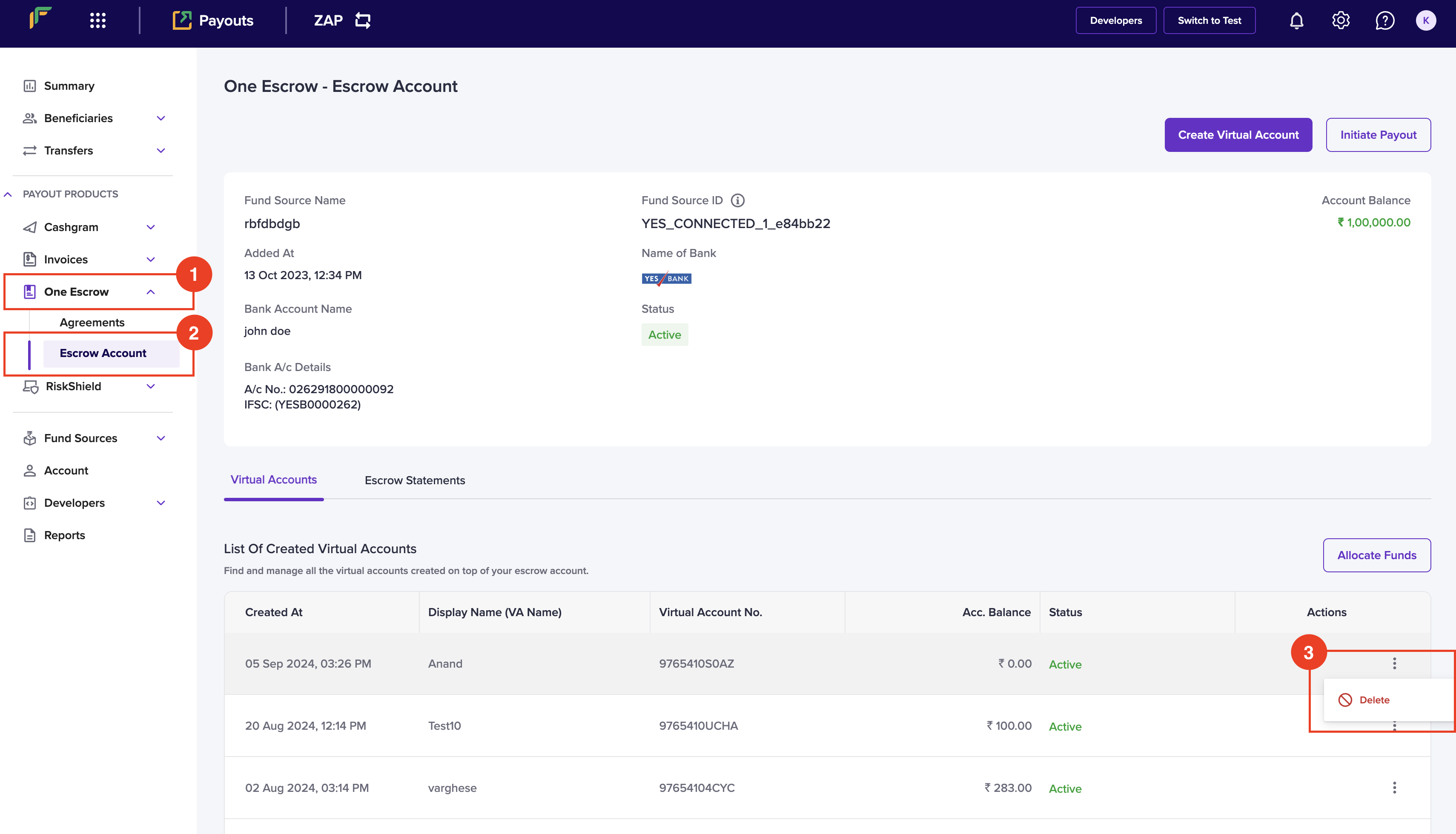
2. Go to **Payouts Dashboard** > **One Escrow** > **Escrow Account**.
3. You can view the created virtual accounts under **Virtual Accounts** > **List of Created Virtual Accounts**.
<img src="https://mintcdn.com/cashfreepayments-d00050e9/rpH767oy7-0Ptnam/static/payouts/oneescrow/11d3851f3304a602b2159c10d872636c028156efdf73eb1a250934be-Screenshot_2024-09-05_at_3.27.13_PM.png?fit=max&auto=format&n=rpH767oy7-0Ptnam&q=85&s=06b0243588c45b62a93cd8aa5620936f" alt="" width="3420" height="1960" data-path="static/payouts/oneescrow/11d3851f3304a602b2159c10d872636c028156efdf73eb1a250934be-Screenshot_2024-09-05_at_3.27.13_PM.png" />

4. Click the ellipses icon against the virtual account you want to delete, and click **Delete**.
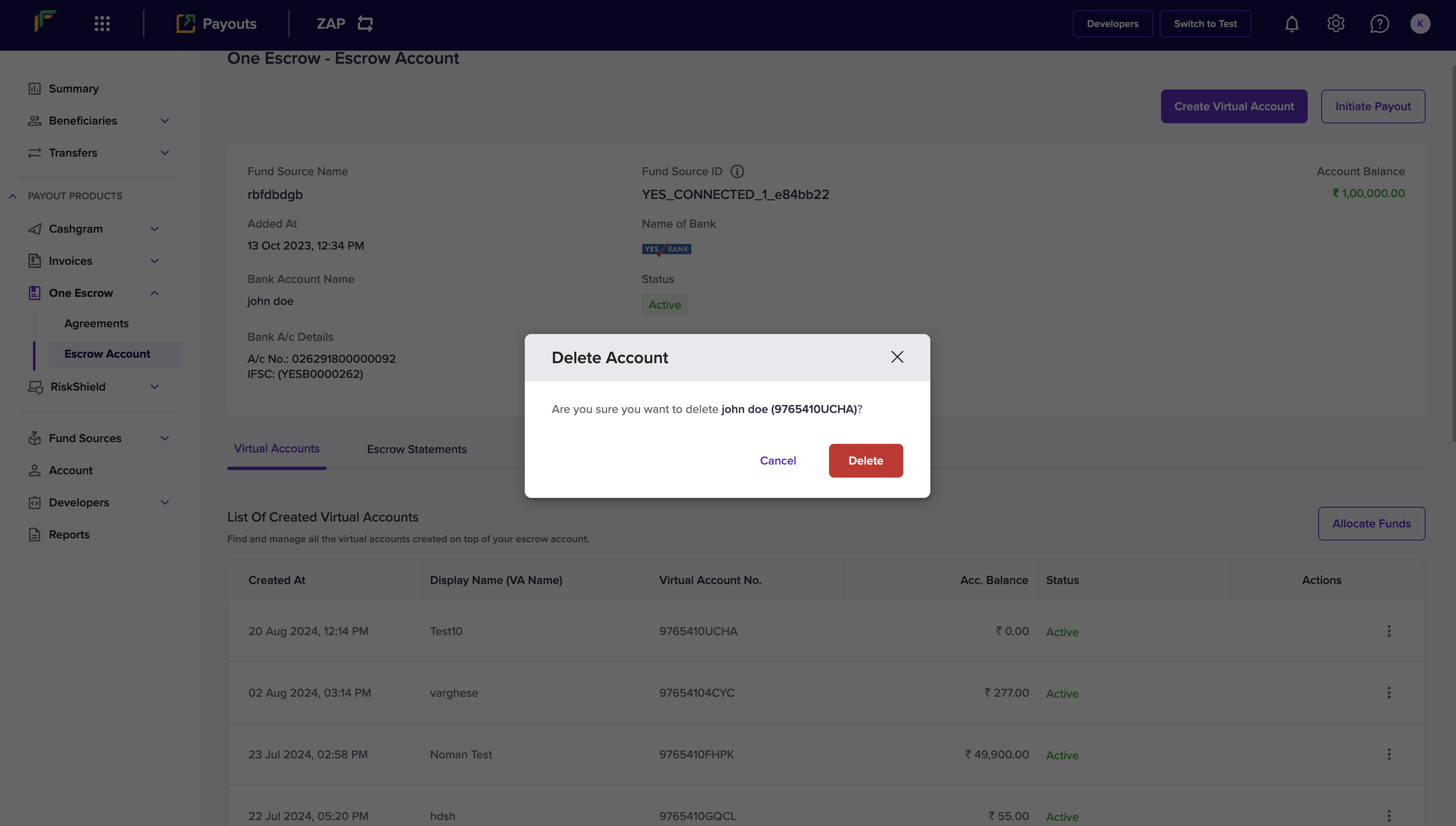
5. Click **Delete** in the *Delete Account* popup.
<img src="https://mintcdn.com/cashfreepayments-d00050e9/rpH767oy7-0Ptnam/static/payouts/oneescrow/Screenshot_2024-08-20_at_12.14.26_PM.png?fit=max&auto=format&n=rpH767oy7-0Ptnam&q=85&s=25b14c96af76e4c4c9d09a4a325c32ef" alt="" width="3446" height="1956" data-path="static/payouts/oneescrow/Screenshot_2024-08-20_at_12.14.26_PM.png" />

Your virtual account will be successfully deleted.

<div class="hidden" data-table-of-contents="bottom">
  <p class="mt-4 font-medium flex items-center gap-2 related-docs-heading">
    <svg width="16" height="16" viewBox="0 0 24 24" fill="none" stroke="currentColor" stroke-width="2" stroke-linecap="round" stroke-linejoin="round" aria-hidden="true" class="w-4 h-4">
      <path d="M3 4h7a2 2 0 0 1 2 2v13a2 2 0 0 0-2-2H3z" />

      <path d="M21 4h-7a2 2 0 0 0-2 2v13a2 2 0 0 1 2-2h7z" />
    </svg>

    <span>Related topics</span>
  </p>

  <ul>
    <li><a href="/docs/api-reference/payouts/v1/oneescrow/create-virtual-account">Delete Virtual Account API</a></li>
    <li><a href="/docs/payouts/oneescrow/manage-virtual-account">Manage Virtual Account</a></li>
  </ul>
</div>
