> ## Documentation Index
> Fetch the complete documentation index at: https://www.cashfree.com/docs/llms.txt
> Use this file to discover all available pages before exploring further.
# Advanced Employment
> Verify detailed employment history and recent Provident Fund contributions from EPFO sources using Cashfree Advanced Employment Verification.
Cashfree's Advanced Employment Verification retrieves comprehensive employment details for businesses through direct EPFO integration. The service focuses on recent data from the past three months using Provident Fund (PF) validation.
The verification returns the following information:
* Company name
* Member ID
* Joining date
* Employment exit date
This dataset supports decision-making across HR operations, lending processes, and compliance workflows. The verification process uses a two-step validation approach:
* **Match via UAN**: The system matches employment information using the individual’s Universal Account Number (UAN).
* **Secondary validation via EPFO filings**: The system validates employment data against EPFO PF filings to identify cases where employers are inactive or employment status updates are pending.
## Key benefits
Cashfree Advanced Employment Verification supports the following:
* **Direct integration with EPFO**: Retrieve employment records directly from government sources to provide data accuracy and authenticity.
* **Double validation model**: Validate employment through UAN and cross-check with recent PF filings to capture inactive employers or misreported employment status.
* **Recent PF filing insights**: Access monthly PF contribution data from the last 3 months to assess the financial stability of salaried individuals.
* **Comprehensive profile data**: Gain access to additional individual information, including bank details, PAN, masked Aadhaar, IFSC, and email addresses linked to employment records.
## Use cases
The following table shows how Advanced Employment Verification can be applied across different business scenarios:
| Business type | Use case |
| -------------------------------------- | --------------------------------------------------------------------------------------------------------------------------- |
| HR, staffing, and workforce onboarding | Verify PF registration for new hires to streamline onboarding. Validate employment history during pre-employment screening. |
| Gig economy platforms | Confirm active employment or PF history to support worker onboarding. |
| Lending | Verify recent employment and EPFO contribution records to assess loan applicants’ financial stability and income status. |
| Microfinance and NBFCs | Use verified employment data and wage patterns to recommend suitable loan products for customer segments. |
## Required information
Provide one of the following input combinations to ensure accurate verification results:
* Phone
* UAN
* Phone, PAN
* Phone, Date of Birth, Employee Name
* Phone, Employee Name, Employer Name
* Phone, Date of Birth, Employee Name, Employer Name
* Phone, PAN, Employee Name, Employer Name
* Phone, PAN, Date of Birth, Employee Name, Employer Name
* UAN, Employee Name
* UAN, Employee Name, Employer Name
* Date of Birth, Employee Name
* Date of Birth, Employee Name, Employer Name
- Always try to include either Phone or UAN in your verification request.
- Adding additional information beyond Phone and UAN significantly increases the fill rate of retrieved data.
- Input combinations without a Phone or UAN may return incorrect details in some cases.
## Verification results
The Advanced Employment Verification provides employment and identity data organised into the following categories:
* UAN
* Source
* Source score
* Employee name
* Gender
* Date of birth
* Verified Aadhaar
* Member ID
* Establishment ID
* Joining date
* Exit date
* Leave reason
* Establishment name
* Employer confidence score
* Masked Aadhaar
* PAN
* Email
* IFSC
* Bank account
* Bank address
* Relation
* Relative name
* Employed (True/False)
* Establishment setup date
* Establishment ownership type
* PF filing details
* Employee name match
* Employer name match
* Total amount
* Employee count
* Wage month
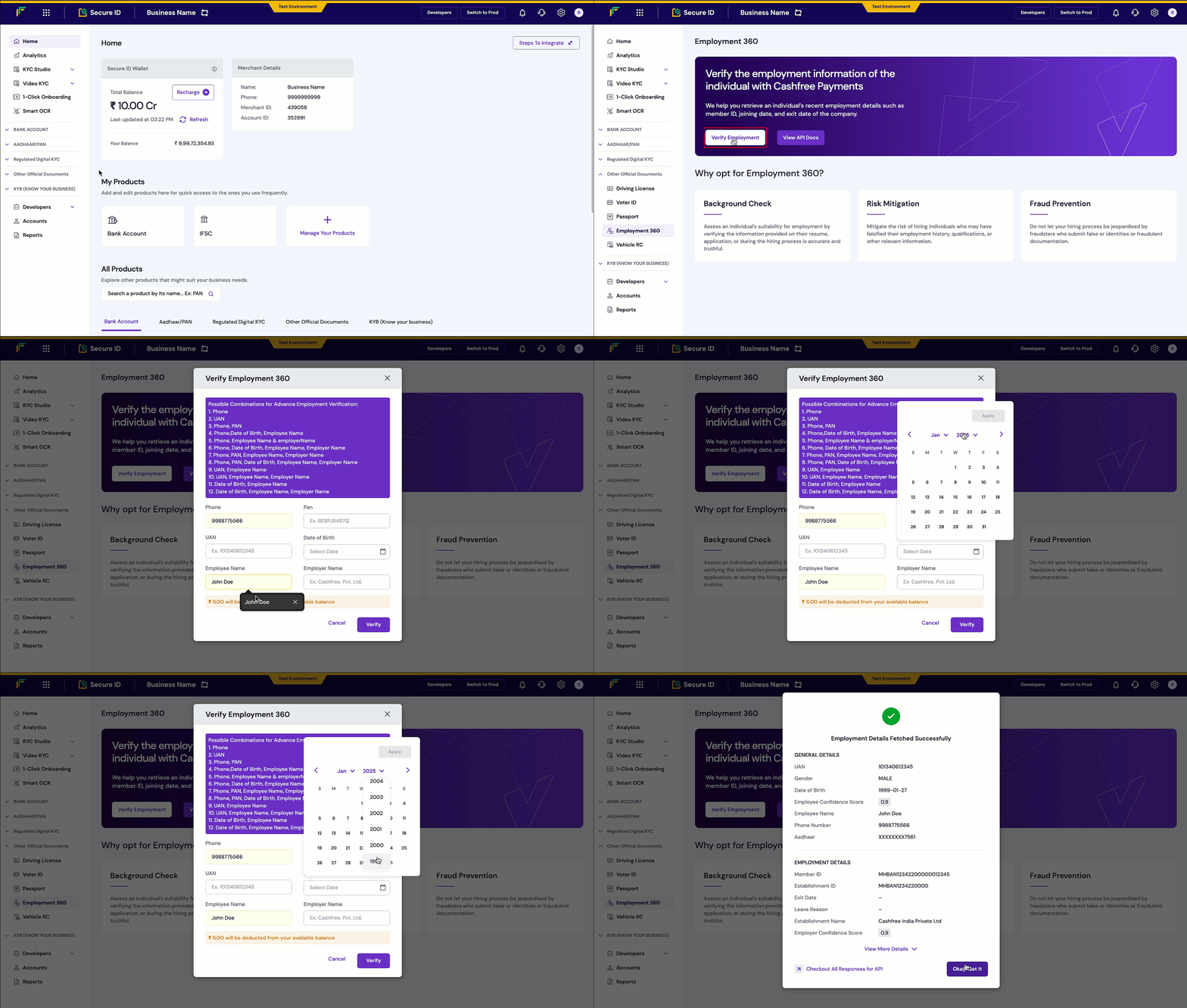
## Verifying employment details
Follow these steps to verify employment details in the Merchant Dashboard:
1. Log in to the [Merchant Dashboard](https://merchant.cashfree.com/auth/login).
2. Go to **Secure ID** > **Other Official Documents** and select **Employment 360**.
3. Click **Verify Employment**.
4. Enter the required information using one of the valid combinations listed above.
5. Click **Verify**. If the information is valid and forms an accepted combination, you will receive comprehensive employment details retrieved directly from EPFO.
 Get started with the [Advanced Employment API](/api-reference/vrs/v2/advanced-employment/get-employment-details) for integration into your workflow.