> ## Documentation Index
> Fetch the complete documentation index at: https://www.cashfree.com/docs/llms.txt
> Use this file to discover all available pages before exploring further.
# Face Liveness
> Use Cashfree Face Liveness to detect whether a face capture is live, blocking spoofing attempts via photos, prints, or masks during biometric KYC.
Cashfree’s Face Liveness verifies whether the face presented during capture belongs to a live person, enabling secure facial authentication and preventing spoofing attempts such as digital photographs, printed images, or printed masks. The Face Liveness API returns:
* Liveness score: `0` to `1`.
* Liveness result: `YES` or `NO`.
* Facial analysis metrics: Detailed indicators to support accurate detection.
Face Liveness uses a single selfie image as input and analyses a combination of facial biometrics, liveness indicators, and image quality metrics to determine if the user is physically present.
It is used in real-time identity verification workflows to ensure live user presence, prevent impersonation, and enhance security.
## Response fields and description
The Face Liveness utilises a diverse set of facial biometrics and image quality parameters to ensure accurate liveness detection, including:
| Feature field | Description |
| :--------------- | :---------------------------------------------------------------------------------------------------- |
| `liveness` | Indicates whether a live person is present or not. |
| `liveness_score` | Gives the confidence score of liveness detection. |
| `gender` | Gives the detected gender and its confidence. |
| `age_range` | Gives an estimate of the age range, specifying the minimum and maximum values. |
| `eye_wear` | Indicates the presence of eyewear. |
| `face_occluded` | Indicates if the face is partially or fully blocked. |
| `quality` | Image quality metrics, such as blur, brightness, and exposure, are analysed. |
| `pose` | Detects the alignment of the face, indicating whether it is positioned to the left, right, or centre. |
| `eyes_open` | Indicates if the eyes are open. |
## Key benefits
Cashfree’s Face Liveness offers the following benefits:
* **Anti-spoofing tested**: Actively detects and prevents real-world spoofing attacks, helping organisations ensure security and meet compliance requirements.
* **Handles challenging image conditions**: Built to perform reliably in real onboarding scenarios, including poor lighting, blurry selfies, partial faces, and off-angle captures.
* **Real-time user feedback**: Enables merchants to deliver actionable feedback on issues such as closed eyes, sunglasses, multiple faces in frame, or off-angle captures, boosting the success rate of subsequent face matching.
## Use cases
You can use Face Liveness across the following industries for real-time identity detection:
| Business type | Use case |
| -------------------- | ------------------------------------------------------------------------------------------- |
| Fintech | Ensures live user presence during high-value transactions, digital KYC, and withdrawals. |
| Banking | Enforces live user presence during onboarding, account opening, and instant loan disbursal. |
| Insurance | Authenticate claimants and policyholders to reduce fraudulent claims. |
| E-commerce | Guarantee single-user access to rewards, bonuses, and account withdrawal features. |
| Workforce onboarding | Authenticate the identity and physical presence of new hires or gig workers remotely. |
## Verify face liveness
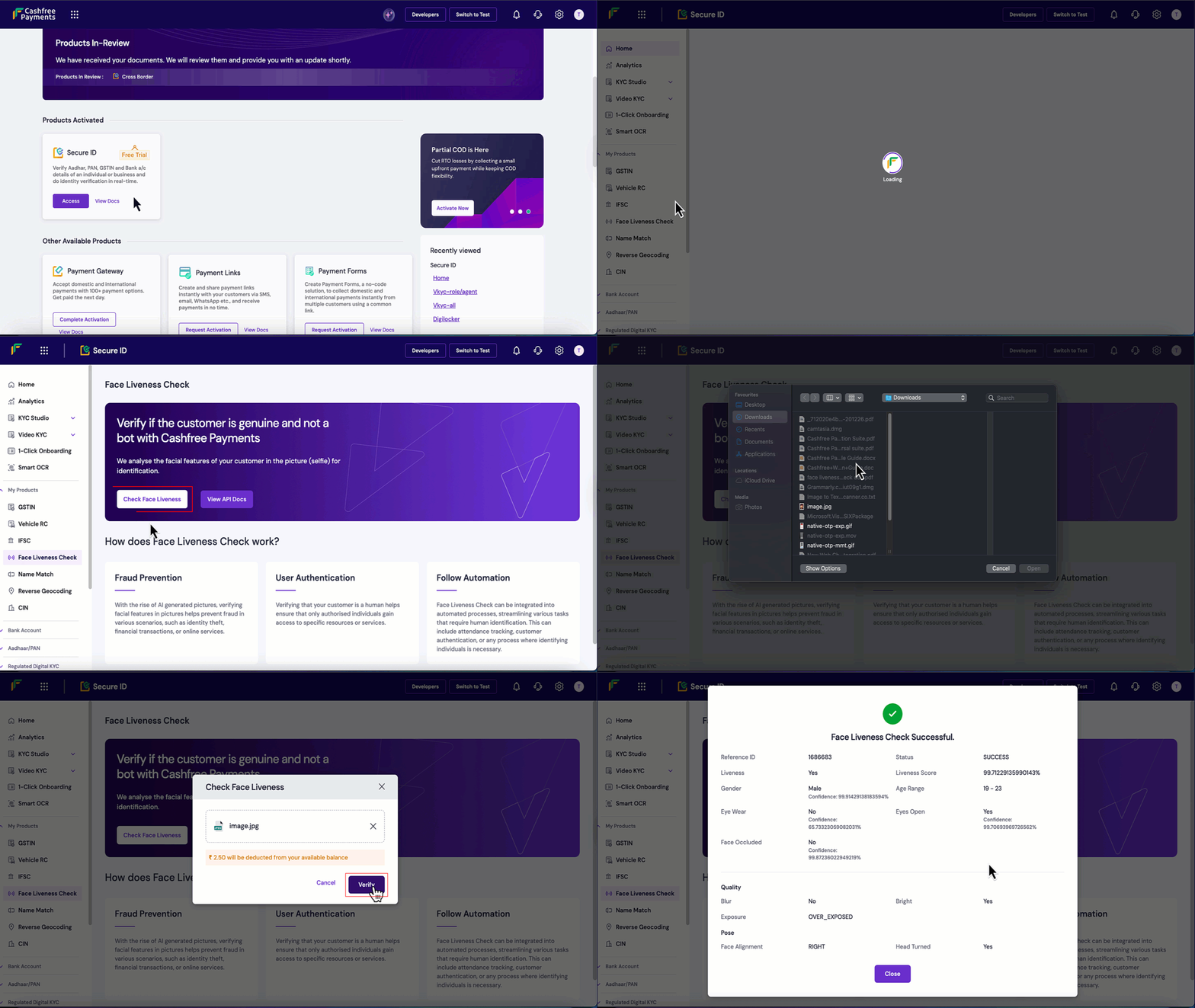
Follow these steps to verify the Face Liveness in the Merchant Dashboard:
1. Log in to the [Merchant Dashboard](https://merchant.cashfree.com/auth/login).
2. Go to the **Secure ID Dashboard > Regulated Digital KYC > Face Liveness Check**.
3. Click on **Check Face Liveness** and upload the image you want to verify for liveness.
4. Click **Verify**. You will see the **Liveness Result** and the liveness score, along with detailed information about the image uploaded.
 Get started with the [Face Liveness Check](/api-reference/vrs/v2/face-liveness/face-liveness) API.
## FAQs
posthog.capture('Accordion Clicked', { title: "How do I verify a user’s identity after the Face Liveness detection?" })}>
After successfully completing the Face Liveness detection, use the [Face Match API](/api-reference/vrs/v2/face-match/face-match) to compare the selfie with an official ID document photograph. Cashfree’s **Face Match** analyses facial features, computes a similarity score, and confirms whether both images belong to the same person.
posthog.capture('Accordion Clicked', { title: "How can merchants use the API responses to improve face capture accuracy?" })}>
Merchants can map API responses to simple prompts that guide users in real time. For instance, if the response is face occluded, prompt the user to **uncover their face**; if multiple faces detected, ask them to **remain alone in the frame**; and if poor lighting, request **better illumination**.
posthog.capture('Accordion Clicked', { title: "How long does the Liveness API take to detect user liveness?" })}>
The Face Liveness detection typically returns results within **2 seconds** after the selfie is uploaded.
Get started with the [Face Liveness Check](/api-reference/vrs/v2/face-liveness/face-liveness) API.
## FAQs
posthog.capture('Accordion Clicked', { title: "How do I verify a user’s identity after the Face Liveness detection?" })}>
After successfully completing the Face Liveness detection, use the [Face Match API](/api-reference/vrs/v2/face-match/face-match) to compare the selfie with an official ID document photograph. Cashfree’s **Face Match** analyses facial features, computes a similarity score, and confirms whether both images belong to the same person.
posthog.capture('Accordion Clicked', { title: "How can merchants use the API responses to improve face capture accuracy?" })}>
Merchants can map API responses to simple prompts that guide users in real time. For instance, if the response is face occluded, prompt the user to **uncover their face**; if multiple faces detected, ask them to **remain alone in the frame**; and if poor lighting, request **better illumination**.
posthog.capture('Accordion Clicked', { title: "How long does the Liveness API take to detect user liveness?" })}>
The Face Liveness detection typically returns results within **2 seconds** after the selfie is uploaded.