> ## Documentation Index
> Fetch the complete documentation index at: https://www.cashfree.com/docs/llms.txt
> Use this file to discover all available pages before exploring further.
# Face Match
> Use Cashfree Face Match to compare two photos and confirm whether they belong to the same person with an AI-powered similarity score and match result.
Cashfree’s Face Match determines whether two images belong to the same individual by analysing facial features and computing a similarity score between them.
The Face Match API returns the following:
* Face match score: `0` to `1`.
* Face match result: `YES` or `NO`.
Cashfree Face Match can compare a user's selfie with images extracted from official identity documents such as Aadhaar, PAN, and other government-issued IDs.
Face verification is a key step in identity verification processes, including Know Your Customer (KYC), customer onboarding in financial services, and fraud prevention. Accurate face matching helps reduce impersonation risks, rejected user onboarding, and compliance issues.
You can configure the threshold for a valid face match. Based on industry standards, a recommended threshold is 0.75 (75%).
## Key benefits
Cashfree Face Match includes the following features:
* **High accuracy**: Trained on large datasets of diverse user selfies and ID documents. Recognises subtle differences across various image types.
* **Edge case handling**: Supports low-resolution images, blurred or glare-filled uploads, and scanned documents. Helps reduce onboarding failures.
* **Optimised user experience**: Minimises onboarding friction. Increases conversion rates and reduces false rejections of valid users.
## Use cases
You can use Face Match across the following industries for identity verification:
| Business type | Use case |
| -------------------------------- | ---------------------------------------------------------- |
| Banks | Face match during account opening for KYC and fraud checks |
| Microfinance institutions | Identity verification before instant loan disbursal |
| Insurance and NBFCs | Selfie and ID verification during insurance application |
| Logistics and on-demand services | Identity verification during driver or staff onboarding |
| Trading and investment platforms | Face match for regulatory KYC compliance |
## Verifying face match
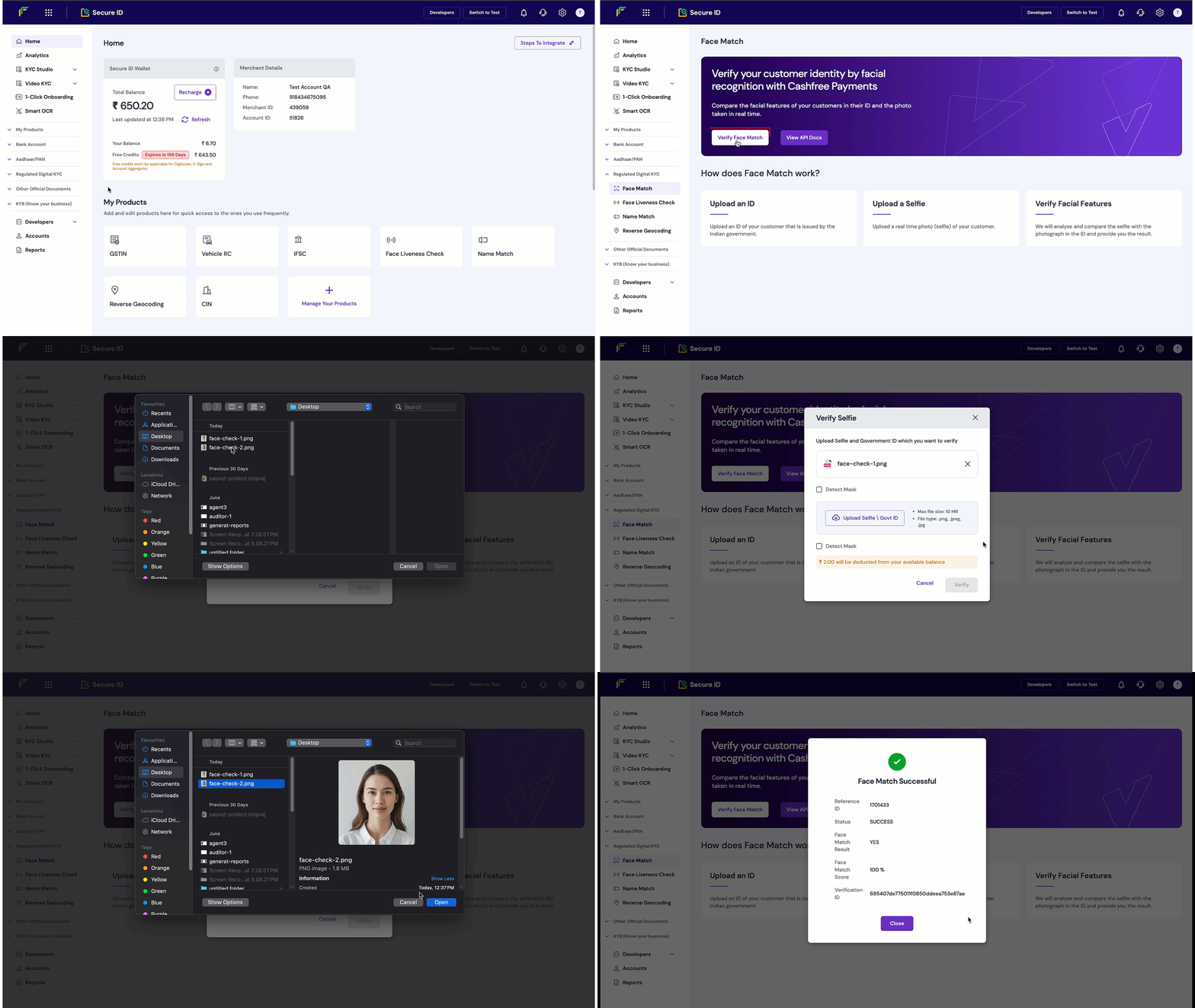
You can test face matches using the Cashfree merchant dashboard.
To verify Face Match:
1. Log in to the [Merchant Dashboard](https://merchant.cashfree.com/auth/login).
2. Go to **Secure ID** > **Regulated digital KYC** > **Face match**.
3. Select **Verify face match**, and upload the two images to compare. These can be selfies or ID document images.
4) Select **Verify**. You’ll see the face match score and match result in the response.
 You can also use the [Face Match API](/api-reference/vrs/v2/face-match/face-match) for integration into your workflow.