> ## Documentation Index
> Fetch the complete documentation index at: https://www.cashfree.com/docs/llms.txt
> Use this file to discover all available pages before exploring further.
# Verify GSTIN
> Verify Goods and Services Tax Identification Numbers in real-time to ensure business compliance, prevent fraud, and streamline KYC processes.
The Goods and Services Tax Identification Number (GSTIN) is a 15-digit unique identifier assigned to each business registered under the GST framework in India. GSTIN verification validates these numbers in real-time, enabling businesses to prevent fraud and streamline KYC, vendor onboarding, lending, and insurance workflows.
## Use cases
Use GSTIN verification across industries to ensure compliance and streamline onboarding:
| Sector | Use case |
| ------------------------------- | ------------------------------------------------------------------------- |
| E-commerce marketplaces | Verify seller GSTINs for compliance and accurate tax filing. |
| Lending platforms | Validate business GSTINs before loan approval and disbursement. |
| B2B resellers | Verify supplier and reseller GST registrations. |
| Insurance providers | Authenticate businesses applying for policies or claims. |
| Banks | Validate GSTINs during KYB checks for account opening or credit approval. |
| Tax platforms | Verify GSTINs for ITC claims, tax returns, and compliance. |
| Identity verification platforms | Enhance KYB workflows with business-level validation. |
## Verification process
You can verify GSTIN through two primary methods: the merchant dashboard for manual verification or the REST API for programmatic integration.
Use the merchant dashboard for quick manual GSTIN verification:
1. Log in to the [Merchant Dashboard](https://merchant.cashfree.com/auth/login).
2. Navigate to **Secure ID** > **KYB (Know Your Business)** > **GSTIN**.
3. Select **Verify GSTIN**, enter the GSTIN and business name (optional).
4. Click **Verify** to get instant results.
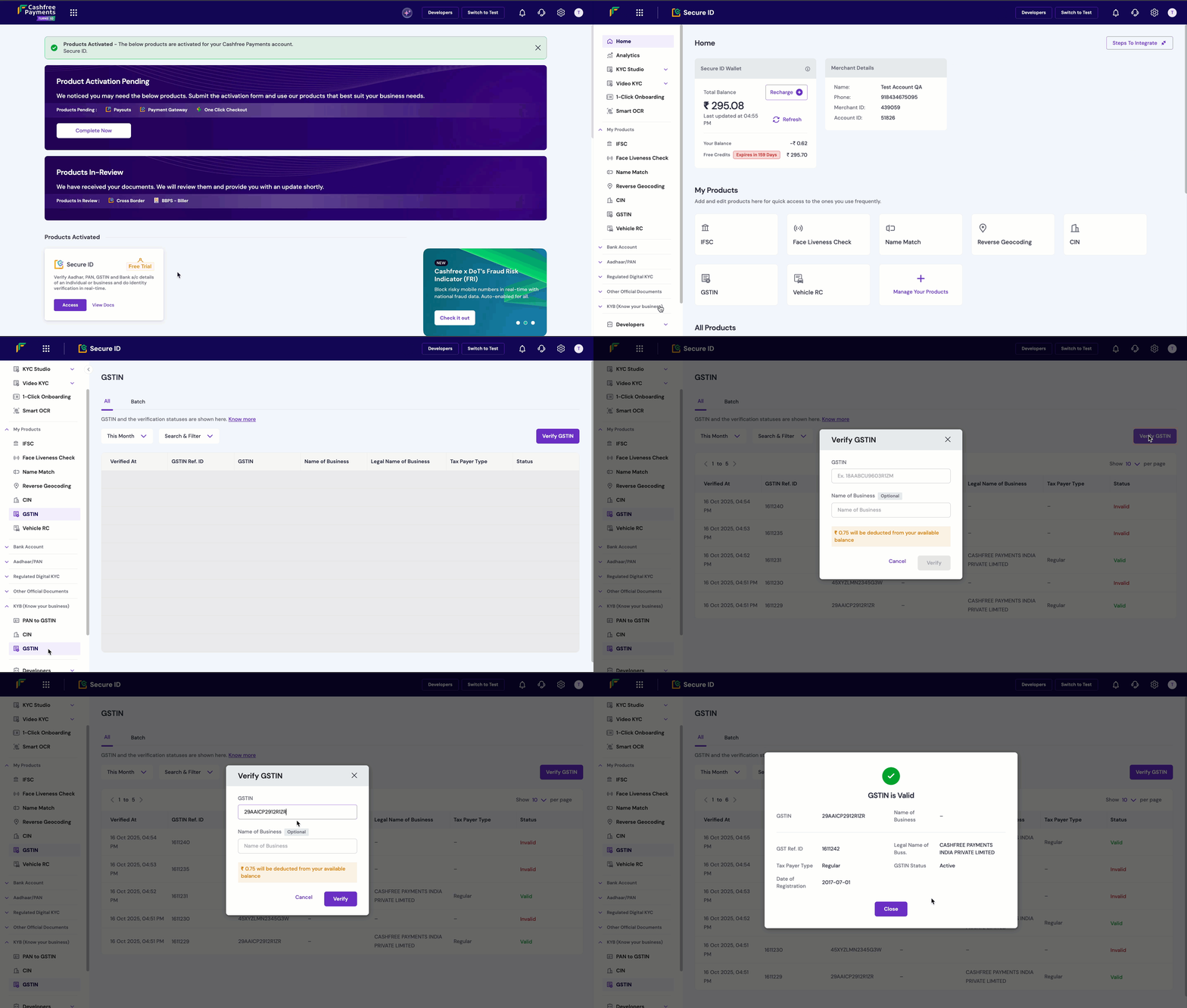 All verified GSTINs appear in your dashboard with comprehensive details including taxpayer type, registration date, business name, and current status.
Integrate GSTIN verification programmatically using the REST API:
**Endpoint**: `POST /api/v2/verification/gstin`
**Authentication**: Include your API key and secret in the request headers
```bash theme={"dark"}
X-Client-Id: YOUR_CLIENT_ID
X-Client-Secret: YOUR_CLIENT_SECRET
Content-Type: application/json
```
**Request format**:
```json theme={"dark"}
{
"gstin": "09ABCDE1234F1Z5",
"name": "Business Name (Optional)"
}
```
**Response format**:
```json theme={"dark"}
{
"status": "SUCCESS",
"message": "GSTIN verified successfully",
"data": {
"gstin": "09ABCDE1234F1Z5",
"legal_name": "ABC Private Limited",
"trade_name": "ABC Trading",
"registration_date": "2018-07-01",
"taxpayer_type": "Regular",
"business_type": "Private Limited Company",
"registration_status": "Active",
"registered_address": {
"address": "123 Business Street",
"city": "Delhi",
"state": "Delhi",
"pincode": "110001"
},
"constitution_of_business": "Private Limited Company"
}
}
```
**Error responses**:
```json theme={"dark"}
{
"status": "FAILED",
"message": "Invalid GSTIN format",
"error_code": "INVALID_GSTIN"
}
```
**Rate limits**: 100 requests per minute per API key
**Response data fields**:
The GSTIN verification API returns detailed business data:
| Field | Description |
| ------------------------ | -------------------------------------------------- |
| GSTIN status | Valid, Invalid, or verification failed |
| Legal name | Official registered business name |
| Trade name | Business trade name (if different from legal name) |
| Registration date | GST registration date |
| Taxpayer type | Regular, Composite, Exempted, etc. |
| Business type | Proprietorship, Partnership, Company, etc. |
| Registration status | Active, Cancelled, Suspended |
| Registered address | Complete business registered address |
| Constitution of business | Legal structure of the entity |
**Integration tips**:
* Validate GSTIN format (15 digits) before making API calls.
* Implement proper error handling for invalid or inactive GSTINs.
* Cache verification results to reduce API calls for repeated checks.
* Use webhooks for bulk verification processing.
Use the [GSTIN Verification API](/api-reference/vrs/v2/gstin/verify-gstin) for programmatic integration into your applications.
## Understanding GSTIN format
The 15-digit GSTIN follows a structured format that encodes key business information:
**Pattern**: `[State Code][PAN][Registration Sequence][Check Digit]`
**Example**: `09ABCDE1234F1Z5`
| Component | Digits | Description | Example |
| --------------------- | ------ | ---------------------------------- | -------------------- |
| State Code | 1-2 | State where business is registered | `09` (Uttar Pradesh) |
| PAN | 3-12 | Business PAN number | `ABCDE1234F` |
| Registration Sequence | 13 | Registration number within state | `1` |
| Check Digits | 14-15 | Validation digits | `Z5` |
Common state codes used in GSTIN:
| Code | State | Code | State |
| ---- | ----------------- | ---- | ------------- |
| 01 | Jammu and Kashmir | 09 | Uttar Pradesh |
| 03 | Punjab | 10 | Bihar |
| 05 | Uttarakhand | 11 | Sikkim |
| 06 | Haryana | 19 | West Bengal |
| 07 | Delhi | 20 | Jharkhand |
| 08 | Rajasthan | 27 | Maharashtra |
## Best practices
Follow these recommendations to optimise your GSTIN verification implementation and ensure reliable business validation:
* **Regular verification**: Re-verify GSTINs periodically as registration status can change over time.
* **Cross-reference data**: Use GSTIN verification alongside other KYB verification methods for comprehensive business validation.
* **Monitor status changes**: Check for GSTIN status changes before processing transactions to avoid compliance issues.
* **Maintain records**: Store verification records for compliance and audit purposes as required by regulatory frameworks.
* **Validate format**: Ensure GSTIN follows the correct 15-digit format before making API calls to avoid unnecessary requests.
* **Handle errors gracefully**: Implement robust error handling for invalid, inactive, or temporarily unavailable GSTIN data.
* **Cache results**: Store verification results temporarily to reduce API calls for repeated checks of the same GSTIN.
* **Set timeouts**: Configure appropriate API timeout values to handle network latency and server response delays.
## FAQs
posthog.capture('Accordion Clicked', { title: "What are the details that I will be able to see on verifying the GSTIN of an entity?" })}>
The system will return whether the GSTIN is valid or not along with the following details (if valid):
* The legal name of the business
* GSTIN status
* Taxpayer type
* Date of registration
* GSTIN
* Nature of business
* Business principal address
posthog.capture('Accordion Clicked', { title: "Is there any limit to the number of GSTINs that can be verified in a day?" })}>
No, there is no limit to the number of GST numbers that can be verified in a day.
posthog.capture('Accordion Clicked', { title: "Can I verify the GSTIN by just knowing the name of the person?" })}>
No, to verify a GSTIN, it is mandatory to enter the GST number.
posthog.capture('Accordion Clicked', { title: "Which businesses can benefit from GSTIN verification?" })}>
With GSTIN verification, businesses can now verify the GST number of an entity instantly. The following businesses can benefit from this feature:
* Ecommerce marketplaces
* B2B Reseller Companies
* B2B Ecommerce
* Tax processing and return filing platforms
* Lending and micro-financing platforms
* Insurance providers
* Banks
* Identity verification companies
posthog.capture('Accordion Clicked', { title: "Do I need to pay in advance for GSTIN verification?" })}>
Yes, GSTIN verification requires prepaid payment. Please get in touch with our sales team to set up your account and find the best suitable plan for you.
posthog.capture('Accordion Clicked', { title: "What are the details I need to input to verify a GSTIN?" })}>
All you need to input is the 15-digit GSTIN number of the business and you will get an instant verification status and other business details.
posthog.capture('Accordion Clicked', { title: "What is online GSTIN verification?" })}>
Online GSTIN verification lets businesses validate and verify the authenticity of their customer/vendor/employee’s GSTIN details to avoid identity theft or dealing with fraudsters.
posthog.capture('Accordion Clicked', { title: "What is the average response time for the GSTIN Api?" })}>
The average response time is less than a second.
All verified GSTINs appear in your dashboard with comprehensive details including taxpayer type, registration date, business name, and current status.
Integrate GSTIN verification programmatically using the REST API:
**Endpoint**: `POST /api/v2/verification/gstin`
**Authentication**: Include your API key and secret in the request headers
```bash theme={"dark"}
X-Client-Id: YOUR_CLIENT_ID
X-Client-Secret: YOUR_CLIENT_SECRET
Content-Type: application/json
```
**Request format**:
```json theme={"dark"}
{
"gstin": "09ABCDE1234F1Z5",
"name": "Business Name (Optional)"
}
```
**Response format**:
```json theme={"dark"}
{
"status": "SUCCESS",
"message": "GSTIN verified successfully",
"data": {
"gstin": "09ABCDE1234F1Z5",
"legal_name": "ABC Private Limited",
"trade_name": "ABC Trading",
"registration_date": "2018-07-01",
"taxpayer_type": "Regular",
"business_type": "Private Limited Company",
"registration_status": "Active",
"registered_address": {
"address": "123 Business Street",
"city": "Delhi",
"state": "Delhi",
"pincode": "110001"
},
"constitution_of_business": "Private Limited Company"
}
}
```
**Error responses**:
```json theme={"dark"}
{
"status": "FAILED",
"message": "Invalid GSTIN format",
"error_code": "INVALID_GSTIN"
}
```
**Rate limits**: 100 requests per minute per API key
**Response data fields**:
The GSTIN verification API returns detailed business data:
| Field | Description |
| ------------------------ | -------------------------------------------------- |
| GSTIN status | Valid, Invalid, or verification failed |
| Legal name | Official registered business name |
| Trade name | Business trade name (if different from legal name) |
| Registration date | GST registration date |
| Taxpayer type | Regular, Composite, Exempted, etc. |
| Business type | Proprietorship, Partnership, Company, etc. |
| Registration status | Active, Cancelled, Suspended |
| Registered address | Complete business registered address |
| Constitution of business | Legal structure of the entity |
**Integration tips**:
* Validate GSTIN format (15 digits) before making API calls.
* Implement proper error handling for invalid or inactive GSTINs.
* Cache verification results to reduce API calls for repeated checks.
* Use webhooks for bulk verification processing.
Use the [GSTIN Verification API](/api-reference/vrs/v2/gstin/verify-gstin) for programmatic integration into your applications.
## Understanding GSTIN format
The 15-digit GSTIN follows a structured format that encodes key business information:
**Pattern**: `[State Code][PAN][Registration Sequence][Check Digit]`
**Example**: `09ABCDE1234F1Z5`
| Component | Digits | Description | Example |
| --------------------- | ------ | ---------------------------------- | -------------------- |
| State Code | 1-2 | State where business is registered | `09` (Uttar Pradesh) |
| PAN | 3-12 | Business PAN number | `ABCDE1234F` |
| Registration Sequence | 13 | Registration number within state | `1` |
| Check Digits | 14-15 | Validation digits | `Z5` |
Common state codes used in GSTIN:
| Code | State | Code | State |
| ---- | ----------------- | ---- | ------------- |
| 01 | Jammu and Kashmir | 09 | Uttar Pradesh |
| 03 | Punjab | 10 | Bihar |
| 05 | Uttarakhand | 11 | Sikkim |
| 06 | Haryana | 19 | West Bengal |
| 07 | Delhi | 20 | Jharkhand |
| 08 | Rajasthan | 27 | Maharashtra |
## Best practices
Follow these recommendations to optimise your GSTIN verification implementation and ensure reliable business validation:
* **Regular verification**: Re-verify GSTINs periodically as registration status can change over time.
* **Cross-reference data**: Use GSTIN verification alongside other KYB verification methods for comprehensive business validation.
* **Monitor status changes**: Check for GSTIN status changes before processing transactions to avoid compliance issues.
* **Maintain records**: Store verification records for compliance and audit purposes as required by regulatory frameworks.
* **Validate format**: Ensure GSTIN follows the correct 15-digit format before making API calls to avoid unnecessary requests.
* **Handle errors gracefully**: Implement robust error handling for invalid, inactive, or temporarily unavailable GSTIN data.
* **Cache results**: Store verification results temporarily to reduce API calls for repeated checks of the same GSTIN.
* **Set timeouts**: Configure appropriate API timeout values to handle network latency and server response delays.
## FAQs
posthog.capture('Accordion Clicked', { title: "What are the details that I will be able to see on verifying the GSTIN of an entity?" })}>
The system will return whether the GSTIN is valid or not along with the following details (if valid):
* The legal name of the business
* GSTIN status
* Taxpayer type
* Date of registration
* GSTIN
* Nature of business
* Business principal address
posthog.capture('Accordion Clicked', { title: "Is there any limit to the number of GSTINs that can be verified in a day?" })}>
No, there is no limit to the number of GST numbers that can be verified in a day.
posthog.capture('Accordion Clicked', { title: "Can I verify the GSTIN by just knowing the name of the person?" })}>
No, to verify a GSTIN, it is mandatory to enter the GST number.
posthog.capture('Accordion Clicked', { title: "Which businesses can benefit from GSTIN verification?" })}>
With GSTIN verification, businesses can now verify the GST number of an entity instantly. The following businesses can benefit from this feature:
* Ecommerce marketplaces
* B2B Reseller Companies
* B2B Ecommerce
* Tax processing and return filing platforms
* Lending and micro-financing platforms
* Insurance providers
* Banks
* Identity verification companies
posthog.capture('Accordion Clicked', { title: "Do I need to pay in advance for GSTIN verification?" })}>
Yes, GSTIN verification requires prepaid payment. Please get in touch with our sales team to set up your account and find the best suitable plan for you.
posthog.capture('Accordion Clicked', { title: "What are the details I need to input to verify a GSTIN?" })}>
All you need to input is the 15-digit GSTIN number of the business and you will get an instant verification status and other business details.
posthog.capture('Accordion Clicked', { title: "What is online GSTIN verification?" })}>
Online GSTIN verification lets businesses validate and verify the authenticity of their customer/vendor/employee’s GSTIN details to avoid identity theft or dealing with fraudsters.
posthog.capture('Accordion Clicked', { title: "What is the average response time for the GSTIN Api?" })}>
The average response time is less than a second.