> ## Documentation Index
> Fetch the complete documentation index at: https://www.cashfree.com/docs/llms.txt
> Use this file to discover all available pages before exploring further.
# Voter ID Verification
> Use Cashfree Voter ID verification to validate EPIC numbers against India's electoral records and fetch voter and constituency details in real time.
Voter ID verification enables businesses to instantly validate the authenticity of an individual's **voter ID (EPIC)** number directly against India's official electoral records. This allows businesses to fetch complete voter details, including assembly and parliamentary constituency information.
This solution is a strong alternative to Aadhaar verification, helping reduce drop-offs in onboarding flows where Aadhaar is unavailable or insufficient.
## Verification process
You can verify Voter IDs through two primary methods:
* **Merchant dashboard**: Verify Voter IDs using manual entry or document upload.
* Manual verification: Enter EPIC number to validate against electoral records
* Smart OCR: Upload Voter ID card images for automatic data extraction and verification
* **REST API**: Integrate verification directly into your applications.
Use the Merchant Dashboard to verify Voter ID details:
### Manual verification
1. Log in to the [Merchant Dashboard](https://merchant.cashfree.com/auth/login).
2. Navigate to **Secure ID** > **Other Official Documents** > **Voter ID**.
3. Enter the voter ID (EPIC) number and click **Verify**.
4. Review the returned voter details including constituency and holder information.
**Batch verification**:
1. Select **Upload File** under the Voter ID section.
2. Upload CSV containing multiple EPIC numbers.
3. Retrieve verification results in bulk format.
### Smart OCR verification
1. Navigate to **Smart OCR** > **Voter ID Verification**.
2. Upload a scanned Voter ID card (front side) or high-quality image.
3. Smart OCR automatically detects and extracts key information.
**Extracted fields**:
* Voter ID number (EPIC number)
* Full name of the cardholder
* Gender and date of birth or age
* Father's/mother's/husband's name
* Complete address details
* Assembly constituency and state
* Issuing authority and signature details
* QR code data (newer formats)
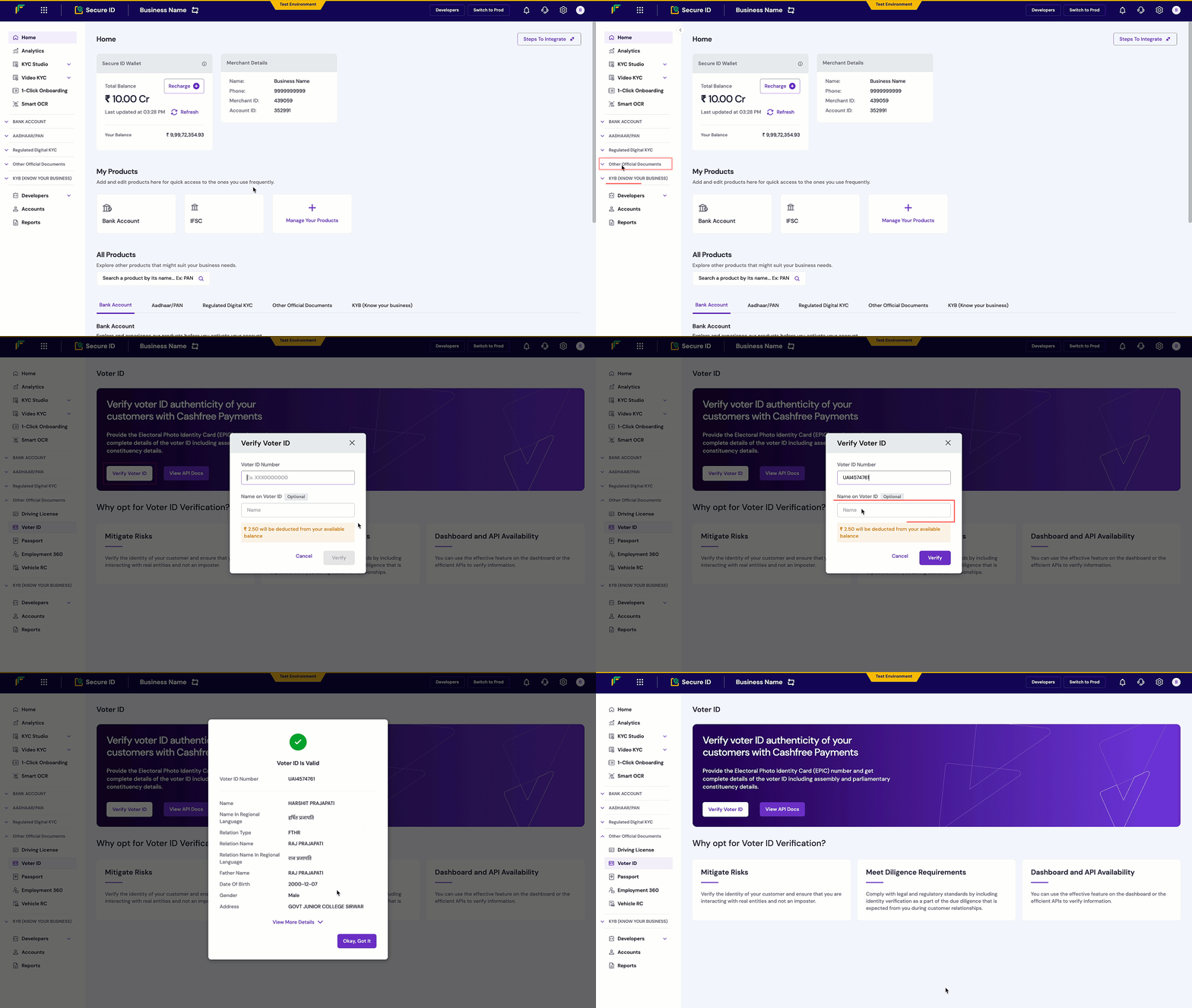 All verified Voter IDs appear in your dashboard with comprehensive details including name, address, and constituency information.
Integrate Voter ID verification programmatically using the REST API:
1. **Trigger the verification request** using the [Voter ID Verification API](/api-reference/vrs/v2/voter-id/verify-voter-id).
2. **Pass the EPIC number** and optional name parameter in the request payload.
3. **Receive verification results** with complete voter details, constituency information, and validation status.
**Endpoint**: `POST /verification/voter-id`
```json theme={"dark"}
{
"verification_id": "ABC00123",
"epic_number": "UAI4574761",
"name": "John Doe"
}
```
```json theme={"dark"}
{
"reference_id": 1358,
"verification_id": "ABC00123",
"status": "VALID",
"epic_number": "UAI4574761",
"name": "HARSHIT PRAJAPATI",
"name_in_regional_lang": "हर्षित",
"age": "23",
"relation_type": "FTHR",
"relation_name": "RAJ PRAJAPATI",
"father_name": "RAJ PRAJAPATI",
"dob": "2000-12-07",
"gender": "Male",
"address": "GOVT JUNIOR COLLEGE SIRWAR",
"split_address": {
"district": ["INDORE"],
"state": ["Madhya Pradesh"],
"city": ["SANER"],
"pincode": "560034",
"country": ["IN", "IND", "INDIA"],
"address_line": "GOVT JUNIOR COLLEGE SIRWAR"
},
"state": "Madhya Pradesh",
"assembly_constituency_number": "211",
"assembly_constituency": "SANER",
"parliamentary_constituency_number": "25",
"parliamentary_constituency": "INDORE"
}
```
```json theme={"dark"}
{
"type": "invalid_request_error",
"code": "verification_failed",
"message": "Invalid EPIC number format",
"details": [
{
"field": "epic_number",
"issue": "EPIC number not found in records"
}
]
}
```
Integrate the [Voter ID Verification API](/api-reference/vrs/v2/voter-id/verify-voter-id) into your application to automatically verify voter ID numbers within your signup or onboarding flow.
snippets/related-topics-loader.mdx
All verified Voter IDs appear in your dashboard with comprehensive details including name, address, and constituency information.
Integrate Voter ID verification programmatically using the REST API:
1. **Trigger the verification request** using the [Voter ID Verification API](/api-reference/vrs/v2/voter-id/verify-voter-id).
2. **Pass the EPIC number** and optional name parameter in the request payload.
3. **Receive verification results** with complete voter details, constituency information, and validation status.
**Endpoint**: `POST /verification/voter-id`
```json theme={"dark"}
{
"verification_id": "ABC00123",
"epic_number": "UAI4574761",
"name": "John Doe"
}
```
```json theme={"dark"}
{
"reference_id": 1358,
"verification_id": "ABC00123",
"status": "VALID",
"epic_number": "UAI4574761",
"name": "HARSHIT PRAJAPATI",
"name_in_regional_lang": "हर्षित",
"age": "23",
"relation_type": "FTHR",
"relation_name": "RAJ PRAJAPATI",
"father_name": "RAJ PRAJAPATI",
"dob": "2000-12-07",
"gender": "Male",
"address": "GOVT JUNIOR COLLEGE SIRWAR",
"split_address": {
"district": ["INDORE"],
"state": ["Madhya Pradesh"],
"city": ["SANER"],
"pincode": "560034",
"country": ["IN", "IND", "INDIA"],
"address_line": "GOVT JUNIOR COLLEGE SIRWAR"
},
"state": "Madhya Pradesh",
"assembly_constituency_number": "211",
"assembly_constituency": "SANER",
"parliamentary_constituency_number": "25",
"parliamentary_constituency": "INDORE"
}
```
```json theme={"dark"}
{
"type": "invalid_request_error",
"code": "verification_failed",
"message": "Invalid EPIC number format",
"details": [
{
"field": "epic_number",
"issue": "EPIC number not found in records"
}
]
}
```
Integrate the [Voter ID Verification API](/api-reference/vrs/v2/voter-id/verify-voter-id) into your application to automatically verify voter ID numbers within your signup or onboarding flow.
snippets/related-topics-loader.mdx