> ## Documentation Index
> Fetch the complete documentation index at: https://www.cashfree.com/docs/llms.txt
> Use this file to discover all available pages before exploring further.
# Add an Agent or Auditor
> Add Cashfree Video KYC users with the Agent or Auditor role from the merchant dashboard so they can run live KYC sessions or audit completed cases.
Use the merchant dashboard to add users with the **Agent** or **Auditor** role for the Video KYC process. Agents conduct KYC sessions, while auditors review session logs and ensure compliance. This article describes how to add users and assign permissions.
## Add an agent or auditor
To add an agent or auditor:
1. Log in to the [Merchant Dashboard](https://merchant.cashfree.com/auth/login).
2. Go to **Secure ID > Video KYC > Agents & Auditors**.
3. Select **+ Add Agent/Auditor**.
4. Under **Role/Permission**, select **Agent** or **Auditor**.
5. In the **Name** field, enter the user’s full name.
6. In the **Work email address** field, enter the user’s email.
7. (Optional) In the **Phone number** field, enter the user’s contact number.
8. Select **Add**.
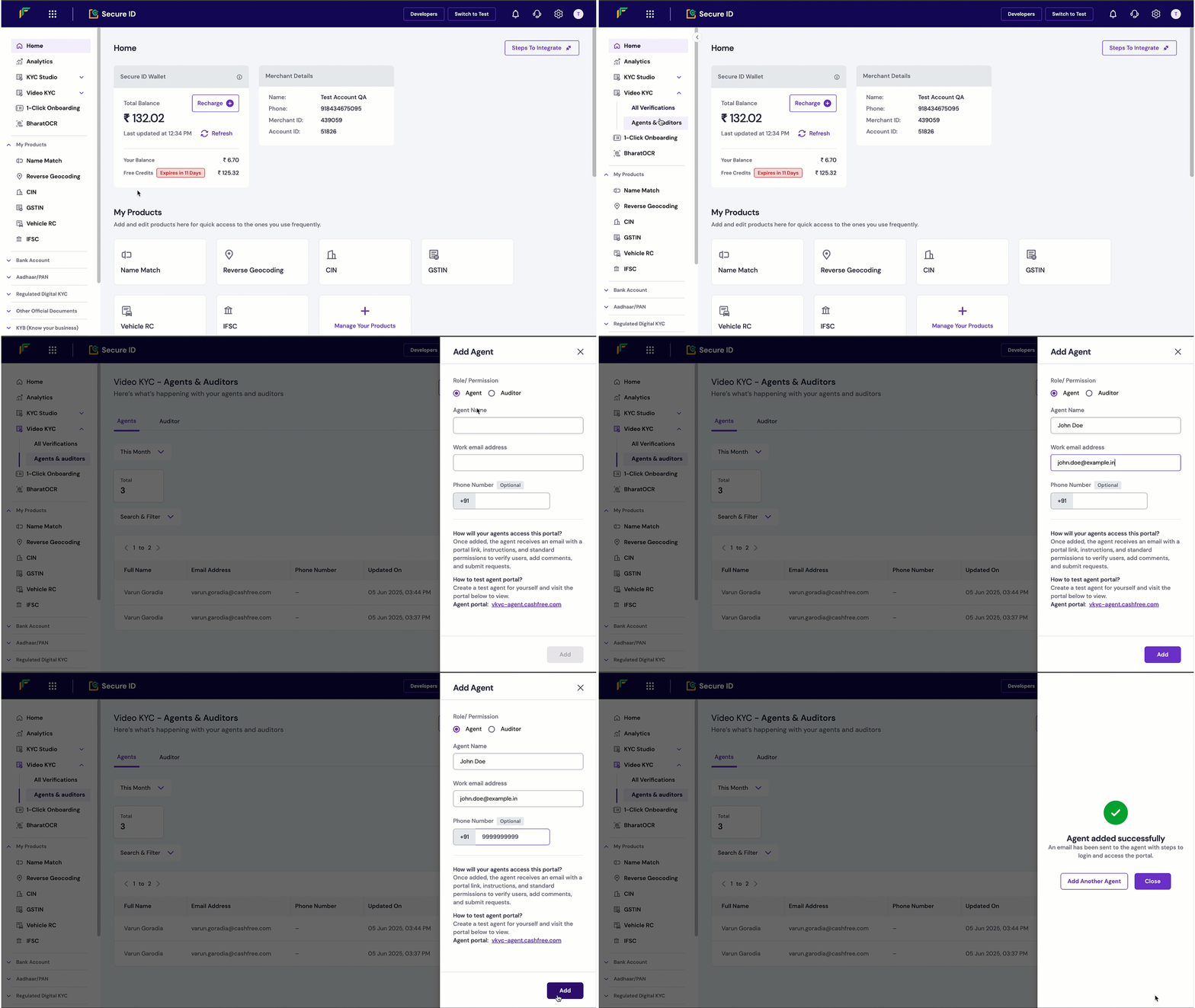 After the user is added, they receive an email with a portal link, setup instructions, and access permissions. Agents can verify users, add comments, and submit requests. Auditors can monitor and review sessions.
## Test environment information
To test Video KYC functionality, create test accounts for both agent and auditor roles and familiarise yourself with the configurations.
Use these URLs to access the Video KYC portals in the test environment:
* **Agent portal**: [vkyc-agent-test.cashfree.com](https://vkyc-agent-test.cashfree.com/)
* **Auditor portal**: [vkyc-auditor-test.cashfree.com](https://vkyc-auditor-test.cashfree.com/)
- SMS and WhatsApp notifications: Links aren't sent via SMS or WhatsApp in the test environment.
- User form login OTP: Use **123456** for user form authentication.
- Portal login OTP: Use **123456** for portal authentication.
After the user is added, they receive an email with a portal link, setup instructions, and access permissions. Agents can verify users, add comments, and submit requests. Auditors can monitor and review sessions.
## Test environment information
To test Video KYC functionality, create test accounts for both agent and auditor roles and familiarise yourself with the configurations.
Use these URLs to access the Video KYC portals in the test environment:
* **Agent portal**: [vkyc-agent-test.cashfree.com](https://vkyc-agent-test.cashfree.com/)
* **Auditor portal**: [vkyc-auditor-test.cashfree.com](https://vkyc-auditor-test.cashfree.com/)
- SMS and WhatsApp notifications: Links aren't sent via SMS or WhatsApp in the test environment.
- User form login OTP: Use **123456** for user form authentication.
- Portal login OTP: Use **123456** for portal authentication.