> ## Documentation Index
> Fetch the complete documentation index at: https://www.cashfree.com/docs/llms.txt
> Use this file to discover all available pages before exploring further.
# Generate Reports
> Generate detailed Cashfree Video KYC reports for agents and auditors in the Merchant Dashboard with custom date ranges, file formats, and data columns.
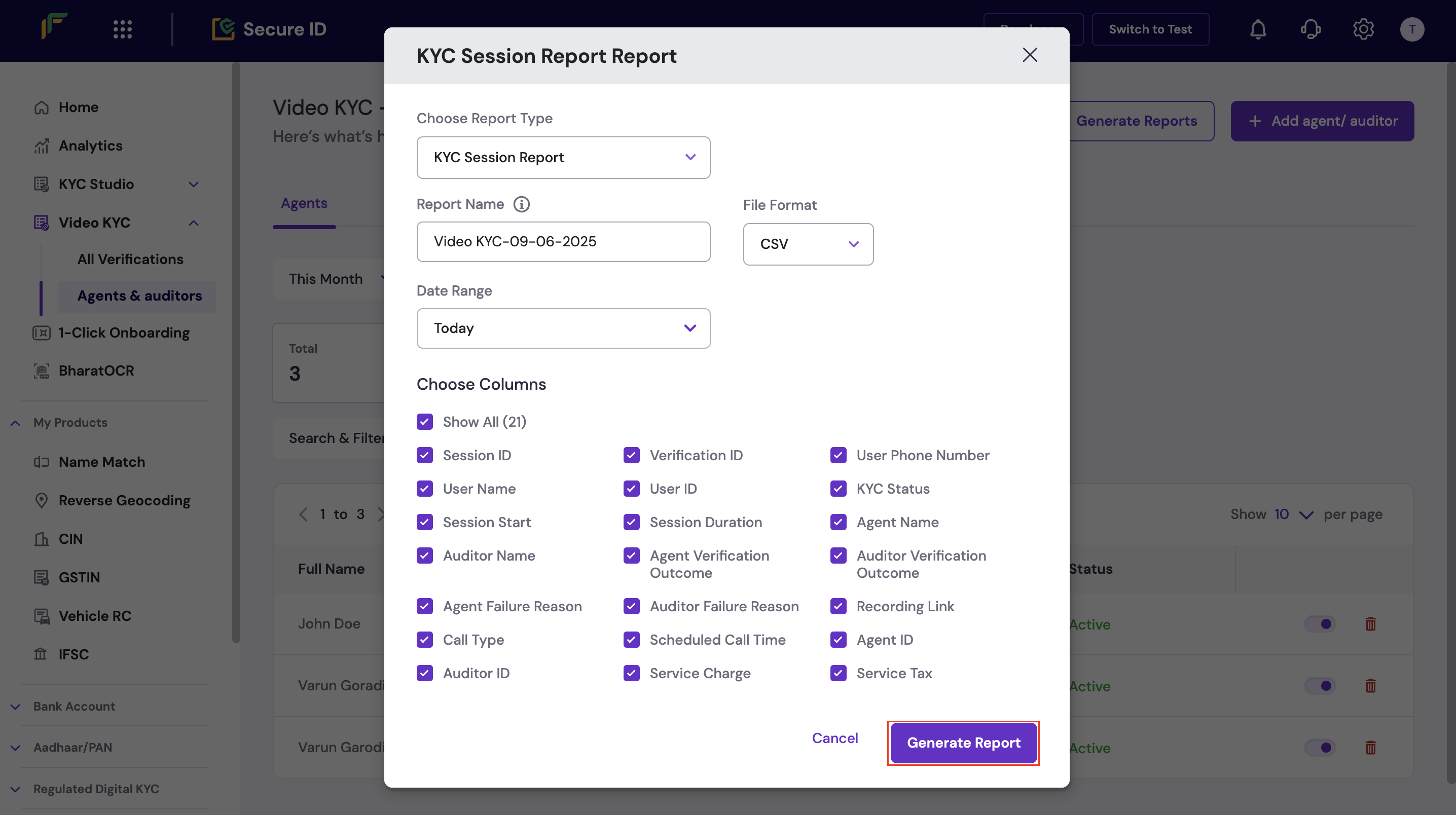
Use the [Merchant Dashboard](https://merchant.cashfree.com/auth/login) to generate detailed reports for Video KYC sessions conducted by agents or auditors. These reports help monitor performance, ensure compliance, and analyse session data. Customise the output by selecting a date range, file format, and data columns.
## Generating reports
To generate a report:
1. Log in to the [Merchant Dashboard](https://merchant.cashfree.com/auth/login).
2. Navigate to **Secure ID > Video KYC > Agents & Auditors**.
3. Select **Generate Reports**. This opens the **KYC Session Report** modal.
4. Under **Choose Report Type**, select **Agent** or **Auditor**.
5. In the **Report Name** field, enter a name for the report.
6. Select a file format from the **File Format** drop-down.
7. Select a date from the **Date Range** drop-down.
8. Choose the columns you want to export from the **Choose Columns** section.
9. Select **Generate Reports** to download the file.