> ## Documentation Index
> Fetch the complete documentation index at: https://www.cashfree.com/docs/llms.txt
> Use this file to discover all available pages before exploring further.
# Manage Agents and Auditors
> Manage Cashfree Video KYC users with Agent or Auditor roles from the merchant dashboard, including permissions, activation toggles, and role updates.
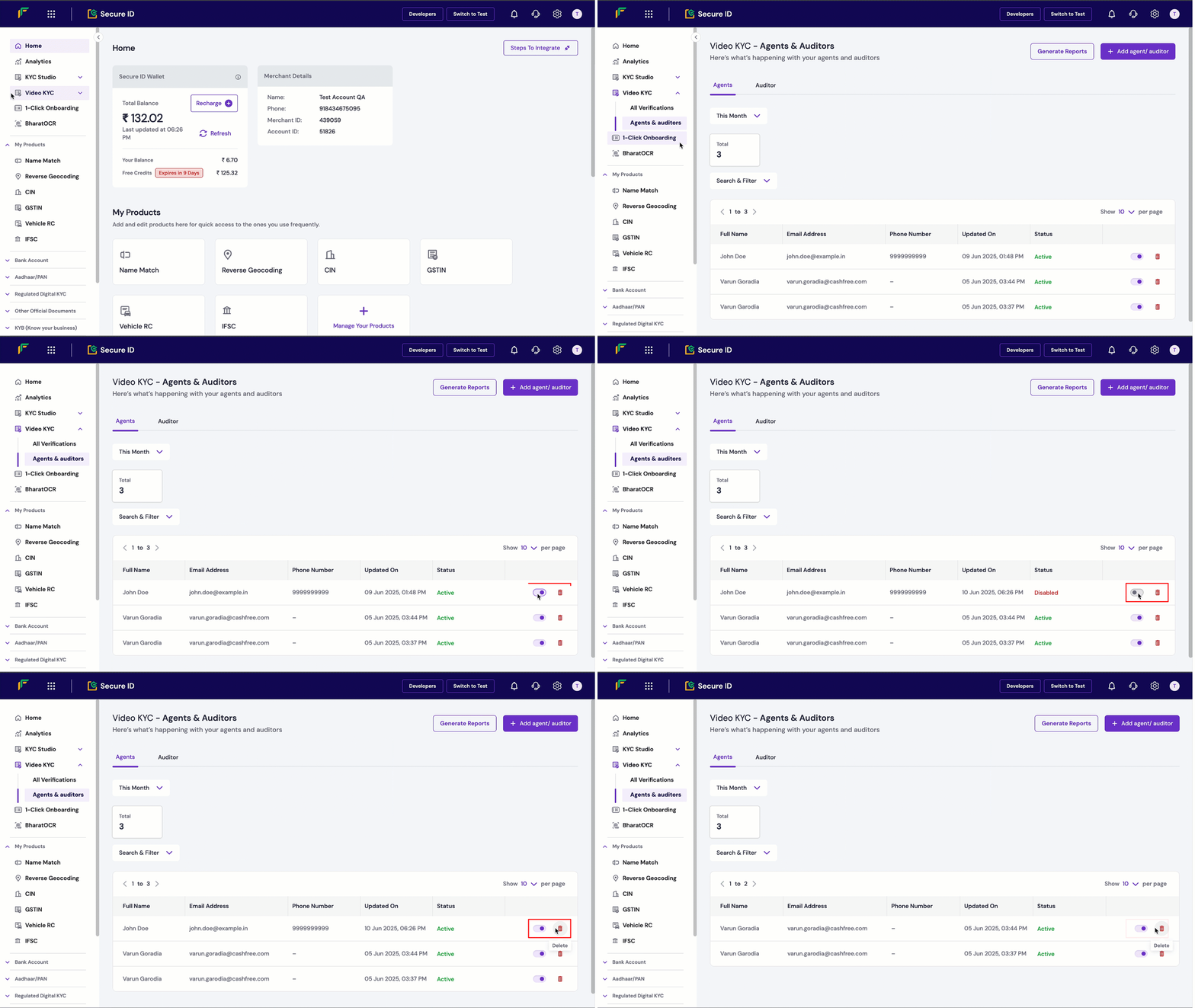
Use the merchant dashboard to manage users with the **Agent** or **Auditor** role for the Video KYC process. Agents conduct KYC sessions, while auditors review session logs and ensure compliance. This article describes how to manage users, assign permissions, and toggle their status.
## Manage agents and auditors
To manage agents and auditors:
1. Log in to the [Merchant Dashboard](https://merchant.cashfree.com/auth/login).
2. Navigate to **Secure ID > Video KYC > Agents & Auditors**.
3. Locate the user in the table.
4. To toggle the user's status:
* Use the **Status** column to enable or disable the user.
* Disabling a user restricts their access while retaining their data in the system.