

The oldest API keys, that are active, for Webhook signature verification to
avoid signature mismatch errors.
Add a webhook
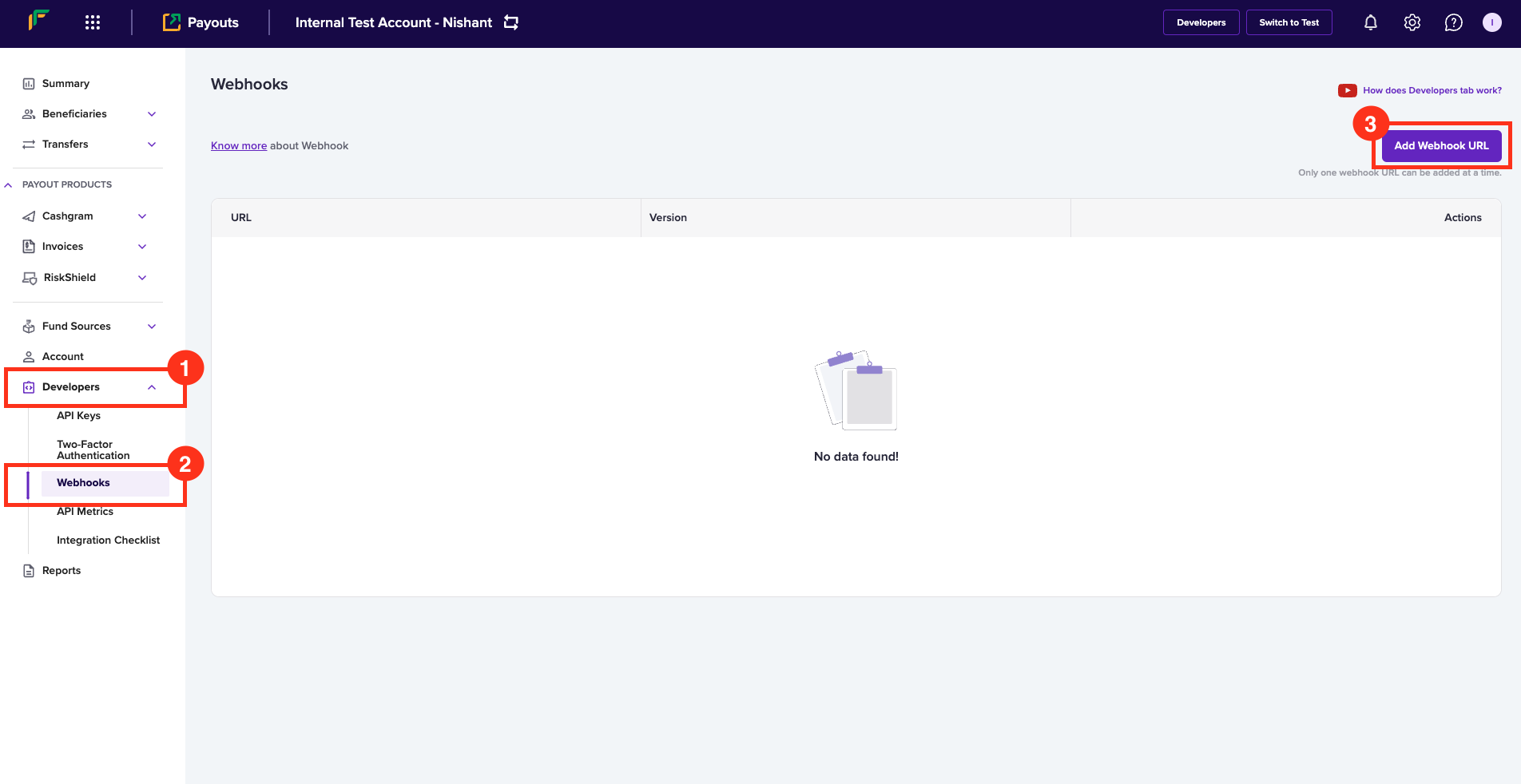
Follow the instructions below to configure webhooks for version 2 APIs:- Log in to the Payouts dashboard using your credentials.
- Navigate to Developers > Webhooks.
- Click Add Webhook URL in the Webhooks page.
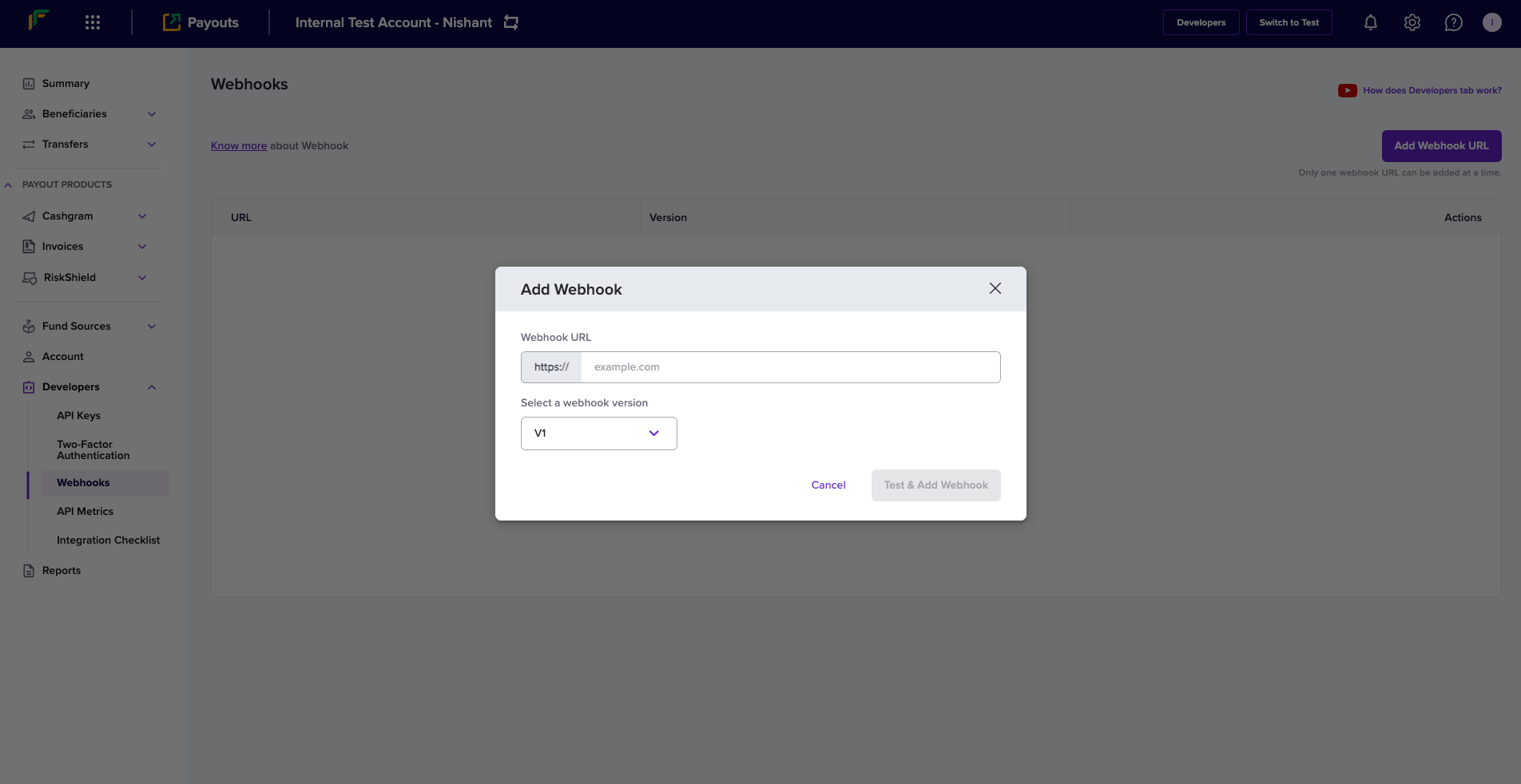
- In the Add Webhook popup, enter the following information:
- Webhook URL: Enter the URL where you want to receive the transfer related notifications.
- Select a webhook version: Select V1 from the dropdown menu.
- Click Test & Add Webhook.
Webhook events
Payouts webhooks enable you to receive updates about all event-driven activities originating from your account. Below is the list of payouts webhooks:TRANSFER_SUCCESS
Sent when a transfer is attempted successfully.What does the response parameter ‘acknowledged’ mean
The acknowledged parameter value conveys if the beneficiary received the funds by checking its value. Ack = 1 or 0. 1 denotes the beneficiary received funds, and 0 denotes the beneficiary had not received funds. The cash flow happens as explained below:- Debit: The debit of the transfers happens on the remitter account. After a successful debit, the beneficiary bank does further processing. When only the debit is successful, Ack = 0.
- Credit: The beneficiary bank credits the fund to the account. The transfer is sent from the remitter bank to the beneficiary bank after a successful debit. When the credit to the end beneficiary is successful, Ack = 1.
TRANSFER_FAILED
Sent when a transfer attempt fails.TRANSFER_REVERSED
Sent when the beneficiary bank reverses a transfer.CREDIT_CONFIRMATION
Sent when the balance credit is confirmed.TRANSFER_ACKNOWLEDGED
Sent when the bank acknowledges a transfer.TRANSFER_REJECTED
Sent when a transfer is rejected.BENEFICIARY_INCIDENT
Sent when a beneficiary incident is created or resolved.LOW_BALANCE_ALERT
Sent when the payout balance is low.BULK_TRANSFER_REJECTED
Sent when one of the transfers in the batch transfer file has been rejected.
Delay in Receiving the Response
Cashfree receives a response from the bank with the status of the transfer instantly. At times the response may get delayed due to various reasons, and the transaction status will be marked as Pending, till we get a response.
Cashfree polls the transaction status from the bank for the next 72 hours. If we do not receive the status after 72 hours, you must manually reconcile the transaction.
Signature Verification
Cashfree sends a signature alongside every webhook, verifying this signature ( passed along with the POST parameters ) is mandatory before processing any response. It helps authenticate that the webhook is from Cashfree. We strongly recommend whitelisting Cashfree production IP to help make your communication with us more secure. Following are the steps to verify Cashfree signature:- Get all the POST parameters except ‘signature’ and assign it to an array as key-value pair.
- Sort the array based on keys.
- Concatenate all the values in this array and the resultant is the post data (say, postData).
- Encrypt postData using SHA-256, then base64-encode it.
- Now verify if both the signature calculated and the signature received a match.
- Proceed further if it matches, else discard the request.