

What is Cashfree Affiliate Program?
What is Cashfree Affiliate Program?
The Cashfree Affiliate Program is a referral program through which you can offer the Cashfree product suite to your clients or customers and get rewarded. You can simplify the payments experience for your customers and earn a commission for every transaction your customer makes.Becoming an affiliate enables you to provide a seamless onboarding experience for your customers and offer them a complete suite of payment solutions for all their payment needs.
How to become a Cashfree Affiliate?
How to become a Cashfree Affiliate?
Visit the Cashfree website and signup for our affiliate program. After you complete the signup process you will get access to the Affiliate Dashboard. You can add merchants, keep a check on your commissions, get a snapshot of your business with Cashfree, and more within the Affiliate Dashboard.
What are the next steps after sign-up?
What are the next steps after sign-up?
After you complete the sign-up process, you must activate your account and send us the scanned copies of the documents for KYC verification.
Who can be a Cashfree Affiliate?
Who can be a Cashfree Affiliate?
Any individual, proprietary firm, partnership firm (including LLP) or private limited company, that requires an online payment solution for their clients, can register with Cashfree as an Affiliate.
How to activate my Affiliate account?
How to activate my Affiliate account?
You need to complete KYC to activate your account. Follow the above steps to activate your account. In case you are not able to contact to Cashfree team on call, you can contact us at partner@cashfree.com or fill out the Support Form We would be happy to assist.
What are the benefits for Cashfree Affiliates?
What are the benefits for Cashfree Affiliates?
Offer payment solutions to your customers for all the payment issues on a single platform - Payment Gateway, Easy Split, Payment Links, Subscriptions, Payouts, Verification Suite (Bank Accounts, IFSC, UPI VPA, PAN), and more.Earn Rewards: You get commissions for every transaction your customers make. There are two types of commission structures - flat rate and percentage of the transaction value.Powerful Dashboard: A separate dashboard to add and manage all your customers. Get detailed reports about transactions, the value of transactions made, commission amount, and more.Extensive Affiliate Support: Dedicated support to solve all your integration queries.Multi-Currency Support: More than 100+ currency types are supported.
How can I refer merchants?
How can I refer merchants?
You can refer merchants using one of the following ways below:
- Refer merchants using the Cashfree Affiliate Partner badge
- Go to Affiliate Dashboard > Summary.
- Click Copy Code in the Affiliate Logosection. Add this code to your website or application.
- Refer merchants using Cashfree Affiliate Referral Links
- Go to Affiliate Dashboard > Summary.
- Copy the referral link in the Referral Link section. Share your unique Affiliate Referral Link with your clients. Once your merchants’ signup using the referral link, they will be added as your referred merchant on the dashboard.
How do I retrieve my password?
How do I retrieve my password?
To reset your password, follow these steps:
- Go to the Merchant Dashboard.
- Click Forgot Password on the login screen.
- Enter your registered email address.
- Follow the instructions sent to your email to create a new password.
What is the onboarding process for referred merchants?
What is the onboarding process for referred merchants?
After you add the merchant details, Cashfree will notify the merchant to accept the invite and verify their email ID. The merchant must submit the business details and upload the required documents.If the merchants did not verify their email ID, you can resend the verification email to them by clicking Resend verification email. To make the merchant onboarding faster, you can also submit business details of your merchants and upload the required documents on your merchants’ behalf by following the steps below:
-
Click the ‘Activate’ option shown for your merchant entries in the Affiliate dashboard.
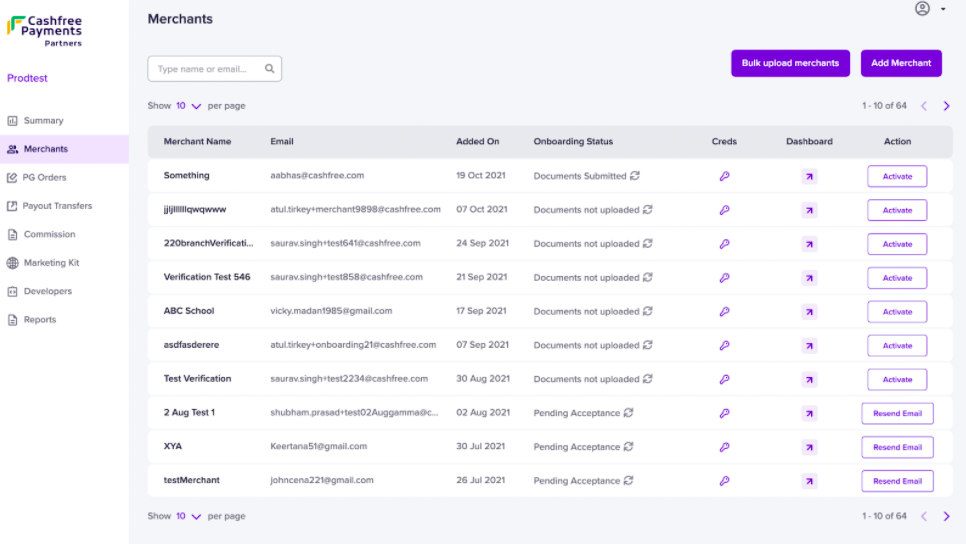
-
You would be directed to the merchant account activation page where you can fill in all required business details of your referred merchant and upload their business documents.
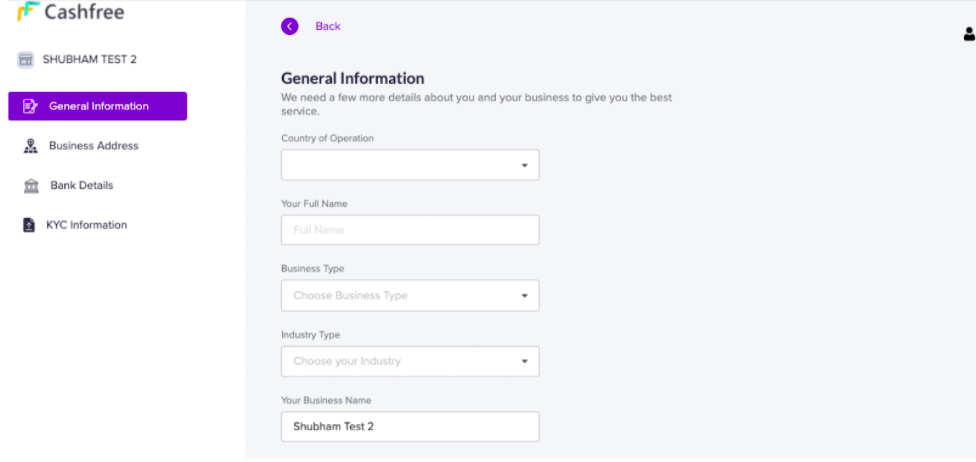
Activate option will be shown only for merchants who have verified their email addresses.
How to resend the verification mail to merchants again?
How to resend the verification mail to merchants again?
If the merchants did not verify their email ID, you can resend the verification email to them by clicking Resend Email.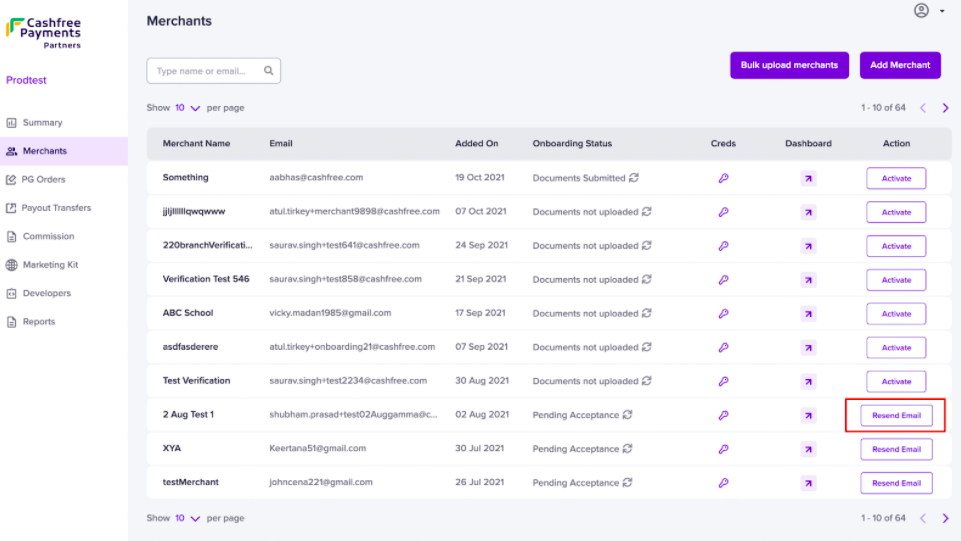
How to track the status of the referred merchants?
How to track the status of the referred merchants?
- Go to Affiliate Dashboard > Merchants.
- Check the status of your referred merchants. You will see the below statuses:
Resend Email: The merchant has not verified their email address. You can select this option to resend the verification email.
Activate: The merchant has not uploaded the documents. You can select this option to activate the merchant.
Activated: The merchant account is active now, the merchant can now start transacting via Cashfree.
How can I track the Payment Gateway and Payout transactions made by my referrals?
How can I track the Payment Gateway and Payout transactions made by my referrals?
To track payment gateway transactions by your merchants, navigate to PG Orders on the left panel. You can view the number of transactions, total transaction amount, and commission earned by you on those transactions for every merchantSimilarly, you can navigate to Payouts Transfers on the left panel to keep track of all transfers made by your merchants using Cashfree Payouts and check the total commission earned on the transactions.
Both Payment Gateway and Payout transactions will reflect on the dashboard after 24 hours of initiating the transactions.
When will I get my commission?
When will I get my commission?
The commission is earned when any PG or payout transaction is done by your referred merchants via Cashfree.In the case of Payment Gateway collections, when any customer makes a transaction on your referred merchant’s website/app and the amount is settled to Cashfree, the commission on that transaction is reflected on your Affiliate dashboard.In the case of Payout disbursals, when your referred merchant makes a payout for vendor payments, processing refunds or disbursing loans etc., using Cashfree, the commission on that transaction is reflected on your Affiliate dashboard.
How to track my commission?
How to track my commission?
- Go to Affiliate Dashboard > Summary to check total daily transactions and daily transaction volume
- To track payment gateway transactions by your merchants, go to PG Orders on the left panel. You would be able to view the number of transactions, total transaction amount and commission earned by you on those transactions for every merchant
- Similarly, you can navigate to ‘Payouts transfer’ on the left panel to keep track of all transfers made by your merchants using Cashfree Payouts, and check the total commission earned on the transactions
- You can also keep a track of the total commission earned on transactions for a particular period by navigating to ‘Commissions’.
How is my commission calculated?
How is my commission calculated?
Refer to Commissions and Invoices section
How will I get my commission in my bank account?
How will I get my commission in my bank account?
Refer to Commissions and Invoices sectionIn case the commission structure is not configured on your Affiliate account, please reach out to partnership.support@cashfree.com.
You will be able to claim your commission only if your Affiliate KYC is complete and the commission structure is configured on your Cashfree Affiliate account.