> ## Documentation Index
> Fetch the complete documentation index at: https://www.cashfree.com/docs/llms.txt
> Use this file to discover all available pages before exploring further.
# Android Custom Card Component (Non-PCI)
> Integrate the Cashfree Subscription Custom Card Component into your Android application to accept subscription payments without handling raw card data.
The Cashfree Subscription Custom Card Component lets you embed a secure, SDK-managed card input field directly into your Android application UI. Because the `CFSubsCardNumberView` component captures and processes the card number entirely within the SDK, your application never receives the raw card number. This makes the integration suitable for non-PCI merchants, that is, merchants who are not certified to store, process, or transmit raw cardholder data, and who rely on the SDK to handle card data securely on their behalf.
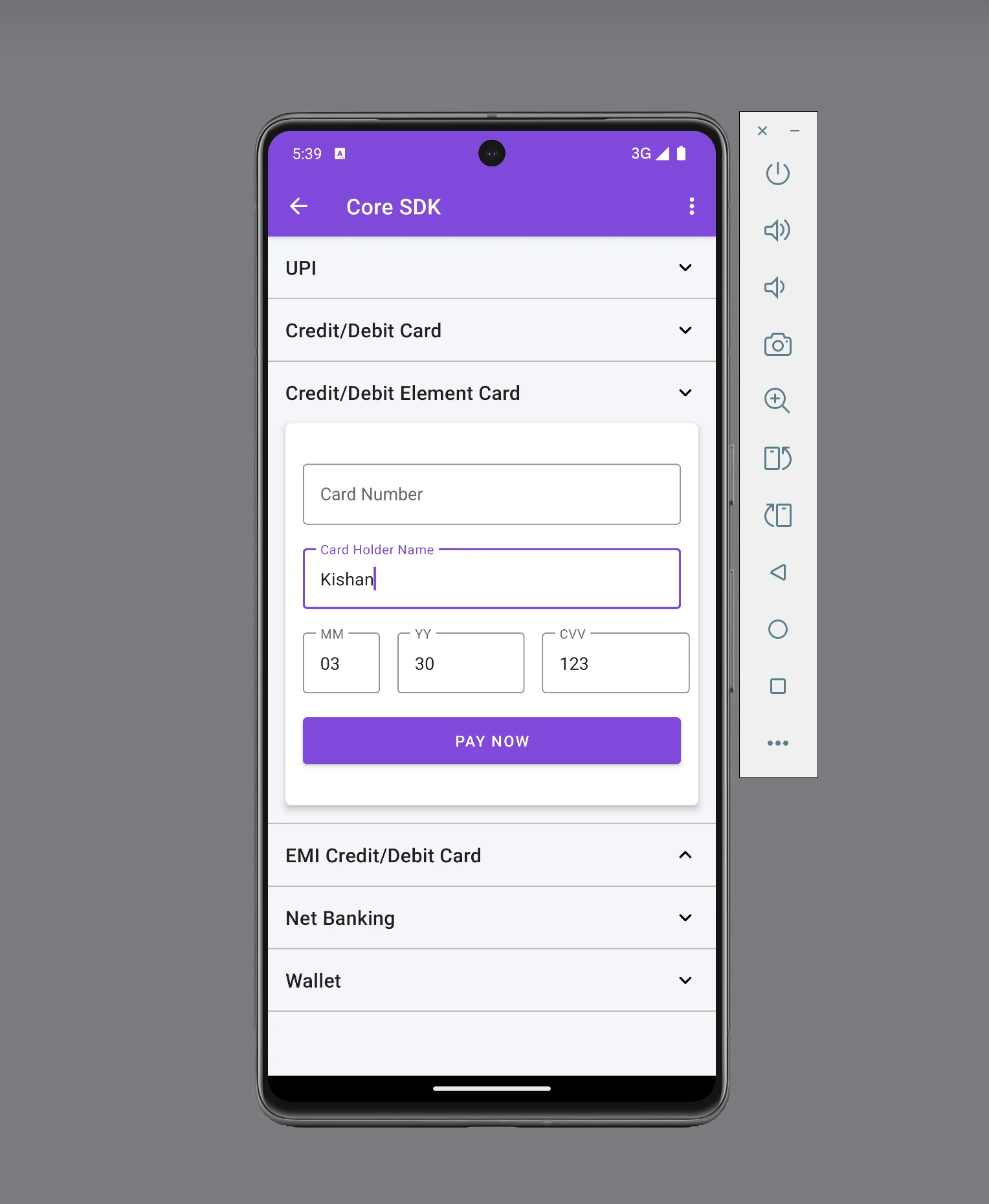 This page covers the custom card component integration only. For the full Android Subscription Element integration, including UPI Intent and eNach (net banking), see [Android Integration](/payments/subscription/custom-checkout/mobile/android-subscription-element).
## Prerequisites
Complete the following tasks before you start the integration:
* Create a [Cashfree Merchant Account](https://merchant.cashfree.com/merchants/signup).
* Log in to the [Merchant Dashboard](https://merchant.cashfree.com/auth/login) and generate an **App ID** and **Secret Key**. Learn how to [generate API keys](/api-reference/authentication#generate-api-keys).
* Set your application's `minSdkVersion` to API level 19 or higher.
The integration consists of three steps:
Create a subscription
Open the payment page
Confirm the payment
## Step 1: Create a subscription Server-side
Create a subscription from your backend server before you process any payment.
This API requires your secret key. Create subscriptions through your server only — do not call this API directly from your mobile application.
After the subscription is created, your backend receives a `subscription_id` and a `subscription_session_id`. Pass both values to your Android client to proceed with the payment.
The following example shows how to create a subscription using the Create Subscription API:
```bash cURL theme={"dark"}
curl --request POST \
--url https://sandbox.cashfree.com/pg/subscriptions \
--header 'Content-Type: application/json' \
--header 'x-api-version: 2025-01-01' \
--header 'x-client-id: ' \
--header 'x-client-secret: ' \
--data '{
"subscription_id": "Demo_Subscription",
"customer_details": {
"customer_name": "john",
"customer_email": "john@dummy.com",
"customer_phone": "9908730221",
"customer_bank_account_number": "59108290701802",
"customer_bank_ifsc": "HDFC0002614",
"customer_bank_code": "HDFC",
"customer_bank_account_type": "SAVINGS"
},
"plan_details": {
"plan_name": "plan12345",
"plan_type": "PERIODIC",
"plan_amount": 10,
"plan_max_amount": 100,
"plan_max_cycles": 100,
"plan_intervals": 2,
"plan_currency": "INR",
"plan_interval_type": "WEEK",
"plan_note": "Bi-weekly INR 10 plan"
},
"authorization_details": {
"authorization_amount": 100,
"authorization_amount_refund": true,
"payment_methods": [
"card"
]
},
"subscription_meta": {
"return_url": "https://example.com/subscription/return",
"notification_channel": [
"EMAIL",
"SMS"
],
"session_id_expiry": "2025-06-01T23:00:08+05:30"
},
"subscription_expiry_time": "2100-01-01T23:00:08+05:30",
"subscription_first_charge_time": "2025-06-01T23:00:08+05:30",
"subscription_tags": {
"psp_note": "Monthly subscription payment"
}
}'
```
```javascript Node theme={"dark"}
// Creating a subscription using the Cashfree Node SDK
// https://github.com/cashfree/cashfree-pg-sdk-nodejs
```
```java Java theme={"dark"}
// Creating a subscription using the Cashfree Java SDK
// https://github.com/cashfree/cashfree-pg-sdk-java
```
```go Golang theme={"dark"}
// Creating a subscription using the Cashfree Go SDK
// https://github.com/cashfree/cashfree-pg
```
```csharp .NET theme={"dark"}
// Creating a subscription using the Cashfree .NET SDK
// https://github.com/cashfree/cashfree-pg-sdk-dotnet
```
```python Python theme={"dark"}
// Creating a subscription using the Cashfree Python SDK
// https://github.com/cashfree/cashfree-pg-sdk-python
```
```php PHP theme={"dark"}
// Creating a subscription using the Cashfree PHP SDK
// https://github.com/cashfree/cashfree-pg-sdk-php
```
A successful response returns the `subscription_id` and `subscription_session_id`. Use these values to build the `CFSubscriptionSession` object in [Step 2](#step-2-open-the-payment-page-client-side). The API returns the following response on success:
```json theme={"dark"}
{
"subscription_id": "Demo_Subscription",
"subscription_session_id": "subs_token_tc9JCN4MzUIJ",
"subscription_status": "INITIALIZED",
"cf_subscription_id": "4"
}
```
For the full list of request parameters and response fields, see the [Create Subscription API](/api-reference/payments/latest/subscription/mandate/create).
## Step 2: Open the payment page Client-side
After you create the subscription, set up the card component and open the payment page so the customer can provide their card details.
### 1. Set up the SDK
The Cashfree Android SDK is available on Maven Central. The latest version is [2.4.0](https://github.com/cashfree/nextgen-android). The SDK requires Android API level 19 or higher.
Add the following dependency to your app-level `build.gradle` file:
```gradle theme={"dark"}
implementation 'com.cashfree.pg:api:2.4.0'
```
### 2. Complete the payment
To complete the payment, follow these steps:
1. Add the `CFSubsCardNumberView` component to your layout XML.
2. Initialise the card component in your activity or fragment.
3. Create a `CFSubscriptionSession` object.
4. Set up the subscription callback.
5. Build the payment object and initiate the payment.
#### Add the card component to your layout
The `CFSubsCardNumberView` component extends `TextInputLayout`, which means all standard `TextInputLayout` properties and methods apply to it. Add it to your layout XML file as follows:
```xml theme={"dark"}
```
The following XML attributes are available to customise the card component's appearance:
| Attribute | Description |
| ------------------------ | -------------------------------------------------------------------------------------------------- |
| `android:hint` | Hint text displayed on the card input field. |
| `app:boxBackgroundColor` | Background colour of the card input field. |
| `app:boxStrokeColor` | Stroke (border) colour of the card input field. |
| `app:errorTextColor` | Colour of the validation error message text. |
| `app:cf_card_error_text` | Custom error message shown when the card number is invalid. This is a Cashfree-provided attribute. |
| `app:cf_card_text_size` | Font size of the card number text. This is a Cashfree-provided attribute. |
Because `CFSubsCardNumberView` extends `TextInputLayout`, you can also call standard `TextInputLayout` methods programmatically. The following example shows commonly used methods:
```java theme={"dark"}
cfSubsCardNumberView.setError("Your error message");
cfSubsCardNumberView.setEnabled(true);
cfSubsCardNumberView.setErrorEnabled(false);
```
#### Initialise the card component
Obtain a reference to the `CFSubsCardNumberView` in your activity or fragment, then call its `initialize()` method. This method requires a `CFSubscriptionSession` object and an `ICardInfo` callback listener.
```java theme={"dark"}
// Declare the variable
private CFSubsCardNumberView cfSubsCardNumberView;
// Get the view reference from the layout
cfSubsCardNumberView = findViewById(R.id.cf_subs_element_card);
```
#### Create a session
The `CFSubscriptionSession` object holds the session context for the payment. It accepts the `subscription_session_id` and `subscription_id` obtained from [Step 1](#step-1-create-a-subscription-server-side), and the Cashfree environment (`.SANDBOX` or `.PRODUCTION`).
Set `Environment` to `.SANDBOX` for testing or `.PRODUCTION` for live payments. The following example shows how to create the session object:
```java theme={"dark"}
CFSubscriptionSession.Environment cfEnvironment = CFSubscriptionSession.Environment.SANDBOX; // or .PRODUCTION
CFSubscriptionSession cfSession = new CFSubscriptionSession.CFSubscriptionSessionBuilder()
.setEnvironment(cfEnvironment)
.setSubscriptionSessionID(subscription_session_id)
.setSubscriptionId(subscription_id)
.build();
```
#### Set up the ICardInfo callback
Call the `initialize()` method on the `CFSubsCardNumberView` object after you have created the session. The `ICardInfo` callback delivers card metadata to your application after each digit the customer enters.
```java theme={"dark"}
try {
cfSubsCardNumberView.initialize(cfSession, jsonObject -> {
// Card metadata is delivered here after each digit is entered.
Log.d("CFCARDVIEW", jsonObject.toString());
});
} catch (CFException e) {
e.printStackTrace();
}
```
The callback delivers a `JSONObject` with the following structure:
| Field | Available from | Description |
| ---------------------- | -------------- | --------------------------------------------------------------------------------------------- |
| `cardLength` | First digit | The number of digits entered so far. |
| `luhnCheckInfo` | First digit | Whether the current card number passes the Luhn algorithm check. Values: `SUCCESS` or `FAIL`. |
| `cardBinInfo` | 8th digit | Card network metadata. Only present after the 8th digit is entered. |
| `cardBinInfo.scheme` | 8th digit | Card network scheme (for example, `visa`, `mastercard`). |
| `cardBinInfo.bankName` | 8th digit | Issuing bank name (for example, `axis bank`). |
| `cardBinInfo.type` | 8th digit | Card type classification. |
| `cardBinInfo.subType` | 8th digit | Card sub-type classification. |
| `cardBinInfo.brand` | 8th digit | Card brand classification. |
The `cardBinInfo` object is only present in the callback after the customer has entered at least 8 digits. Always check that the key exists in the `JSONObject` before accessing it to avoid a `JSONException`.
The following log output illustrates how the callback data evolves as the customer enters their card number:
```json theme={"dark"}
// After the 1st digit
{"cardLength": 1, "luhnCheckInfo": "FAIL"}
// After the 2nd digit
{"cardLength": 2, "luhnCheckInfo": "FAIL"}
// After the 8th digit — cardBinInfo becomes available
{
"cardLength": 8,
"luhnCheckInfo": "FAIL",
"cardBinInfo": {
"scheme": "visa",
"type": "filtered",
"subType": "filtered",
"brand": "filtered",
"bankName": "axis bank"
}
}
// After all 16 digits — luhnCheckInfo passes
{
"cardLength": 16,
"luhnCheckInfo": "SUCCESS",
"cardBinInfo": {
"scheme": "visa",
"type": "filtered",
"subType": "filtered",
"brand": "filtered",
"bankName": "axis bank"
}
}
```
#### Set up the subscription callback
The SDK exposes the `CFSubscriptionResponseCallback` interface to receive callbacks when the subscription payment journey ends. This interface consists of two methods:
```java theme={"dark"}
public void onSubscriptionVerify(CFSubscriptionResponse response)
public void onSubscriptionFailure(CFErrorResponse cfErrorResponse)
```
Register the callback in your activity's `onCreate` method. This configuration also handles activity restarts correctly.
The following example shows how to implement the callback in your activity:
```java theme={"dark"}
public class YourActivity extends AppCompatActivity implements CFSubscriptionResponseCallback {
@Override
public void onSubscriptionVerify(CFSubscriptionResponse response) {
// Verify subscription status from your backend before proceeding.
}
@Override
public void onSubscriptionFailure(CFErrorResponse cfErrorResponse) {
// Handle payment failure. Inspect cfErrorResponse for details.
}
@Override
protected void onCreate(Bundle savedInstanceState) {
super.onCreate(savedInstanceState);
setContentView(R.layout.activity_element_checkout);
cfSubsCardNumberView = findViewById(R.id.cf_subs_element_card);
try {
CFPaymentGatewayService.getInstance().setCheckoutCallback(this);
} catch (CFException e) {
e.printStackTrace();
}
try {
CFSubscriptionSession session = new CFSubscriptionSession.CFSubscriptionSessionBuilder()
.setSubscriptionId("your-subscription-id")
.setSubscriptionSessionID("your-subscription-session-id")
.setEnvironment(CFSubscriptionSession.Environment.SANDBOX) // or .PRODUCTION
.build();
cfSubsCardNumberView.initialize(session, new ICardInfo() {
@Override
public void onInfo(JSONObject jsonObject) {
Log.d("CFCARDVIEW", jsonObject.toString());
}
});
} catch (CFException e) {
e.printStackTrace();
}
}
}
```
#### Build the payment object and initiate payment
When the customer fills in their card details and taps the pay button, build the `CFSubsCard` and `CFSubsCardPayment` objects and call `doSubscriptionPayment()` on the `CFSubsCardNumberView` instance.
You must set `.setCfCard(true)` on the `CFSubsCard` builder. Because the SDK manages the card number internally via `CFSubsCardNumberView`, your application does not have access to the raw card number. Setting this flag tells the SDK to retrieve the card number from the component rather than expecting it from your code. Omitting this field causes the payment to fail.
```java theme={"dark"}
public void onPayNowClick(View view) {
try {
CFSubsCard cfSubsCard = new CFSubsCard.CFSubsCardBuilder()
.setCardHolderName(cardHolderName)
.setCardExpiryMonth(cardMM)
.setCardExpiryYear(cardYY)
.setCVV(cardCVV)
.setCfCard(true) // Required for non-PCI card component integration
.build();
CFSubsCardPayment cfCardPayment = new CFSubsCardPayment.CFSubsCardPaymentBuilder()
.setSubscriptionSession(cfSession)
.setSubsCard(cfSubsCard)
.build();
// doSubscriptionPayment is called on the CFSubsCardNumberView object, not on CFPaymentGatewayService.
cfSubsCardNumberView.doSubscriptionPayment(YourActivity.this, cfCardPayment);
} catch (CFException exception) {
exception.printStackTrace();
}
}
```
Call `doSubscriptionPayment()` on the `cfSubsCardNumberView` object, not on `CFPaymentGatewayService`. This is different from the standard card integration.
#### Sample code
The following example shows a complete custom card component payment flow, including session creation, card component initialisation, optional theme customisation, and payment initiation.
The following method demonstrates a complete non-PCI card payment integration using `CFSubsCardNumberView`:
```java theme={"dark"}
// Declare the card view variable
private CFSubsCardNumberView cfSubsCardNumberView;
@Override
protected void onCreate(Bundle savedInstanceState) {
super.onCreate(savedInstanceState);
setContentView(R.layout.activity_element_checkout);
// Initialise the card view reference
cfSubsCardNumberView = findViewById(R.id.cf_subs_element_card);
try {
CFPaymentGatewayService.getInstance().setCheckoutCallback(this);
} catch (CFException e) {
e.printStackTrace();
}
try {
CFSubscriptionSession session = new CFSubscriptionSession.CFSubscriptionSessionBuilder()
.setSubscriptionId("your-subscription-id")
.setSubscriptionSessionID("your-subscription-session-id")
.setEnvironment(CFSubscriptionSession.Environment.SANDBOX) // or .PRODUCTION
.build();
cfSubsCardNumberView.initialize(session, new ICardInfo() {
@Override
public void onInfo(JSONObject jsonObject) {
Log.d("CFCARDVIEW", jsonObject.toString());
}
});
} catch (CFException e) {
e.printStackTrace();
}
}
public void onElementPayClick(View view) {
try {
// Mandatory: build the card object
CFSubsCard cfSubsCard = new CFSubsCard.CFSubsCardBuilder()
.setCardHolderName(cardHolderName)
.setCardExpiryMonth(cardMM)
.setCardExpiryYear(cardYY)
.setCVV(cardCVV)
.setCfCard(true) // Required for non-PCI card component integration
.build();
// Optional: apply a custom theme
CFTheme theme = new CFTheme.CFThemeBuilder()
.setNavigationBarBackgroundColor("#6A2222")
.setNavigationBarTextColor("#FFFFFF")
.setButtonBackgroundColor("#6Aaaaa")
.setButtonTextColor("#FFFFFF")
.setPrimaryTextColor("#11385b")
.setSecondaryTextColor("#808080")
.build();
// Mandatory: build the payment object
CFSubsCardPayment cfCardPayment = new CFSubsCardPayment.CFSubsCardPaymentBuilder()
.setSubscriptionSession(cfSession)
.setSubsCard(cfSubsCard)
.build();
// Optional: apply the theme to the payment object
cfCardPayment.setTheme(theme);
// Mandatory: initiate payment via the card view object
cfSubsCardNumberView.doSubscriptionPayment(ElementCheckoutActivity.this, cfCardPayment);
} catch (CFException exception) {
exception.printStackTrace();
}
}
```
For a working end-to-end implementation, refer to the sample integration on GitHub.
[GitHub sample](https://github.com/cashfree/nextgen-android/blob/7f1c8d1b9a35b024fadf9901202bba7d06d1bff7/app/src/main/java/com/cashfree/sdk_sample/java/SubscriptionCheckoutActivity.java#L214)
## Step 3: Confirm the payment Server-side
After the SDK delivers a callback via `onSubscriptionVerify`, confirm the payment status from your backend before taking any action. The SDK callback signals only that the payment flow has ended. It does not guarantee a successful payment.
Use the [Fetch Details of All Payments of a Subscription API](/api-reference/payments/latest/subscription/payment/fetch-payments-for-mandate) to retrieve the current payment status.
The following request fetches all payments for a subscription:
```bash theme={"dark"}
curl --request GET \
--url https://api.cashfree.com/pg/subscriptions/{subscription_id}/payments \
--header 'x-api-version: 2025-01-01' \
--header 'x-client-id: ' \
--header 'x-client-secret: '
```
A successful response returns an array of payment objects. Check the `payment_status` field to determine the outcome. The API returns the following response on success:
```json theme={"dark"}
[
{
"cf_payment_id": "123456",
"cf_subscription_id": "7891011",
"payment_id": "your-payment-id",
"payment_amount": 1,
"payment_status": "SUCCESS",
"payment_type": "AUTH",
"payment_initiated_date": "2025-06-01T22:14:58+0530",
"subscription_id": "your-subscription-id",
"retry_attempts": 0,
"failure_details": {
"failure_reason": ""
}
}
]
```
Always verify the subscription status from your backend before delivering goods or services to the customer. Proceed only when `payment_status` is `SUCCESS`.
## Error codes
If a required field or object is missing when you initiate payment, the SDK returns a `CFException`. The following table lists SDK-level validation errors and when they occur.
The SDK validation errors are grouped by category as follows:
### Session errors
These errors occur when the `CFSubscriptionSession` object or its required fields are not provided.
| Error code | Message | Description |
| ------------------------------------- | ---------------------------------------------------------- | ---------------------------------------------------------------------------------------------------------- |
| `SUBSCRIPTION_SESSION_OBJECT_MISSING` | The "CFSubscriptionSession" is missing in the request. | The `CFSubscriptionSession` object was not passed to the payment builder. |
| `SUBSCRIPTION_SESSION_ID_MISSING` | The "subscription\_session\_id" is missing in the request. | The `subscription_session_id` was not set on the `CFSubscriptionSession` builder. |
| `SUBSCRIPTION_ID_MISSING` | The "subscription\_id" is missing in the request. | The `subscription_id` was not set on the `CFSubscriptionSession` builder. |
| `ENVIRONMENT_MISSING` | The "environment" is missing in the request. | The Cashfree environment (`.SANDBOX` or `.PRODUCTION`) was not set on the `CFSubscriptionSession` builder. |
### Payment method object errors
These errors occur when a payment method object is absent or one of its required fields is not set.
| Error code | Message | Description |
| ---------------------------------- | -------------------------------------------------- | -------------------------------------------------------------------------- |
| `SUBSCRIPTION_CARD_OBJECT_MISSING` | The "CFSubsCard" object is missing in the request. | The `CFSubsCard` object was not passed to the `CFSubsCardPayment` builder. |
### Callback errors
These errors occur when the payment callback is not registered before initiating payment.
| Error code | Message | Description |
| ------------------ | ------------------------------ | -------------------------------------------------------------------------------------------------------------------------------------------------------------- |
| `CALLBACK_MISSING` | The "callback" cannot be null. | `setCheckoutCallback` was not called before `doSubscriptionPayment()`. Register the callback in your activity's `onCreate` method before you initiate payment. |
## Other options
The following optional configurations let you customise the payment screen appearance and enable SDK logging for troubleshooting.
Apply a custom theme to the payment screen to match your application's visual design. Use the `CFTheme` builder to set colours for the navigation bar, buttons, and text. Apply the theme to your payment object before you call `doSubscriptionPayment()`.
The following example sets the available theme properties:
```java theme={"dark"}
CFTheme theme = new CFTheme.CFThemeBuilder()
.setNavigationBarBackgroundColor("#6A2222") // Sets the status bar and toolbar colour
.setNavigationBarTextColor("#FFFFFF") // Sets the toolbar text colour
.setButtonBackgroundColor("#6Aaaaa") // Sets the primary button background colour
.setButtonTextColor("#FFFFFF") // Sets the primary button text colour
.setPrimaryTextColor("#11385b") // Sets the primary text colour
.setSecondaryTextColor("#808080") // Sets the secondary text colour
.build();
cfCardPayment.setTheme(theme);
```
To enable SDK logging, add the following entry to your `values.xml` file:
```xml theme={"dark"}
3
```
The following logging levels are available, listed from least to most verbose:
| Level | Value |
| ------- | ----- |
| VERBOSE | 2 |
| DEBUG | 3 |
| INFO | 4 |
| WARN | 5 |
| ERROR | 6 |
| ASSERT | 7 |
This page covers the custom card component integration only. For the full Android Subscription Element integration, including UPI Intent and eNach (net banking), see [Android Integration](/payments/subscription/custom-checkout/mobile/android-subscription-element).
## Prerequisites
Complete the following tasks before you start the integration:
* Create a [Cashfree Merchant Account](https://merchant.cashfree.com/merchants/signup).
* Log in to the [Merchant Dashboard](https://merchant.cashfree.com/auth/login) and generate an **App ID** and **Secret Key**. Learn how to [generate API keys](/api-reference/authentication#generate-api-keys).
* Set your application's `minSdkVersion` to API level 19 or higher.
The integration consists of three steps:
Create a subscription
Open the payment page
Confirm the payment
## Step 1: Create a subscription Server-side
Create a subscription from your backend server before you process any payment.
This API requires your secret key. Create subscriptions through your server only — do not call this API directly from your mobile application.
After the subscription is created, your backend receives a `subscription_id` and a `subscription_session_id`. Pass both values to your Android client to proceed with the payment.
The following example shows how to create a subscription using the Create Subscription API:
```bash cURL theme={"dark"}
curl --request POST \
--url https://sandbox.cashfree.com/pg/subscriptions \
--header 'Content-Type: application/json' \
--header 'x-api-version: 2025-01-01' \
--header 'x-client-id: ' \
--header 'x-client-secret: ' \
--data '{
"subscription_id": "Demo_Subscription",
"customer_details": {
"customer_name": "john",
"customer_email": "john@dummy.com",
"customer_phone": "9908730221",
"customer_bank_account_number": "59108290701802",
"customer_bank_ifsc": "HDFC0002614",
"customer_bank_code": "HDFC",
"customer_bank_account_type": "SAVINGS"
},
"plan_details": {
"plan_name": "plan12345",
"plan_type": "PERIODIC",
"plan_amount": 10,
"plan_max_amount": 100,
"plan_max_cycles": 100,
"plan_intervals": 2,
"plan_currency": "INR",
"plan_interval_type": "WEEK",
"plan_note": "Bi-weekly INR 10 plan"
},
"authorization_details": {
"authorization_amount": 100,
"authorization_amount_refund": true,
"payment_methods": [
"card"
]
},
"subscription_meta": {
"return_url": "https://example.com/subscription/return",
"notification_channel": [
"EMAIL",
"SMS"
],
"session_id_expiry": "2025-06-01T23:00:08+05:30"
},
"subscription_expiry_time": "2100-01-01T23:00:08+05:30",
"subscription_first_charge_time": "2025-06-01T23:00:08+05:30",
"subscription_tags": {
"psp_note": "Monthly subscription payment"
}
}'
```
```javascript Node theme={"dark"}
// Creating a subscription using the Cashfree Node SDK
// https://github.com/cashfree/cashfree-pg-sdk-nodejs
```
```java Java theme={"dark"}
// Creating a subscription using the Cashfree Java SDK
// https://github.com/cashfree/cashfree-pg-sdk-java
```
```go Golang theme={"dark"}
// Creating a subscription using the Cashfree Go SDK
// https://github.com/cashfree/cashfree-pg
```
```csharp .NET theme={"dark"}
// Creating a subscription using the Cashfree .NET SDK
// https://github.com/cashfree/cashfree-pg-sdk-dotnet
```
```python Python theme={"dark"}
// Creating a subscription using the Cashfree Python SDK
// https://github.com/cashfree/cashfree-pg-sdk-python
```
```php PHP theme={"dark"}
// Creating a subscription using the Cashfree PHP SDK
// https://github.com/cashfree/cashfree-pg-sdk-php
```
A successful response returns the `subscription_id` and `subscription_session_id`. Use these values to build the `CFSubscriptionSession` object in [Step 2](#step-2-open-the-payment-page-client-side). The API returns the following response on success:
```json theme={"dark"}
{
"subscription_id": "Demo_Subscription",
"subscription_session_id": "subs_token_tc9JCN4MzUIJ",
"subscription_status": "INITIALIZED",
"cf_subscription_id": "4"
}
```
For the full list of request parameters and response fields, see the [Create Subscription API](/api-reference/payments/latest/subscription/mandate/create).
## Step 2: Open the payment page Client-side
After you create the subscription, set up the card component and open the payment page so the customer can provide their card details.
### 1. Set up the SDK
The Cashfree Android SDK is available on Maven Central. The latest version is [2.4.0](https://github.com/cashfree/nextgen-android). The SDK requires Android API level 19 or higher.
Add the following dependency to your app-level `build.gradle` file:
```gradle theme={"dark"}
implementation 'com.cashfree.pg:api:2.4.0'
```
### 2. Complete the payment
To complete the payment, follow these steps:
1. Add the `CFSubsCardNumberView` component to your layout XML.
2. Initialise the card component in your activity or fragment.
3. Create a `CFSubscriptionSession` object.
4. Set up the subscription callback.
5. Build the payment object and initiate the payment.
#### Add the card component to your layout
The `CFSubsCardNumberView` component extends `TextInputLayout`, which means all standard `TextInputLayout` properties and methods apply to it. Add it to your layout XML file as follows:
```xml theme={"dark"}
```
The following XML attributes are available to customise the card component's appearance:
| Attribute | Description |
| ------------------------ | -------------------------------------------------------------------------------------------------- |
| `android:hint` | Hint text displayed on the card input field. |
| `app:boxBackgroundColor` | Background colour of the card input field. |
| `app:boxStrokeColor` | Stroke (border) colour of the card input field. |
| `app:errorTextColor` | Colour of the validation error message text. |
| `app:cf_card_error_text` | Custom error message shown when the card number is invalid. This is a Cashfree-provided attribute. |
| `app:cf_card_text_size` | Font size of the card number text. This is a Cashfree-provided attribute. |
Because `CFSubsCardNumberView` extends `TextInputLayout`, you can also call standard `TextInputLayout` methods programmatically. The following example shows commonly used methods:
```java theme={"dark"}
cfSubsCardNumberView.setError("Your error message");
cfSubsCardNumberView.setEnabled(true);
cfSubsCardNumberView.setErrorEnabled(false);
```
#### Initialise the card component
Obtain a reference to the `CFSubsCardNumberView` in your activity or fragment, then call its `initialize()` method. This method requires a `CFSubscriptionSession` object and an `ICardInfo` callback listener.
```java theme={"dark"}
// Declare the variable
private CFSubsCardNumberView cfSubsCardNumberView;
// Get the view reference from the layout
cfSubsCardNumberView = findViewById(R.id.cf_subs_element_card);
```
#### Create a session
The `CFSubscriptionSession` object holds the session context for the payment. It accepts the `subscription_session_id` and `subscription_id` obtained from [Step 1](#step-1-create-a-subscription-server-side), and the Cashfree environment (`.SANDBOX` or `.PRODUCTION`).
Set `Environment` to `.SANDBOX` for testing or `.PRODUCTION` for live payments. The following example shows how to create the session object:
```java theme={"dark"}
CFSubscriptionSession.Environment cfEnvironment = CFSubscriptionSession.Environment.SANDBOX; // or .PRODUCTION
CFSubscriptionSession cfSession = new CFSubscriptionSession.CFSubscriptionSessionBuilder()
.setEnvironment(cfEnvironment)
.setSubscriptionSessionID(subscription_session_id)
.setSubscriptionId(subscription_id)
.build();
```
#### Set up the ICardInfo callback
Call the `initialize()` method on the `CFSubsCardNumberView` object after you have created the session. The `ICardInfo` callback delivers card metadata to your application after each digit the customer enters.
```java theme={"dark"}
try {
cfSubsCardNumberView.initialize(cfSession, jsonObject -> {
// Card metadata is delivered here after each digit is entered.
Log.d("CFCARDVIEW", jsonObject.toString());
});
} catch (CFException e) {
e.printStackTrace();
}
```
The callback delivers a `JSONObject` with the following structure:
| Field | Available from | Description |
| ---------------------- | -------------- | --------------------------------------------------------------------------------------------- |
| `cardLength` | First digit | The number of digits entered so far. |
| `luhnCheckInfo` | First digit | Whether the current card number passes the Luhn algorithm check. Values: `SUCCESS` or `FAIL`. |
| `cardBinInfo` | 8th digit | Card network metadata. Only present after the 8th digit is entered. |
| `cardBinInfo.scheme` | 8th digit | Card network scheme (for example, `visa`, `mastercard`). |
| `cardBinInfo.bankName` | 8th digit | Issuing bank name (for example, `axis bank`). |
| `cardBinInfo.type` | 8th digit | Card type classification. |
| `cardBinInfo.subType` | 8th digit | Card sub-type classification. |
| `cardBinInfo.brand` | 8th digit | Card brand classification. |
The `cardBinInfo` object is only present in the callback after the customer has entered at least 8 digits. Always check that the key exists in the `JSONObject` before accessing it to avoid a `JSONException`.
The following log output illustrates how the callback data evolves as the customer enters their card number:
```json theme={"dark"}
// After the 1st digit
{"cardLength": 1, "luhnCheckInfo": "FAIL"}
// After the 2nd digit
{"cardLength": 2, "luhnCheckInfo": "FAIL"}
// After the 8th digit — cardBinInfo becomes available
{
"cardLength": 8,
"luhnCheckInfo": "FAIL",
"cardBinInfo": {
"scheme": "visa",
"type": "filtered",
"subType": "filtered",
"brand": "filtered",
"bankName": "axis bank"
}
}
// After all 16 digits — luhnCheckInfo passes
{
"cardLength": 16,
"luhnCheckInfo": "SUCCESS",
"cardBinInfo": {
"scheme": "visa",
"type": "filtered",
"subType": "filtered",
"brand": "filtered",
"bankName": "axis bank"
}
}
```
#### Set up the subscription callback
The SDK exposes the `CFSubscriptionResponseCallback` interface to receive callbacks when the subscription payment journey ends. This interface consists of two methods:
```java theme={"dark"}
public void onSubscriptionVerify(CFSubscriptionResponse response)
public void onSubscriptionFailure(CFErrorResponse cfErrorResponse)
```
Register the callback in your activity's `onCreate` method. This configuration also handles activity restarts correctly.
The following example shows how to implement the callback in your activity:
```java theme={"dark"}
public class YourActivity extends AppCompatActivity implements CFSubscriptionResponseCallback {
@Override
public void onSubscriptionVerify(CFSubscriptionResponse response) {
// Verify subscription status from your backend before proceeding.
}
@Override
public void onSubscriptionFailure(CFErrorResponse cfErrorResponse) {
// Handle payment failure. Inspect cfErrorResponse for details.
}
@Override
protected void onCreate(Bundle savedInstanceState) {
super.onCreate(savedInstanceState);
setContentView(R.layout.activity_element_checkout);
cfSubsCardNumberView = findViewById(R.id.cf_subs_element_card);
try {
CFPaymentGatewayService.getInstance().setCheckoutCallback(this);
} catch (CFException e) {
e.printStackTrace();
}
try {
CFSubscriptionSession session = new CFSubscriptionSession.CFSubscriptionSessionBuilder()
.setSubscriptionId("your-subscription-id")
.setSubscriptionSessionID("your-subscription-session-id")
.setEnvironment(CFSubscriptionSession.Environment.SANDBOX) // or .PRODUCTION
.build();
cfSubsCardNumberView.initialize(session, new ICardInfo() {
@Override
public void onInfo(JSONObject jsonObject) {
Log.d("CFCARDVIEW", jsonObject.toString());
}
});
} catch (CFException e) {
e.printStackTrace();
}
}
}
```
#### Build the payment object and initiate payment
When the customer fills in their card details and taps the pay button, build the `CFSubsCard` and `CFSubsCardPayment` objects and call `doSubscriptionPayment()` on the `CFSubsCardNumberView` instance.
You must set `.setCfCard(true)` on the `CFSubsCard` builder. Because the SDK manages the card number internally via `CFSubsCardNumberView`, your application does not have access to the raw card number. Setting this flag tells the SDK to retrieve the card number from the component rather than expecting it from your code. Omitting this field causes the payment to fail.
```java theme={"dark"}
public void onPayNowClick(View view) {
try {
CFSubsCard cfSubsCard = new CFSubsCard.CFSubsCardBuilder()
.setCardHolderName(cardHolderName)
.setCardExpiryMonth(cardMM)
.setCardExpiryYear(cardYY)
.setCVV(cardCVV)
.setCfCard(true) // Required for non-PCI card component integration
.build();
CFSubsCardPayment cfCardPayment = new CFSubsCardPayment.CFSubsCardPaymentBuilder()
.setSubscriptionSession(cfSession)
.setSubsCard(cfSubsCard)
.build();
// doSubscriptionPayment is called on the CFSubsCardNumberView object, not on CFPaymentGatewayService.
cfSubsCardNumberView.doSubscriptionPayment(YourActivity.this, cfCardPayment);
} catch (CFException exception) {
exception.printStackTrace();
}
}
```
Call `doSubscriptionPayment()` on the `cfSubsCardNumberView` object, not on `CFPaymentGatewayService`. This is different from the standard card integration.
#### Sample code
The following example shows a complete custom card component payment flow, including session creation, card component initialisation, optional theme customisation, and payment initiation.
The following method demonstrates a complete non-PCI card payment integration using `CFSubsCardNumberView`:
```java theme={"dark"}
// Declare the card view variable
private CFSubsCardNumberView cfSubsCardNumberView;
@Override
protected void onCreate(Bundle savedInstanceState) {
super.onCreate(savedInstanceState);
setContentView(R.layout.activity_element_checkout);
// Initialise the card view reference
cfSubsCardNumberView = findViewById(R.id.cf_subs_element_card);
try {
CFPaymentGatewayService.getInstance().setCheckoutCallback(this);
} catch (CFException e) {
e.printStackTrace();
}
try {
CFSubscriptionSession session = new CFSubscriptionSession.CFSubscriptionSessionBuilder()
.setSubscriptionId("your-subscription-id")
.setSubscriptionSessionID("your-subscription-session-id")
.setEnvironment(CFSubscriptionSession.Environment.SANDBOX) // or .PRODUCTION
.build();
cfSubsCardNumberView.initialize(session, new ICardInfo() {
@Override
public void onInfo(JSONObject jsonObject) {
Log.d("CFCARDVIEW", jsonObject.toString());
}
});
} catch (CFException e) {
e.printStackTrace();
}
}
public void onElementPayClick(View view) {
try {
// Mandatory: build the card object
CFSubsCard cfSubsCard = new CFSubsCard.CFSubsCardBuilder()
.setCardHolderName(cardHolderName)
.setCardExpiryMonth(cardMM)
.setCardExpiryYear(cardYY)
.setCVV(cardCVV)
.setCfCard(true) // Required for non-PCI card component integration
.build();
// Optional: apply a custom theme
CFTheme theme = new CFTheme.CFThemeBuilder()
.setNavigationBarBackgroundColor("#6A2222")
.setNavigationBarTextColor("#FFFFFF")
.setButtonBackgroundColor("#6Aaaaa")
.setButtonTextColor("#FFFFFF")
.setPrimaryTextColor("#11385b")
.setSecondaryTextColor("#808080")
.build();
// Mandatory: build the payment object
CFSubsCardPayment cfCardPayment = new CFSubsCardPayment.CFSubsCardPaymentBuilder()
.setSubscriptionSession(cfSession)
.setSubsCard(cfSubsCard)
.build();
// Optional: apply the theme to the payment object
cfCardPayment.setTheme(theme);
// Mandatory: initiate payment via the card view object
cfSubsCardNumberView.doSubscriptionPayment(ElementCheckoutActivity.this, cfCardPayment);
} catch (CFException exception) {
exception.printStackTrace();
}
}
```
For a working end-to-end implementation, refer to the sample integration on GitHub.
[GitHub sample](https://github.com/cashfree/nextgen-android/blob/7f1c8d1b9a35b024fadf9901202bba7d06d1bff7/app/src/main/java/com/cashfree/sdk_sample/java/SubscriptionCheckoutActivity.java#L214)
## Step 3: Confirm the payment Server-side
After the SDK delivers a callback via `onSubscriptionVerify`, confirm the payment status from your backend before taking any action. The SDK callback signals only that the payment flow has ended. It does not guarantee a successful payment.
Use the [Fetch Details of All Payments of a Subscription API](/api-reference/payments/latest/subscription/payment/fetch-payments-for-mandate) to retrieve the current payment status.
The following request fetches all payments for a subscription:
```bash theme={"dark"}
curl --request GET \
--url https://api.cashfree.com/pg/subscriptions/{subscription_id}/payments \
--header 'x-api-version: 2025-01-01' \
--header 'x-client-id: ' \
--header 'x-client-secret: '
```
A successful response returns an array of payment objects. Check the `payment_status` field to determine the outcome. The API returns the following response on success:
```json theme={"dark"}
[
{
"cf_payment_id": "123456",
"cf_subscription_id": "7891011",
"payment_id": "your-payment-id",
"payment_amount": 1,
"payment_status": "SUCCESS",
"payment_type": "AUTH",
"payment_initiated_date": "2025-06-01T22:14:58+0530",
"subscription_id": "your-subscription-id",
"retry_attempts": 0,
"failure_details": {
"failure_reason": ""
}
}
]
```
Always verify the subscription status from your backend before delivering goods or services to the customer. Proceed only when `payment_status` is `SUCCESS`.
## Error codes
If a required field or object is missing when you initiate payment, the SDK returns a `CFException`. The following table lists SDK-level validation errors and when they occur.
The SDK validation errors are grouped by category as follows:
### Session errors
These errors occur when the `CFSubscriptionSession` object or its required fields are not provided.
| Error code | Message | Description |
| ------------------------------------- | ---------------------------------------------------------- | ---------------------------------------------------------------------------------------------------------- |
| `SUBSCRIPTION_SESSION_OBJECT_MISSING` | The "CFSubscriptionSession" is missing in the request. | The `CFSubscriptionSession` object was not passed to the payment builder. |
| `SUBSCRIPTION_SESSION_ID_MISSING` | The "subscription\_session\_id" is missing in the request. | The `subscription_session_id` was not set on the `CFSubscriptionSession` builder. |
| `SUBSCRIPTION_ID_MISSING` | The "subscription\_id" is missing in the request. | The `subscription_id` was not set on the `CFSubscriptionSession` builder. |
| `ENVIRONMENT_MISSING` | The "environment" is missing in the request. | The Cashfree environment (`.SANDBOX` or `.PRODUCTION`) was not set on the `CFSubscriptionSession` builder. |
### Payment method object errors
These errors occur when a payment method object is absent or one of its required fields is not set.
| Error code | Message | Description |
| ---------------------------------- | -------------------------------------------------- | -------------------------------------------------------------------------- |
| `SUBSCRIPTION_CARD_OBJECT_MISSING` | The "CFSubsCard" object is missing in the request. | The `CFSubsCard` object was not passed to the `CFSubsCardPayment` builder. |
### Callback errors
These errors occur when the payment callback is not registered before initiating payment.
| Error code | Message | Description |
| ------------------ | ------------------------------ | -------------------------------------------------------------------------------------------------------------------------------------------------------------- |
| `CALLBACK_MISSING` | The "callback" cannot be null. | `setCheckoutCallback` was not called before `doSubscriptionPayment()`. Register the callback in your activity's `onCreate` method before you initiate payment. |
## Other options
The following optional configurations let you customise the payment screen appearance and enable SDK logging for troubleshooting.
Apply a custom theme to the payment screen to match your application's visual design. Use the `CFTheme` builder to set colours for the navigation bar, buttons, and text. Apply the theme to your payment object before you call `doSubscriptionPayment()`.
The following example sets the available theme properties:
```java theme={"dark"}
CFTheme theme = new CFTheme.CFThemeBuilder()
.setNavigationBarBackgroundColor("#6A2222") // Sets the status bar and toolbar colour
.setNavigationBarTextColor("#FFFFFF") // Sets the toolbar text colour
.setButtonBackgroundColor("#6Aaaaa") // Sets the primary button background colour
.setButtonTextColor("#FFFFFF") // Sets the primary button text colour
.setPrimaryTextColor("#11385b") // Sets the primary text colour
.setSecondaryTextColor("#808080") // Sets the secondary text colour
.build();
cfCardPayment.setTheme(theme);
```
To enable SDK logging, add the following entry to your `values.xml` file:
```xml theme={"dark"}
3
```
The following logging levels are available, listed from least to most verbose:
| Level | Value |
| ------- | ----- |
| VERBOSE | 2 |
| DEBUG | 3 |
| INFO | 4 |
| WARN | 5 |
| ERROR | 6 |
| ASSERT | 7 |