> ## Documentation Index
> Fetch the complete documentation index at: https://www.cashfree.com/docs/llms.txt
> Use this file to discover all available pages before exploring further.
# Import Mandates
> Import existing NACH mandates from other gateways into Cashfree Payments via the dashboard and manage every subscription without reauthorising customers.
The **Import Mandates** feature allows you to migrate your existing subscription data from other payment providers to Cashfree Payments. By importing your historical mandate data, you can centrally manage all your active subscriptions directly within the Cashfree ecosystem.
**Applicable only for eNACH and Physical NACH mandates.**
Importing mandates offers the following benefits:
* You can do this without requiring additional authorisation from your customer.
* Use a single interface or payment gateway to control all mandates.
* Provide a seamless experience for customers even if you switch from one gateway to another.
## Initiate porting process
Cashfree Payments will assist you throughout the mandate porting process.
Contact the Cashfree support team to initiate the porting process. Nominate Cashfree as your preferred payment processing partner for your Utility Code or mandates.
Once you have initiated the process, the Cashfree team will guide you through sharing the list of mandates with your partner bank. This ensures the partner bank's systems are updated to reflect the change.
Import the updated list of mandates into Cashfree's system.
Once the mandates are successfully imported, you can begin processing payments through Cashfree.
## Import mandates to Cashfree
To import the mandates, upload a file containing all mandate details in either the NPCI file format or the Cashfree-specified format. After uploading, download the mandate file to check the import status. The file also includes rejection reasons for mandates that could not be imported.
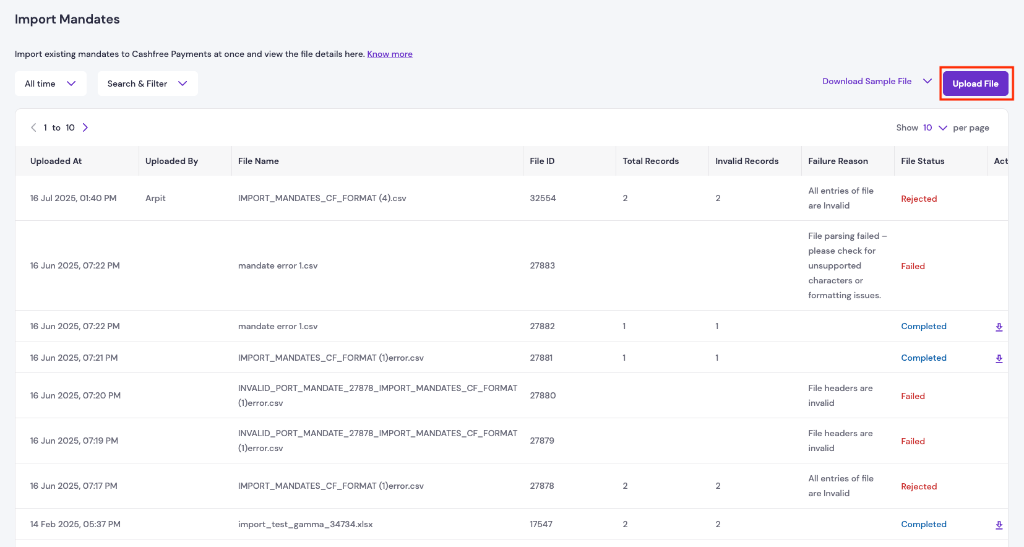 Cashfree rejects the file in the following cases:
* The file format is incorrect (only CSV and XLSX formats are supported), the headers do not match the required format, or all records contain invalid data.
* If some records are invalid, Cashfree displays a pop-up asking whether to proceed with the valid records or cancel the entire import.
Cashfree processes the file for valid records only. After processing is complete, you can view the imported subscriptions in the `ACTIVE` state on the **Subscriptions** page.
The Cashfree Subscription object determines how the customer is charged. Mandates are the payment method used to charge customers. You can import mandates from the Subscription Dashboard using the Cashfree format, with a sample file available for download from the Subscription Dashboard.
### File format
| Required field | Description |
| ---------------------------- | -------------------------------------------------------------------------------------------------------------------------------------------------------------------------------- |
| UMRN\_NO | UMRN number of the mandate. Must be 20 characters. |
| PAYMENT\_TYPE | Import mandates is applicable only for NACH. The value must be `E_MANDATE`. |
| DEBIT\_ACCOUNT\_NUMBER | Account number of the customer. Must be a maximum of 35 characters. Ensure leading zeros are not trimmed. |
| DEBIT\_ACCOUNT\_HOLDER\_NAME | Name of the customer. Must be a maximum of 40 characters. |
| DEBIT\_BANK\_ID | Bank ID. Must be the same as the first 4 characters of the UMRN number. |
| DEBIT\_ACCOUNT\_TYPE | Account type. Possible values: `SAVINGS` or `CURRENT`. |
| MAX\_AMOUNT | Maximum amount of the mandate. |
| FREQUENCY | Debit frequency. Possible values: `ADHO` — Adhoc, `WEEK` — Weekly, `MNTH` — Monthly, `BIMN` — Every 2 months, `QURT` — Every 3 months, `MIAN` — Every 6 months, `YEAR` — Yearly. |
| START\_DATE | The date on which the mandate was authorised. This must be on or before the current date. |
| END\_DATE | Expiry date of the mandate. Must be a future date. |
| SUBSCRIPTION\_ID | A unique ID for the subscription. It can include alphanumeric characters, underscore, dot, hyphen, and space. A maximum of 200 characters are allowed. |
| CUSTOMER\_EMAIL | Email ID of the customer. Must be a valid email address. A maximum of 250 characters are allowed. |
| CUSTOMER\_PHONE | Phone number of the customer. Must be a valid phone number, with or without +91. |
**Conditional fields**
| Conditional field | Description |
| ------------------- | --------------------------------------------------------------------------------------------------------------- |
| FIXED\_AMOUNT | This is the recurring amount for the mandate for the given `FREQUENCY`. Mandatory if `FREQUENCY` is not `ADHO`. |
| FIRST\_CHARGE\_DATE | The first charge date for the mandate after importing. Mandatory if `FREQUENCY` is not `ADHO`. |
**Optional fields**
| Optional field | Description |
| -------------- | ----------------------------------------------------------------------------------------- |
| MAX\_CYCLES | The number of charge cycles required before moving the subscription to `COMPLETED` state. |
Cashfree rejects the file in the following cases:
* The file format is incorrect (only CSV and XLSX formats are supported), the headers do not match the required format, or all records contain invalid data.
* If some records are invalid, Cashfree displays a pop-up asking whether to proceed with the valid records or cancel the entire import.
Cashfree processes the file for valid records only. After processing is complete, you can view the imported subscriptions in the `ACTIVE` state on the **Subscriptions** page.
The Cashfree Subscription object determines how the customer is charged. Mandates are the payment method used to charge customers. You can import mandates from the Subscription Dashboard using the Cashfree format, with a sample file available for download from the Subscription Dashboard.
### File format
| Required field | Description |
| ---------------------------- | -------------------------------------------------------------------------------------------------------------------------------------------------------------------------------- |
| UMRN\_NO | UMRN number of the mandate. Must be 20 characters. |
| PAYMENT\_TYPE | Import mandates is applicable only for NACH. The value must be `E_MANDATE`. |
| DEBIT\_ACCOUNT\_NUMBER | Account number of the customer. Must be a maximum of 35 characters. Ensure leading zeros are not trimmed. |
| DEBIT\_ACCOUNT\_HOLDER\_NAME | Name of the customer. Must be a maximum of 40 characters. |
| DEBIT\_BANK\_ID | Bank ID. Must be the same as the first 4 characters of the UMRN number. |
| DEBIT\_ACCOUNT\_TYPE | Account type. Possible values: `SAVINGS` or `CURRENT`. |
| MAX\_AMOUNT | Maximum amount of the mandate. |
| FREQUENCY | Debit frequency. Possible values: `ADHO` — Adhoc, `WEEK` — Weekly, `MNTH` — Monthly, `BIMN` — Every 2 months, `QURT` — Every 3 months, `MIAN` — Every 6 months, `YEAR` — Yearly. |
| START\_DATE | The date on which the mandate was authorised. This must be on or before the current date. |
| END\_DATE | Expiry date of the mandate. Must be a future date. |
| SUBSCRIPTION\_ID | A unique ID for the subscription. It can include alphanumeric characters, underscore, dot, hyphen, and space. A maximum of 200 characters are allowed. |
| CUSTOMER\_EMAIL | Email ID of the customer. Must be a valid email address. A maximum of 250 characters are allowed. |
| CUSTOMER\_PHONE | Phone number of the customer. Must be a valid phone number, with or without +91. |
**Conditional fields**
| Conditional field | Description |
| ------------------- | --------------------------------------------------------------------------------------------------------------- |
| FIXED\_AMOUNT | This is the recurring amount for the mandate for the given `FREQUENCY`. Mandatory if `FREQUENCY` is not `ADHO`. |
| FIRST\_CHARGE\_DATE | The first charge date for the mandate after importing. Mandatory if `FREQUENCY` is not `ADHO`. |
**Optional fields**
| Optional field | Description |
| -------------- | ----------------------------------------------------------------------------------------- |
| MAX\_CYCLES | The number of charge cycles required before moving the subscription to `COMPLETED` state. |