> ## Documentation Index
> Fetch the complete documentation index at: https://www.cashfree.com/docs/llms.txt
> Use this file to discover all available pages before exploring further.
# Driving Licence Verification
> Use Cashfree Driving Licence verification to validate authenticity, fetch holder details, and confirm vehicle class against official RTO records in real time.
Driving Licence verification allows businesses to validate the authenticity and details of an individual's Driving Licence by accessing official government records. The verification process confirms licence type such as Light Motor Vehicle or Transport, issuance and expiry dates, personal information, photo, and addresses including both temporary and permanent.
This verification method can be used when Aadhaar-based address verification isn't available or doesn't provide sufficient information for user onboarding.
## Verification process
You can verify Driving Licences through two primary methods:
* **Merchant dashboard**: Verify licences using manual entry or document upload.
* Manual verification: Enter licence number and date of birth to validate against RTO records
* Smart OCR: Upload licence images for automatic data extraction and verification
* **REST API**: Integrate verification directly into your applications.
Use the Merchant Dashboard to verify Driving Licence details:
### Manual verification
1. Log in to the [Merchant Dashboard](https://merchant.cashfree.com/auth/login).
2. Navigate to **Secure ID** > **Other Official Documents** > **Driving License**.
3. Enter the licence number and date of birth, then click **Verify**.
4. Review the returned licence details including validity, address, and holder information.
**Batch verification**:
1. Select **Upload File** under the Driving License section.
2. Upload CSV with multiple licence numbers and DOBs.
3. Retrieve verification results in bulk format.
### Smart OCR verification
1. Navigate to **Smart OCR** > **Driving License Verification**.
2. Upload a scanned Driving Licence (front side) or high-quality image.
3. Smart OCR automatically detects and extracts key information.
**Extracted fields**:
* Driving license number
* Full name of the licence holder
* Date of birth and gender
* Father's or husband's name
* Date of issue and validity period
* Issuing RTO (Regional Transport Office)
* Licence holder address (permanent and temporary)
* Vehicle class or category authorised
* Blood group (if available)
* Embedded QR or barcode details
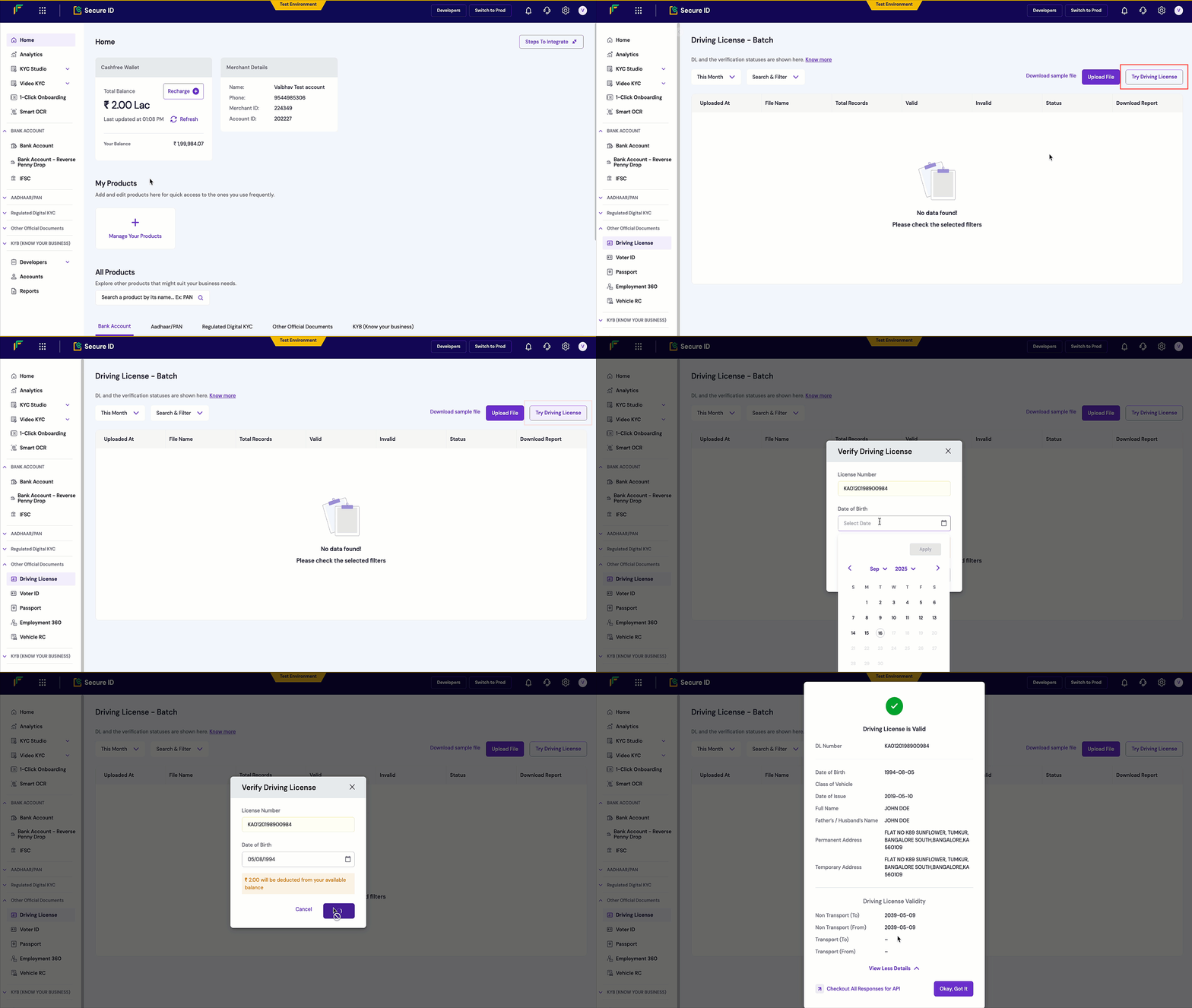 All verified licences appear in your dashboard with comprehensive details including validity dates, vehicle categories, and address information.
Integrate Driving Licence verification programmatically using the REST API:
1. **Trigger the verification request** using the [Driving Licence Verification API](/api-reference/vrs/v2/driving-license/verify-driving-licence-details).
2. **Pass licence number and date of birth** in the required format for government record matching.
3. **Receive verification results** with licence holder details, validity status, and RTO information.
**Endpoint**: `POST /verification/driving-license`
```json theme={"dark"}
{
"verification_id": "DL00123",
"license_number": "MH1234567890123",
"date_of_birth": "1990-01-15"
}
```
```json theme={"dark"}
{
"verification_id": "DL00123",
"reference_id": 12345,
"license_number": "MH1234567890123",
"name": "John Doe",
"date_of_birth": "1990-01-15",
"gender": "M",
"father_name": "Robert Doe",
"blood_group": "O+",
"address": {
"permanent": {
"house_number": "123",
"street": "Main Street",
"area": "Bandra West",
"city": "Mumbai",
"state": "Maharashtra",
"pincode": "400050"
}
},
"license_details": {
"issue_date": "2020-01-15",
"validity_date": "2040-01-14",
"issuing_rto": "Maharashtra RTO 01",
"vehicle_classes": ["LMV", "MCWG"],
"status": "ACTIVE"
},
"verification_status": "SUCCESS"
}
```
```json theme={"dark"}
{
"type": "invalid_request_error",
"code": "verification_failed",
"message": "Invalid license number or date of birth",
"details": [
{
"field": "license_number",
"issue": "License not found in records"
}
]
}
```
Integrate the [Driving Licence Verification API](/api-reference/vrs/v2/driving-license/verify-driving-licence-details) into your application to automatically verify driving licence details within your signup or onboarding flow.
snippets/related-topics-loader.mdx
All verified licences appear in your dashboard with comprehensive details including validity dates, vehicle categories, and address information.
Integrate Driving Licence verification programmatically using the REST API:
1. **Trigger the verification request** using the [Driving Licence Verification API](/api-reference/vrs/v2/driving-license/verify-driving-licence-details).
2. **Pass licence number and date of birth** in the required format for government record matching.
3. **Receive verification results** with licence holder details, validity status, and RTO information.
**Endpoint**: `POST /verification/driving-license`
```json theme={"dark"}
{
"verification_id": "DL00123",
"license_number": "MH1234567890123",
"date_of_birth": "1990-01-15"
}
```
```json theme={"dark"}
{
"verification_id": "DL00123",
"reference_id": 12345,
"license_number": "MH1234567890123",
"name": "John Doe",
"date_of_birth": "1990-01-15",
"gender": "M",
"father_name": "Robert Doe",
"blood_group": "O+",
"address": {
"permanent": {
"house_number": "123",
"street": "Main Street",
"area": "Bandra West",
"city": "Mumbai",
"state": "Maharashtra",
"pincode": "400050"
}
},
"license_details": {
"issue_date": "2020-01-15",
"validity_date": "2040-01-14",
"issuing_rto": "Maharashtra RTO 01",
"vehicle_classes": ["LMV", "MCWG"],
"status": "ACTIVE"
},
"verification_status": "SUCCESS"
}
```
```json theme={"dark"}
{
"type": "invalid_request_error",
"code": "verification_failed",
"message": "Invalid license number or date of birth",
"details": [
{
"field": "license_number",
"issue": "License not found in records"
}
]
}
```
Integrate the [Driving Licence Verification API](/api-reference/vrs/v2/driving-license/verify-driving-licence-details) into your application to automatically verify driving licence details within your signup or onboarding flow.
snippets/related-topics-loader.mdx