> ## Documentation Index
> Fetch the complete documentation index at: https://www.cashfree.com/docs/llms.txt
> Use this file to discover all available pages before exploring further.
# Passport Verification
> Validate passport authenticity using the Cashfree Passport Verification API to confirm passport file numbers and date of birth against government records.
The Passport Verification API validates passport authenticity by verifying the passport file number and date of birth against official government records. When validation is successful, the API returns the passport holder's name, application type, application date, and verification status.
This verification method is used by travel, hospitality, and compliance industries to confirm identity during bookings and check-ins to meet required security protocols.
## Verification process
You can verify Passports through two primary methods:
* **Merchant dashboard**: Verify passports using manual entry or document upload.
* Manual verification: Enter passport number and date of birth to validate against government records
* Smart OCR: Upload passport images for automatic data extraction and verification
* **REST API**: Integrate verification directly into your applications.
Use the Merchant Dashboard to verify Passport details:
### Manual verification
1. Log in to the [Merchant Dashboard](https://merchant.cashfree.com/auth/login).
2. Navigate to **Secure ID** > **Other Official Documents** > **Passport Verification**.
3. Enter the passport number and date of birth.
4. Click **Verify** to fetch passport details and validation status.
**Batch verification**:
1. Select **Upload File** under the Passport Verification section.
2. Upload CSV containing multiple passport numbers and DOBs.
3. Retrieve verification results for all uploaded entries.
### Smart OCR verification
1. Navigate to **Smart OCR** > **Passport Verification**.
2. Upload a clear front or back side of the passport (image or PDF).
3. Smart OCR automatically detects and extracts key information.
**Extracted fields**:
* Passport number and holder's full name
* Surname and given names separately
* Date of birth, gender, and nationality
* Issuing city and date, expiry date
* Birth city and country code
* Application type (Fresh/Renewal/Re-issue)
* MRZ (Machine-Readable Zone) lines
* Document type and issuing authority
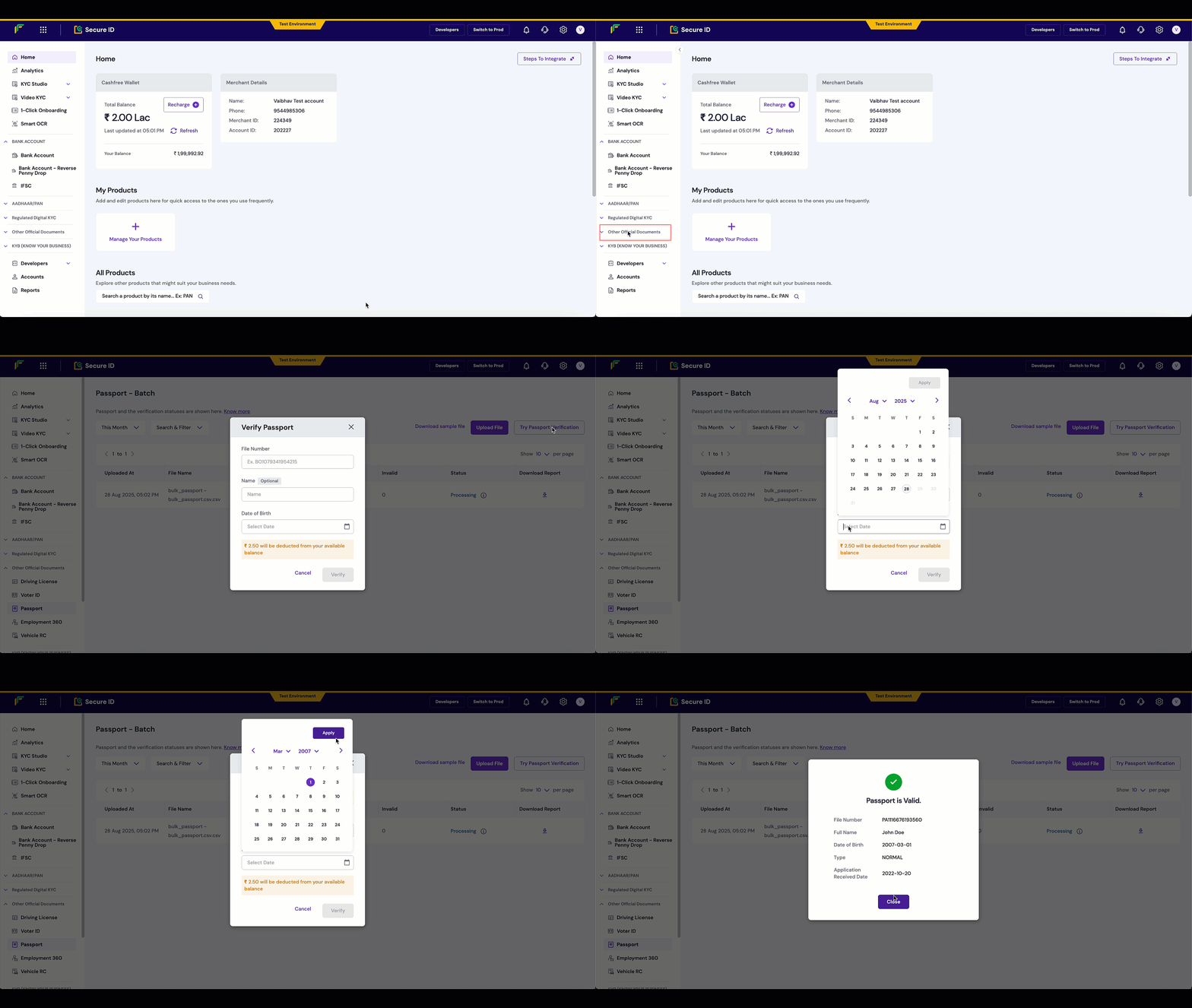 All verified passports appear in your dashboard with comprehensive details including holder information, validity dates, and verification status.
Integrate Passport verification programmatically using the REST API:
1. **Trigger the verification request** using the [Passport Verification API](/api-reference/vrs/v2/passport/verify-passport).
2. **Pass passport number and date of birth** for validation against official passport records.
3. **Receive verification results** with passport holder details, validity status, and document authenticity confirmation.
**Endpoint**: `POST /verification/passport`
```json theme={"dark"}
{
"verification_id": "PP00123",
"passport_number": "Z1234567",
"date_of_birth": "1990-01-15"
}
```
```json theme={"dark"}
{
"verification_id": "PP00123",
"reference_id": 12345,
"passport_number": "Z1234567",
"name": "John Doe",
"surname": "Doe",
"given_names": "John",
"date_of_birth": "1990-01-15",
"gender": "M",
"nationality": "Indian",
"passport_details": {
"issue_date": "2020-01-15",
"expiry_date": "2030-01-14",
"issue_place": "Mumbai",
"application_type": "Fresh",
"status": "ACTIVE"
},
"birth_details": {
"birth_city": "Mumbai",
"birth_country": "India"
},
"verification_status": "SUCCESS"
}
```
```json theme={"dark"}
{
"type": "invalid_request_error",
"code": "verification_failed",
"message": "Invalid passport number or date of birth",
"details": [
{
"field": "passport_number",
"issue": "Passport not found in records"
}
]
}
```
Integrate the [Passport Verification API](/api-reference/vrs/v2/passport/verify-passport) into your application to automatically verify passport details within your signup or onboarding flow.
snippets/related-topics-loader.mdx
{/* Related topics Section */}}
All verified passports appear in your dashboard with comprehensive details including holder information, validity dates, and verification status.
Integrate Passport verification programmatically using the REST API:
1. **Trigger the verification request** using the [Passport Verification API](/api-reference/vrs/v2/passport/verify-passport).
2. **Pass passport number and date of birth** for validation against official passport records.
3. **Receive verification results** with passport holder details, validity status, and document authenticity confirmation.
**Endpoint**: `POST /verification/passport`
```json theme={"dark"}
{
"verification_id": "PP00123",
"passport_number": "Z1234567",
"date_of_birth": "1990-01-15"
}
```
```json theme={"dark"}
{
"verification_id": "PP00123",
"reference_id": 12345,
"passport_number": "Z1234567",
"name": "John Doe",
"surname": "Doe",
"given_names": "John",
"date_of_birth": "1990-01-15",
"gender": "M",
"nationality": "Indian",
"passport_details": {
"issue_date": "2020-01-15",
"expiry_date": "2030-01-14",
"issue_place": "Mumbai",
"application_type": "Fresh",
"status": "ACTIVE"
},
"birth_details": {
"birth_city": "Mumbai",
"birth_country": "India"
},
"verification_status": "SUCCESS"
}
```
```json theme={"dark"}
{
"type": "invalid_request_error",
"code": "verification_failed",
"message": "Invalid passport number or date of birth",
"details": [
{
"field": "passport_number",
"issue": "Passport not found in records"
}
]
}
```
Integrate the [Passport Verification API](/api-reference/vrs/v2/passport/verify-passport) into your application to automatically verify passport details within your signup or onboarding flow.
snippets/related-topics-loader.mdx
{/* Related topics Section */}}