

Understanding Model Context Protocol Apps
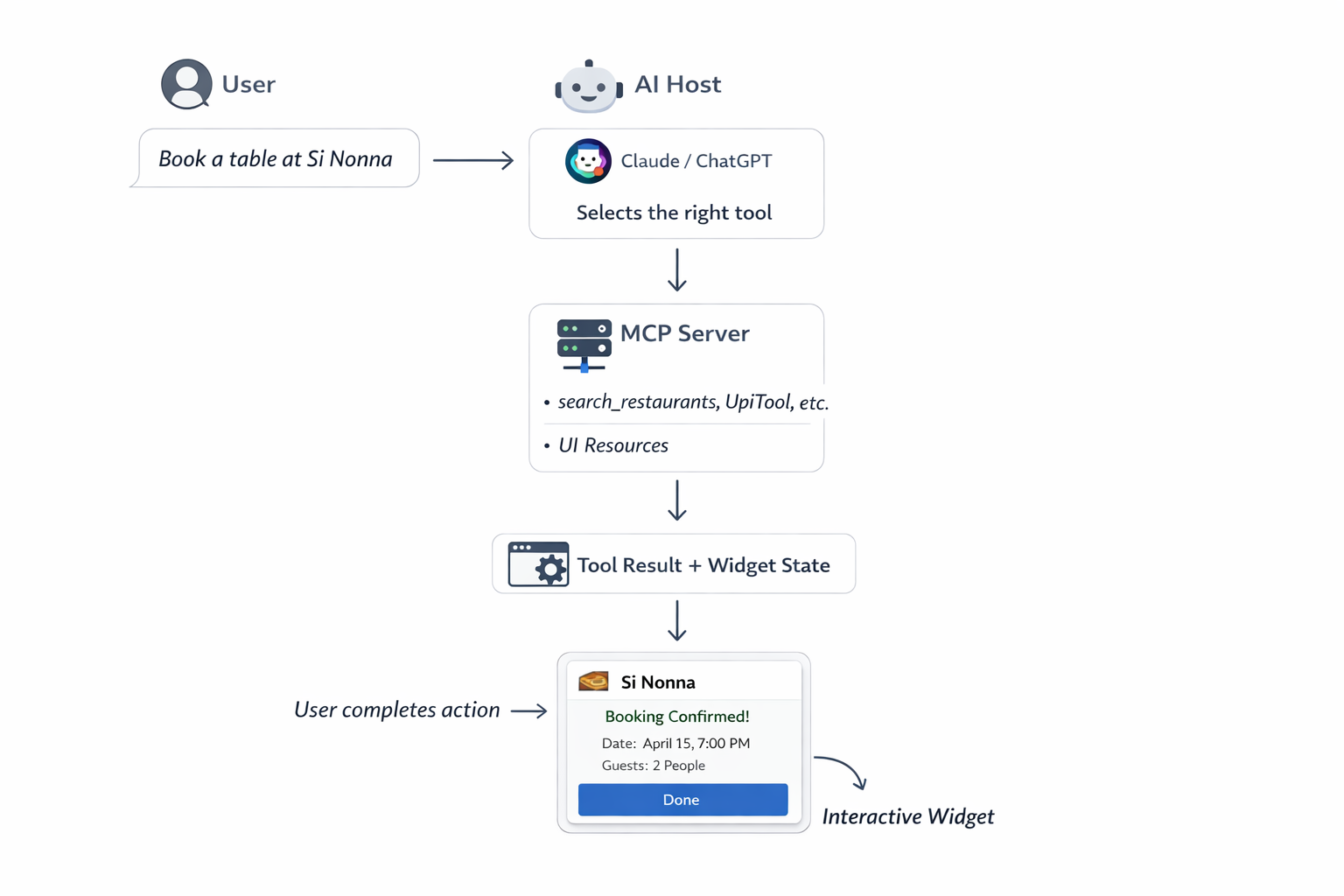
An MCP (Model Context Protocol) App is an application that communicates with AI hosts (such as Claude Desktop, ChatGPT, and VS Code Copilot) through a standardised protocol. MCP defines how AI models discover and use tools (actions), resources (data and UI), and prompts (templates). A standard MCP server exposes tools that return text. An MCP App extends this capability by serving interactive UI widgets as resources. When the AI invokes a tool, the host renders a rich widget inline within the chat, enabling experiences such as payment forms, booking interfaces, and dashboards.How Model Context Protocol Apps work
Key concepts
The core MCP concepts are defined in the following table:
Refer to the following resources for additional information about the MCP standard:
- MCP Specification - The official Model Context Protocol documentation.
- MCP Apps Extension - The MCP Apps extension specification for UI widgets and interactive resources.
- MCP TypeScript SDK - The official TypeScript SDK for building MCP servers and clients.
- MCP ext-apps package - Helpers for registering app resources and tools with UI metadata.
Create your own Model Context Protocol App
To build an MCP App that renders UI widgets in AI chats, complete the following steps:1
Create an MCP server using @modelcontextprotocol/sdk
2
Register a UI resource (your widget HTML)
3
Register tools that reference the widget
4
Serve over HTTP for remote access (ChatGPT, Claude, and other MCP Apps hosts)
Cashfree payment plugin
The@cashfreepayments/cashfree-here npm package provides pre-built payment tools and a payment widget. You register them on your MCP server, and the AI host renders the payment UI when the tool is invoked.
Supported payment methods
The plugin supports the following payment methods:Security
The payment widget implements the following security measures:- Card details are handled entirely client-side within the widget.
- No sensitive payment data is sent to the AI model.
- Cashfree handles card processing (PCI-DSS compliant).
- 3D Secure is supported for card payments.
- Cards are stored and managed by using Cashfree’s instrument vault.
Prerequisites
Before you begin, ensure that you have the following prerequisites:- Node.js version 18 or later.
- A Cashfree Merchant Account.
- API credentials from the Merchant Dashboard (App ID and Secret Key). For more information, see generate API keys.
Installation
Install the package by using one of the following package managers:Usage
The plugin exports three functions that you register on your MCP server. The following table describes each export:
You can register them in two ways: by using the MCP ext-apps helpers or by using the standard MCP SDK directly. Both approaches work with any MCP Apps host, including ChatGPT and Claude.
- MCP Apps (ext-apps helpers)
- Standard MCP SDK
Use
registerAppResource and registerAppTool from @modelcontextprotocol/ext-apps/server for automatic MCP Apps metadata handling.Configuration
The configuration interface for the Cashfree tools is defined as follows:cashfreeNetbankingTool only requires environment. No clientId or clientSecret is needed.
Tool input schemas
The following sections define the input schemas for each tool: UpiToolbankCode parameter controls how the bank selection UI is presented:
Use the table below for common bank codes:
For the complete list of supported bank codes, refer to the Cashfree netbanking bank codes reference.
Environment variables
Configure the following environment variables:Example: Good Food restaurant booking app
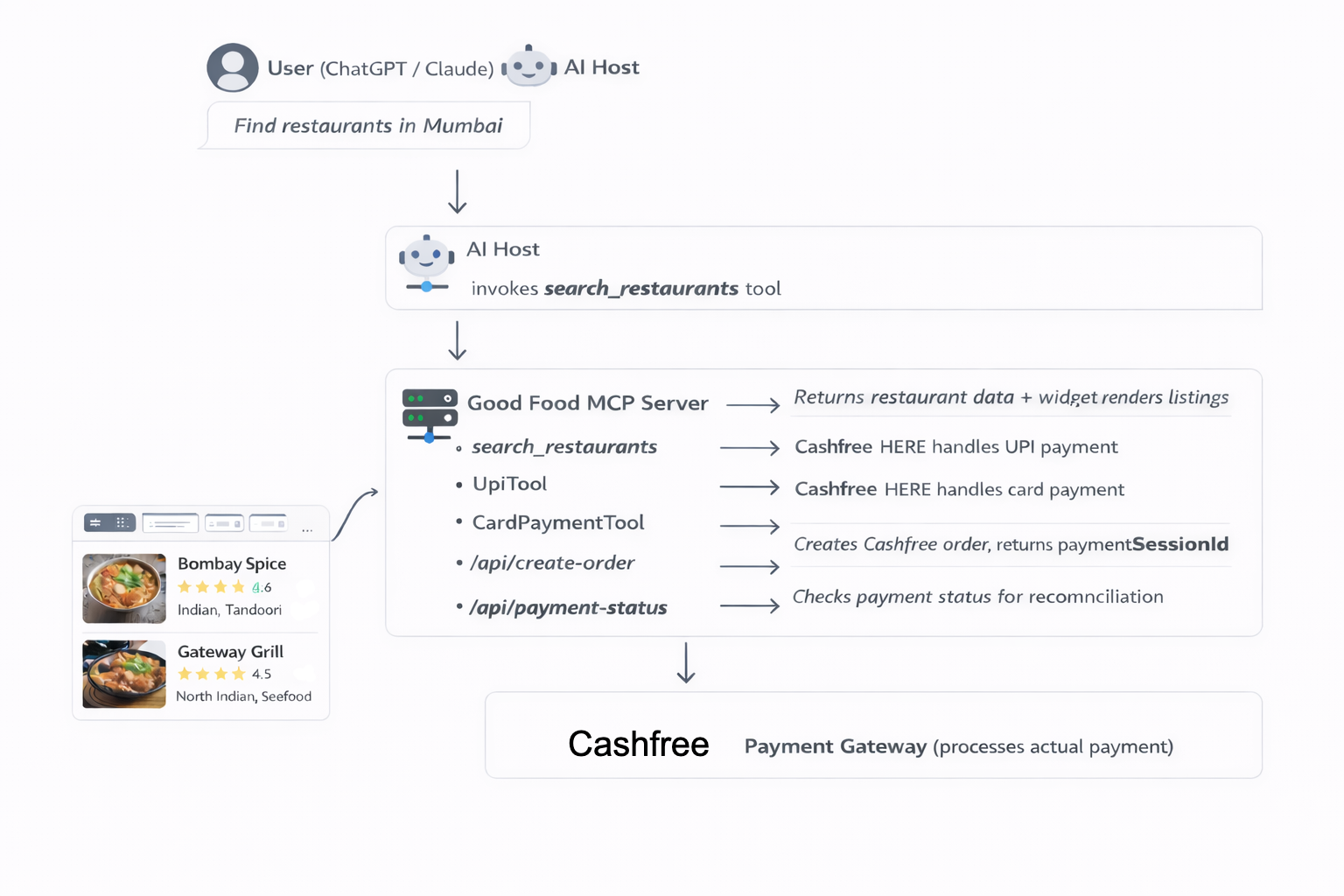
The Good Food app demonstrates a complete real-world integration: a restaurant table booking system with Cashfree HERE payments, running as an MCP App inside AI interfaces such as ChatGPT and Claude.What it does
The app follows this workflow:- The user asks to find restaurants in Mumbai.
- The AI host invokes
search_restaurants. The widget displays restaurant listings with images, ratings, and prices. - The user selects a restaurant and books a table.
- The widget creates a Cashfree order and receives a
paymentSessionId. - The AI host invokes
UpiToolorCardPaymentToolwith the session ID. The payment widget renders inline. - The user completes payment by using UPI or a card.
- The booking is confirmed.
How it integrates payment tools
The server registers Cashfree HERE alongside its own app-specific tools:Payment flow
The widget creates a Cashfree order by making a direct API call to the server, which returns apaymentSessionId. This session ID is then passed to the Cashfree HERE payment tools. The following example shows how to create a Cashfree order:
How the widget triggers payment tools
When a user selects a payment method inside the widget, the widget has two valid ways to continue the payment flow. The important difference is simple:- Call the tool now Use this when you want the payment tool to run immediately from the current widget.
- Create a new chat message Use this when you want the payment widget to appear in a separate ChatGPT message.
Option 1: Call the payment tool immediately
Use this when the current widget should directly trigger the payment tool. In ChatGPT, this is:- The user clicked a payment button inside the current widget.
- You want the host to run the payment tool immediately.
- You do not need to create a separate follow-up chat turn.
tools or call request. You only need the raw postMessage form if you are implementing the bridge yourself:
Option 2: Ask the host to create a new chat message
Use this when you want the payment flow to continue in a new message in the chat, instead of staying inside the current widget. This is a two-step pattern:- Send hidden technical instructions to the host.
- Send a short user-facing message that creates the next chat turn.
- you want the payment widget to open in a separate assistant/chat message
- you want the transcript to show a clear payment continuation step
- your app flow is designed around follow-up turns instead of in-place tool calls
Which option should you use?
- Use
callTool/tools/callwhen the current widget should immediately launch the payment tool. - Use follow-up messaging when you want the payment tool to appear in a new chat message.
Mapping to ChatGPT and MCP Apps
These are the current equivalents:tools/call->window.openai.callToolui/message->window.openai.sendFollowUpMessageui/update-model-context-> hidden model-visible context for the next turn
window.openai when you want the ChatGPT convenience APIs. For more information, see MCP Apps compatibility in ChatGPT and the Apps SDK reference.
Providing the customerId
The CardPaymentTool requires a customerId to fetch saved cards for one-tap checkout. This must be the ID of the currently logged-in user in your platform and not a hardcoded value. Pass it when creating the Cashfree order on your server so the widget receives it alongside the paymentSessionId.
Architecture
Building a custom payment host
If you are building your own AI-powered product (such as your own chat interface, assistant, or custom platform), you aren’t limited to ChatGPT or Claude. You can build a custom host that connects to your MCP server and renders the Cashfree HERE payment widget directly in your interface. To support Cashfree HERE (and MCP Apps in general) in your own host, your platform must complete the following tasks:1
Connect to the MCP server
Connect to the MCP server by using HTTP and
StreamableHTTPServerTransport. Discover its tools and resources.2
Detect UI resources
Detect UI resources. When a tool result references a resource with
mimeType: "text/html;profile=mcp-app", treat it as a widget.3
Render the widget in a sandboxed iframe
Render the widget in a sandboxed iframe. Pass tool arguments and results into the iframe by using
postMessage, following the MCP Apps messaging protocol.4
Proxy tool calls from the widget
Proxy tool calls from the widget. The widget may invoke further MCP tools (such as
UpiTool) from within the iframe. Your host must relay these calls back to the MCP server.Reference host implementation
The MCP Apps team provides abasic-host reference implementation in the official ext-apps repository. It is a minimal working example of an MCP Apps host. It connects to any MCP server, calls tools, and renders widget UIs in sandboxed iframes. Use it as a starting point for your own platform.
Using @mcp-ui/client
If your platform is React-based, the @mcp-ui/client package provides ready-made React components for rendering MCP Apps views. It handles the iframe sandboxing, postMessage protocol, and tool result delivery. You don’t have to implement the host protocol from scratch.
To install the package, run the following command:
MCP Apps widgets run in a sandboxed iframe. They can’t access your parent page, cookies, or DOM. This security model makes it safe to embed third-party MCP App widgets, including Cashfree HERE, in your own product.
Resources
Npm Package
Install the Cashfree HERE plugin from npm.
MCP Apps Extension
Official MCP Apps extension spec for UI widgets and interactive resources.
ext-apps Reference Host
Basic-host reference implementation and examples for building MCP Apps hosts.
@mcp-ui/client
React components for rendering MCP Apps widgets in your own host application.