

Why do I have to whitelist the IP address or generate a public key?
Why do I have to whitelist the IP address or generate a public key?
What is an IP address?
What is an IP address?
What does it mean to whitelist an IP?
What does it mean to whitelist an IP?
What happens after I whitelist my IP address?
What happens after I whitelist my IP address?
How many IP addresses can I whitelist?
How many IP addresses can I whitelist?
Does Cashfree support IPv6?
Does Cashfree support IPv6?
Why does an IP whitelisting error occur even after whitelisting an IP, and how can it be resolved?
Why does an IP whitelisting error occur even after whitelisting an IP, and how can it be resolved?
When do I use a public key?
When do I use a public key?
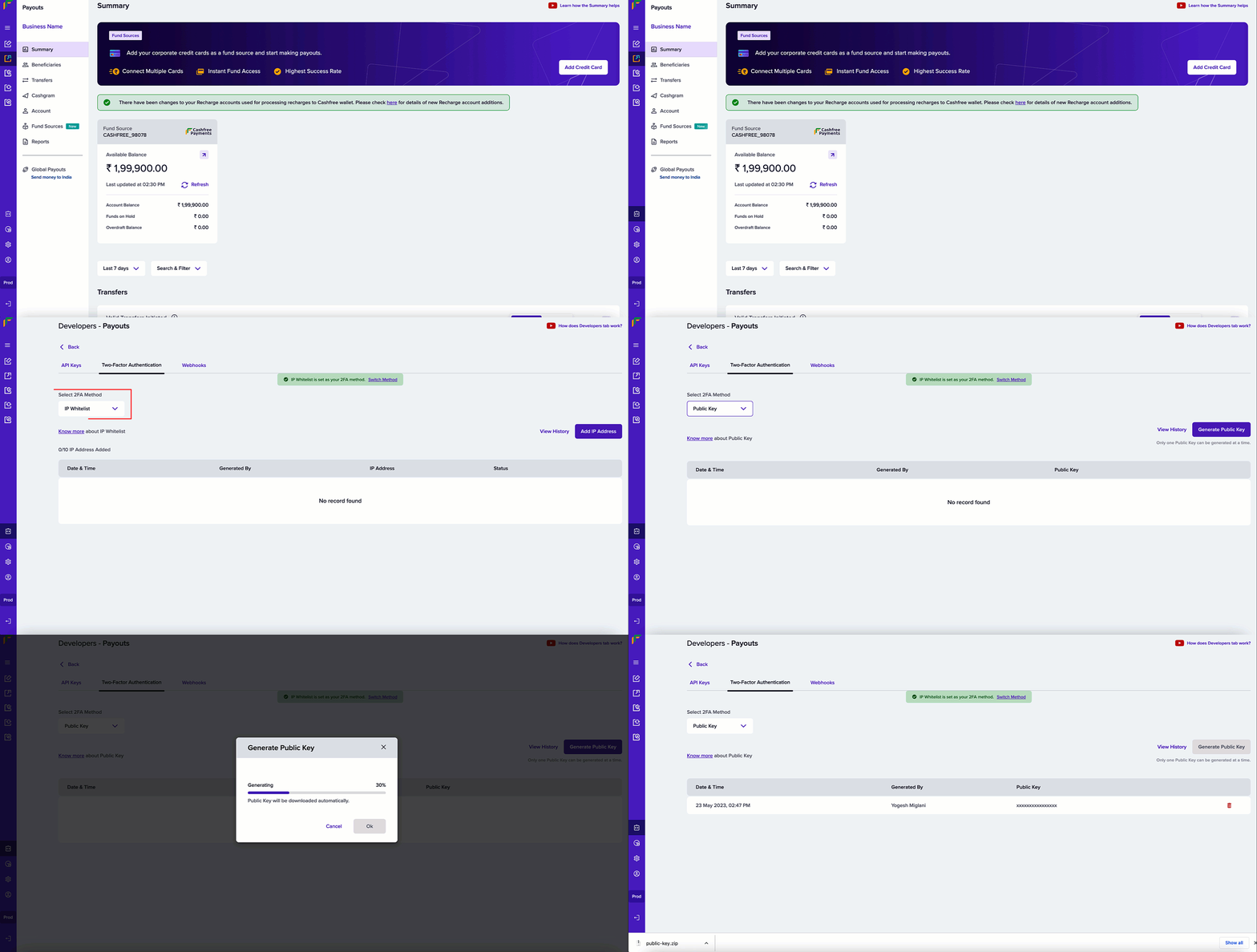
How to generate a public key from the Cashfree portal?
How to generate a public key from the Cashfree portal?
- In the Cashfree dashboard, select Developers from the navigation panel on the left.
- Click Two-Factor Authentication from the Payouts card.
- Select Public Key from the Select 2FA Method dropdown menu.
- Click Generate Public Key.
-
The public key is downloaded to your computer. Use your registered email ID to access the key.
How many public keys can I generate at a time?
How many public keys can I generate at a time?
How to use the public key to send API requests?
How to use the public key to send API requests?
- Retrieve your client ID.
- Append this with CURRENT UNIX timestamp separated by a period (.).
- Encrypt this data with the generated public key using RSA encryption - this is the signature.
- Pass this signature in the header X-CF-Signature.
Do Payment Gateway (PG) APIs require IP whitelisting?
Do Payment Gateway (PG) APIs require IP whitelisting?
Broken Link or not enabled error during testing, confirm that you are not applying another product’s IP whitelist requirement to a Payment Gateway API call.Which Client ID should I use for Public Key Signature Authentication, and how do I resolve a 'Signature Mismatched' error?
Which Client ID should I use for Public Key Signature Authentication, and how do I resolve a 'Signature Mismatched' error?
Signature Mismatched error, verify the following:-
Pass the oldest (first) Client ID in the
X-Client-Idheader. -
Form the string as
clientId.unixTimestamp(Client ID, a dot, then the current UNIX timestamp). -
Encrypt the string using RSA with OAEP padding and the public key downloaded from the Merchant Dashboard. Base64-encode the result and pass it in the
X-Cf-Signatureheader. - Generate a new signature every 5 minutes. The signature is valid for 5 minutes. See 2FA: IP Whitelisting and Public Keys.
-
Use a Client ID and public key from the same environment (for example, the same Payouts or Secure ID account).
Which Cashfree IP addresses should I whitelist in my server firewall?
Which Cashfree IP addresses should I whitelist in my server firewall?