

- Initiated At: This represents when the transaction was initiated by your customer.
- CF Transaction ID: This represents the transaction ID generated by Cashfree to identify each transaction.
- Account: This represents the collection account in which the payment is received.
- Account Type: This represents the account type of the collection account.
- Payment Type: This represents the payment mode in which the payment is received.
- Amount: This represents the amount and currency of the transaction.
- Remitter Account: This represents the account number from which the payment is made.
- Remitter Name: This represents the name of the person who made the payment.
- Status: This represents the status of the transaction.
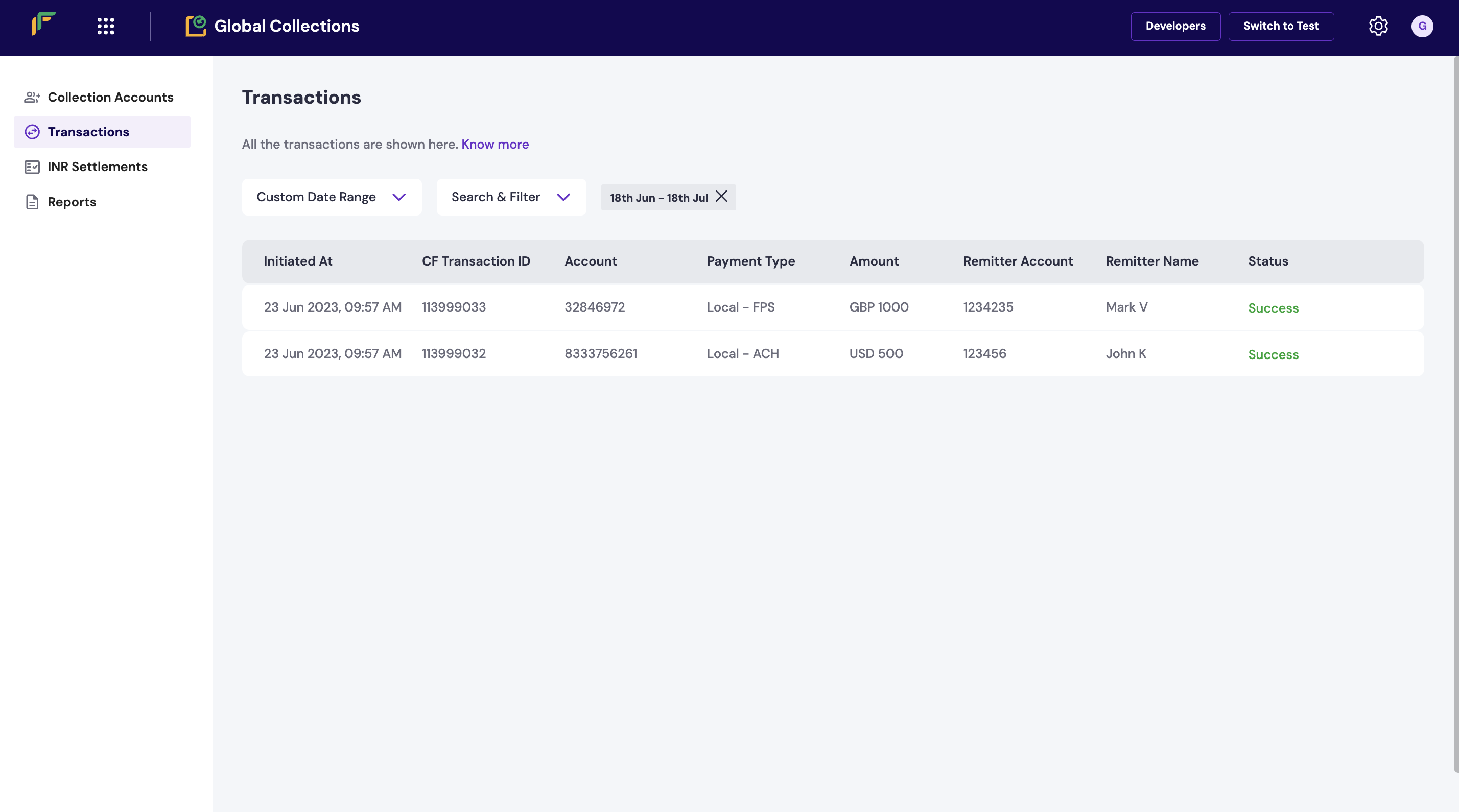
Transactions
Transaction details
Click on a transaction to view the complete details of the transaction along with the remitter details.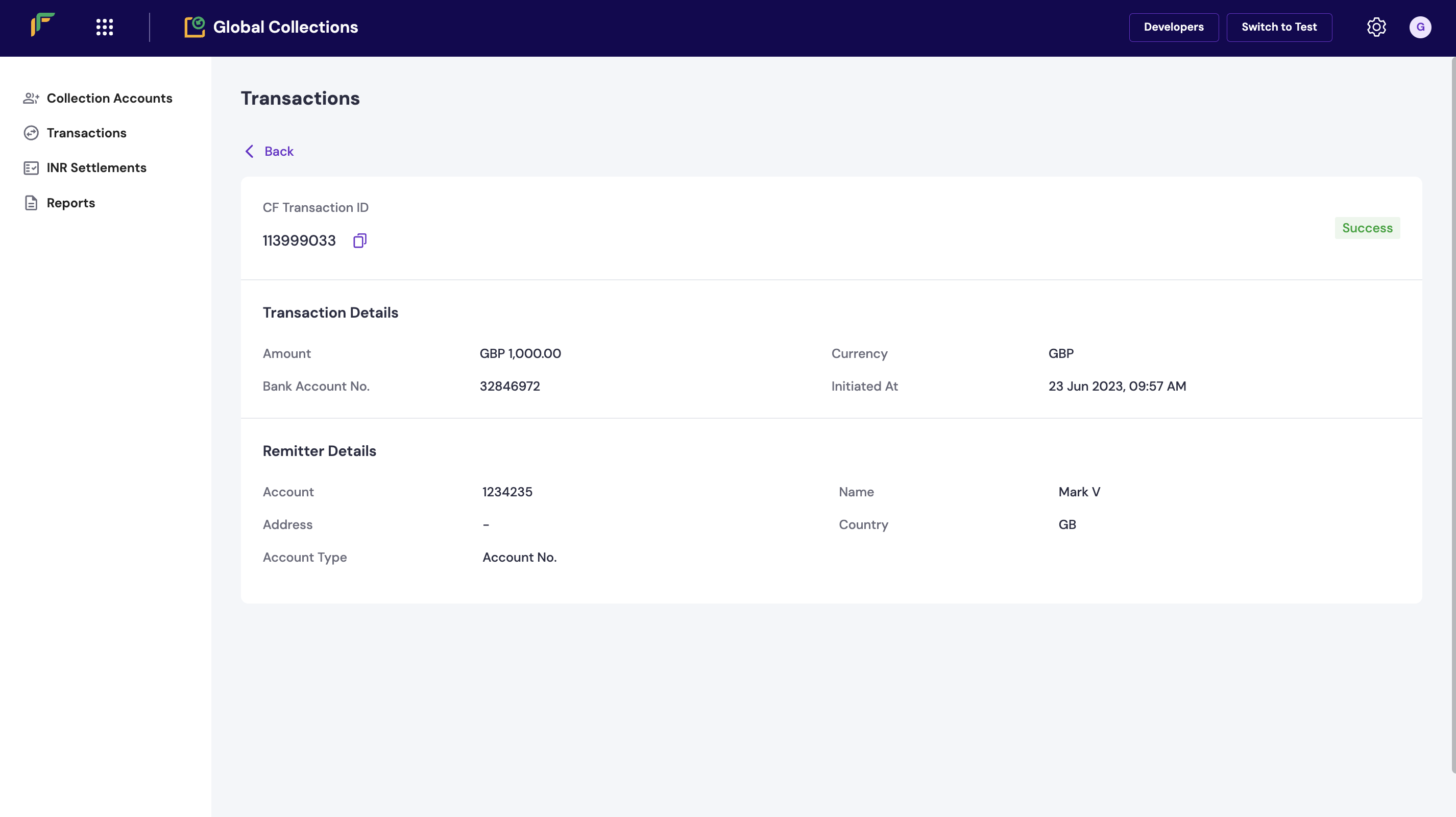
Transaction Details
FAQs
How do I initiate refunds in Cashfree?
How do I initiate refunds in Cashfree?
You can initiate refunds through our APIs or directly from the Merchant Dashboard.To initiate a refund from the dashboard:Navigate to Payment Gateway Dashboard → Transactions → Payments.
Select the specific transaction you want to refund.
If you have the Transaction ID or Order ID, you can search and initiate the refund directly from the dashboard.
Refunds can only be processed for successful transactions.
How do I check the status of a transaction?
How do I check the status of a transaction?
As soon as you log in to your Cashfree account, the Summary section in the payment gateway dashboard will give
you instant context as to what is the amount of transaction that has happened on that particular day, and the
settlement amount that you’re yet to receive. Besides this, Cashfree also provides a wide range of reports to
analyse your business finances. The different reports that Cashfree provides you are,
- Transactions Report
- Settlement Reconciliation Report
- Settlement Summary
- Refunds Report
- Ledger Report
- Monthly Invoices
Can I track the amount of daily transactions in Cashfree?
Can I track the amount of daily transactions in Cashfree?
The Cashfree Dashboard provides a real-time overview of your daily transactions and finances. You can instantly track the total transactions for the day and the unsettled amount pending from Cashfree.Click here to learn more
Can Cashfree send reports to my own SFTP servers?
Can Cashfree send reports to my own SFTP servers?
Yes. With Cashfree, you can receive specific reports such as Transaction reports, Settlements and
Adjustment reports, directly into your own SFTP servers or Cashfree’s SFTP servers at a set frequency
everyday.If you’d like Cashfree to push out the reports to your own SFTP servers, please fill out this
Support Form with your requirements.
What is a dispute?
What is a dispute?
A dispute arises when there is a disagreement over a transaction, initiated by your customer with their issuing bank or directly with Cashfree. Customers may also report fraudulent transactions to cyber cells, while suspicious transaction disputes are often raised directly by banks.As a merchant, you have the option to either defend the dispute by providing sufficient evidence or accept the dispute if you agree with the claim. If you accept the dispute, the amount will be refunded to the customer.Read more on disputes.
- Product Quality Issues – The delivered product is defective, damaged, or does not match the description.
- Incorrect Product – The customer received a different item than what was ordered.
- Unauthorised Charges – Additional fees were applied without the customer’s consent.
- Non-Delivery – The product or service was not delivered as promised.
- Billing Errors – Mistakes in the amount charged, duplicate transactions, or incorrect billing details.
- Fraudulent Transactions – The customer did not authorise the transaction (potential fraud or misuse).
Why am I debited for a dispute and When will I get the amount back?
Why am I debited for a dispute and When will I get the amount back?
When a dispute is raised, the disputed amount is debited from the merchant’s account, as banks debit Cashfree to provide provisional credit to the customer.The final refund depends on the dispute outcome:
If the dispute is resolved in your favour, the amount will be credited back to your account.
If the dispute is ruled in the customer’s favour, the amount will remain with the customer.
What is a POD QR Code and how does the TTL (Time to Live) feature work?
What is a POD QR Code and how does the TTL (Time to Live) feature work?
A POD (Pay on Demand) QR code allows merchants to generate payment QR codes that remain valid for an extended period of up to 30 days. This Time to Live (TTL) duration is configured via the PG Config settings, and it gives customers the flexibility to complete the payment at any time within the configured TTL window.
For example, a merchant may print a POD QR code on a physical receipt and hand it to a customer. The customer can scan and pay later, within the 30-day TTL.
During the TTL period:
-The payment status will not be marked as “Failed” even if payment hasn’t been received. It will be marked as incomplete
-The system waits for a successful payment until TTL expires.
-If no payment is made after 30 days, the transaction is marked as USER_DROPPED.This ensures better control over delayed payment flows while reducing refund-related complications.
How will I be notified if my customer has raised a dispute?
How will I be notified if my customer has raised a dispute?
Email notifications can be configured from the Merchant Dashboard. Emails on which the merchant wants to receive these notifications can be configured from the Merchant Dashboard by following the below steps:Go to Payment Gateway Dashboard > Settings > Email Notifications > Dispute Emails.Emails are triggered on following events:
New Dispute Created – Get notified when a customer raises a dispute.
- Dispute Phase/Type Change – Receive updates when the dispute moves between phases like Pre-arbitration or Arbitration.
- State Change – Stay informed when the dispute transitions between states, e.g., Action Required → Under Review.
- Comment Updated – Get alerts when a new comment is added to the dispute.
- Reminder Email – Receive a notification when the dispute deadline approaches.
What are the various types of dispute?
What are the various types of dispute?
In Cashfree, Disputes can be of the following types:Dispute
Raised for end-customer complaints, fraudulent, or suspicious transactions reported by law enforcement or banks.Retrieval
Soft chargebacks initiated when the customer queries a transaction with their issuing bank before an actual chargeback occurs.Chargeback
Raised when a customer disputes a transaction due to non-delivery of services or transaction issues, following a retrieval request.Pre-Arbitration
The second level of chargeback, where the customer decides whether to pursue further dispute based on the evidence provided.Arbitration
The final stage of the chargeback, where both parties submit evidence, and the card network or NPCI makes the final decision.
What are the deadlines for various disputes?
What are the deadlines for various disputes?
Following are the representation deadlines given to merchants depending on the type of dispute:
- Disputes: 3 calendar days. In certain cases, such as real-time fraudulent transactions, a 1-day deadline may apply.
- Retrieval: 3 calendar days.
- Chargeback: 3 calendar days.
- Pre-arbitration: 2 calendar days.
- Arbitration: 1 calendar day.
Why did a transaction marked as Failed later show as Success?
Why did a transaction marked as Failed later show as Success?
In rare cases, a transaction initially marked as “Failed” may later move to “Success” status during the bank reconciliation process. This typically happens when the bank confirms the settlement of funds after the initial failure was recorded.