The Import Mandates feature allows you to migrate your existing subscription data from other payment providers to Cashfree Payments. By importing your historical mandate data, you can centrally manage all your active subscriptions directly within the Cashfree ecosystem.Documentation Index
Fetch the complete documentation index at: https://www.cashfree.com/docs/llms.txt
Use this file to discover all available pages before exploring further.
Applicable only for eNACH and Physical NACH mandates.
- You can do this without requiring additional authorisation from your customer.
- Use a single interface or payment gateway to control all mandates.
- Provide a seamless experience for customers even if you switch from one gateway to another.
Initiate porting process
Cashfree Payments will assist you throughout the mandate porting process.Contact Cashfree support
Contact the Cashfree support team to initiate the porting process. Nominate Cashfree as your preferred payment processing partner for your Utility Code or mandates.
Partner bank coordination
Once you have initiated the process, the Cashfree team will guide you through sharing the list of mandates with your partner bank. This ensures the partner bank’s systems are updated to reflect the change.
Import mandates to Cashfree
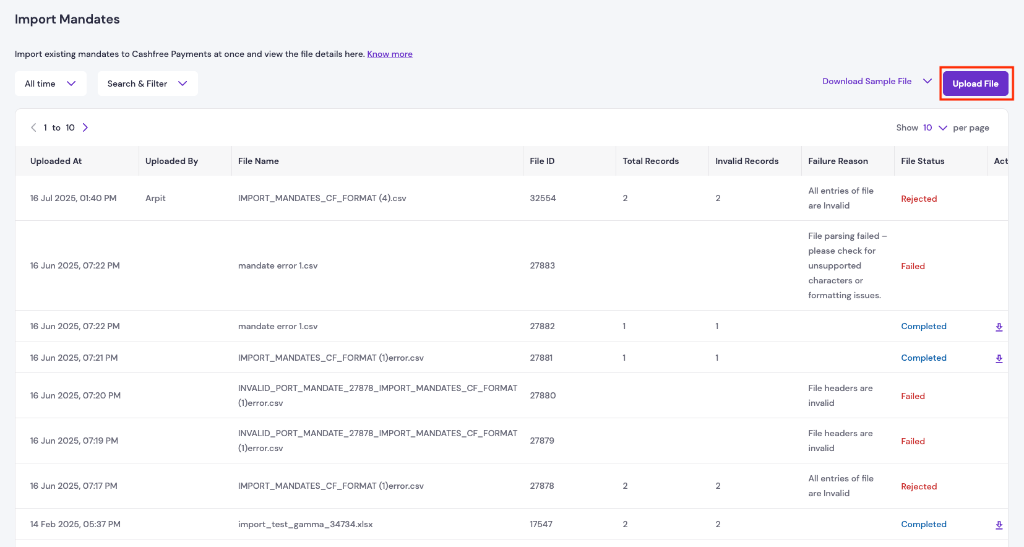
To import the mandates, upload a file containing all mandate details in either the NPCI file format or the Cashfree-specified format. After uploading, download the mandate file to check the import status. The file also includes rejection reasons for mandates that could not be imported.
File format
| Required field | Description |
|---|---|
| UMRN_NO | UMRN number of the mandate. Must be 20 characters. |
| PAYMENT_TYPE | Import mandates is applicable only for NACH. The value must be E_MANDATE. |
| DEBIT_ACCOUNT_NUMBER | Account number of the customer. Must be a maximum of 35 characters. Ensure leading zeros are not trimmed. |
| DEBIT_ACCOUNT_HOLDER_NAME | Name of the customer. Must be a maximum of 40 characters. |
| DEBIT_BANK_ID | Bank ID. Must be the same as the first 4 characters of the UMRN number. |
| DEBIT_ACCOUNT_TYPE | Account type. Possible values: SAVINGS or CURRENT. |
| MAX_AMOUNT | Maximum amount of the mandate. |
| FREQUENCY | Debit frequency. Possible values: ADHO — Adhoc, WEEK — Weekly, MNTH — Monthly, BIMN — Every 2 months, QURT — Every 3 months, MIAN — Every 6 months, YEAR — Yearly. |
| START_DATE | The date on which the mandate was authorised. This must be on or before the current date. |
| END_DATE | Expiry date of the mandate. Must be a future date. |
| SUBSCRIPTION_ID | A unique ID for the subscription. It can include alphanumeric characters, underscore, dot, hyphen, and space. A maximum of 200 characters are allowed. |
| CUSTOMER_EMAIL | Email ID of the customer. Must be a valid email address. A maximum of 250 characters are allowed. |
| CUSTOMER_PHONE | Phone number of the customer. Must be a valid phone number, with or without +91. |
| Conditional field | Description |
|---|---|
| FIXED_AMOUNT | This is the recurring amount for the mandate for the given FREQUENCY. Mandatory if FREQUENCY is not ADHO. |
| FIRST_CHARGE_DATE | The first charge date for the mandate after importing. Mandatory if FREQUENCY is not ADHO. |
| Optional field | Description |
|---|---|
| MAX_CYCLES | The number of charge cycles required before moving the subscription to COMPLETED state. |