

How it works
Cashfree notifications give you important information about the status of Cashfree’s platform, for example scheduled maintenance or service downtime. You can also refer to status.cashfree.com for updates on Cashfree’s platform. Cashfree provides the following alerts:Success Rate Alerts
Get notified if there is any drop in your payment success rate.
API Alerts
Get notified if there are failures in your API success rate.
Success rate alerts
We notify you when your transaction success rate falls below your set threshold. This helps you analyse the factors that lead to the decline, such as payment failures, system errors, or fraudulent activities, and take corrective actions. You can configure your preferred channels to receive these alerts from the dashboard. How to create a success rate alert rule? You can set this up from: Log in to the Merchant Dashboard and go to Payment Gateway > Settings > Notifications > Success Rate Alerts.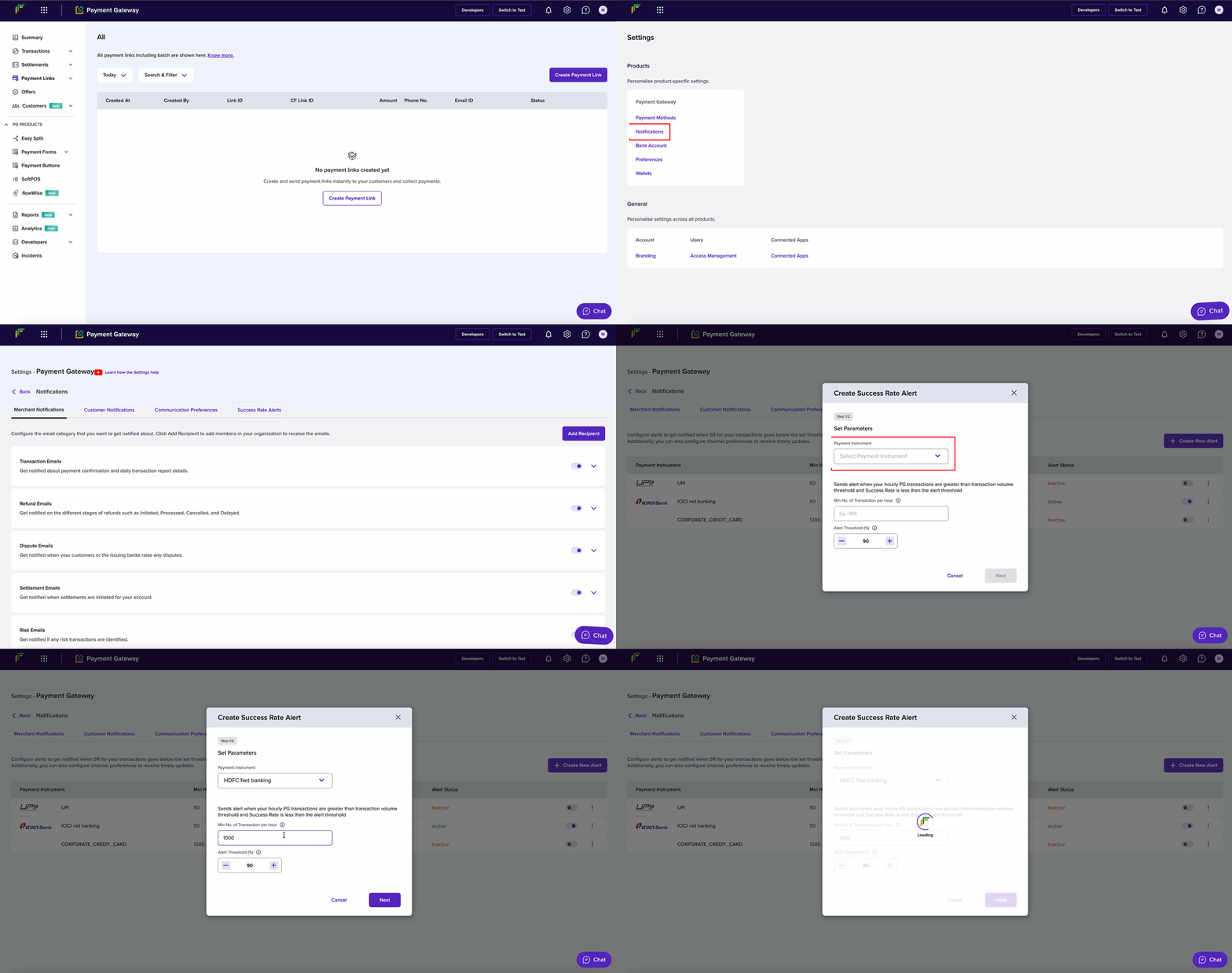
API alerts
We notify you about the success rate of your APIs. This ensures you are promptly notified of API errors, high latencies, or rate-limiting issues so you can maintain smooth payment operations. Alert types- API starts experiencing 4XX errors
- API usage reaches close to its configured rate limit (Rate Limit Warning Alert)
- API latency goes above 1s