

UPI Collect for person-to-merchant (P2M) payments is restricted on Android and desktop. Use UPI Intent on mobile and UPI QR codes on desktop. For the exemptions and migration steps, see UPI Collect Flow Deprecation.
Key terms
The following terms appear throughout the UPI documentation:How a UPI payment works
A UPI payment passes between four parties, coordinated by NPCI’s central routing system, the UPI switch. The following table describes the role of each party: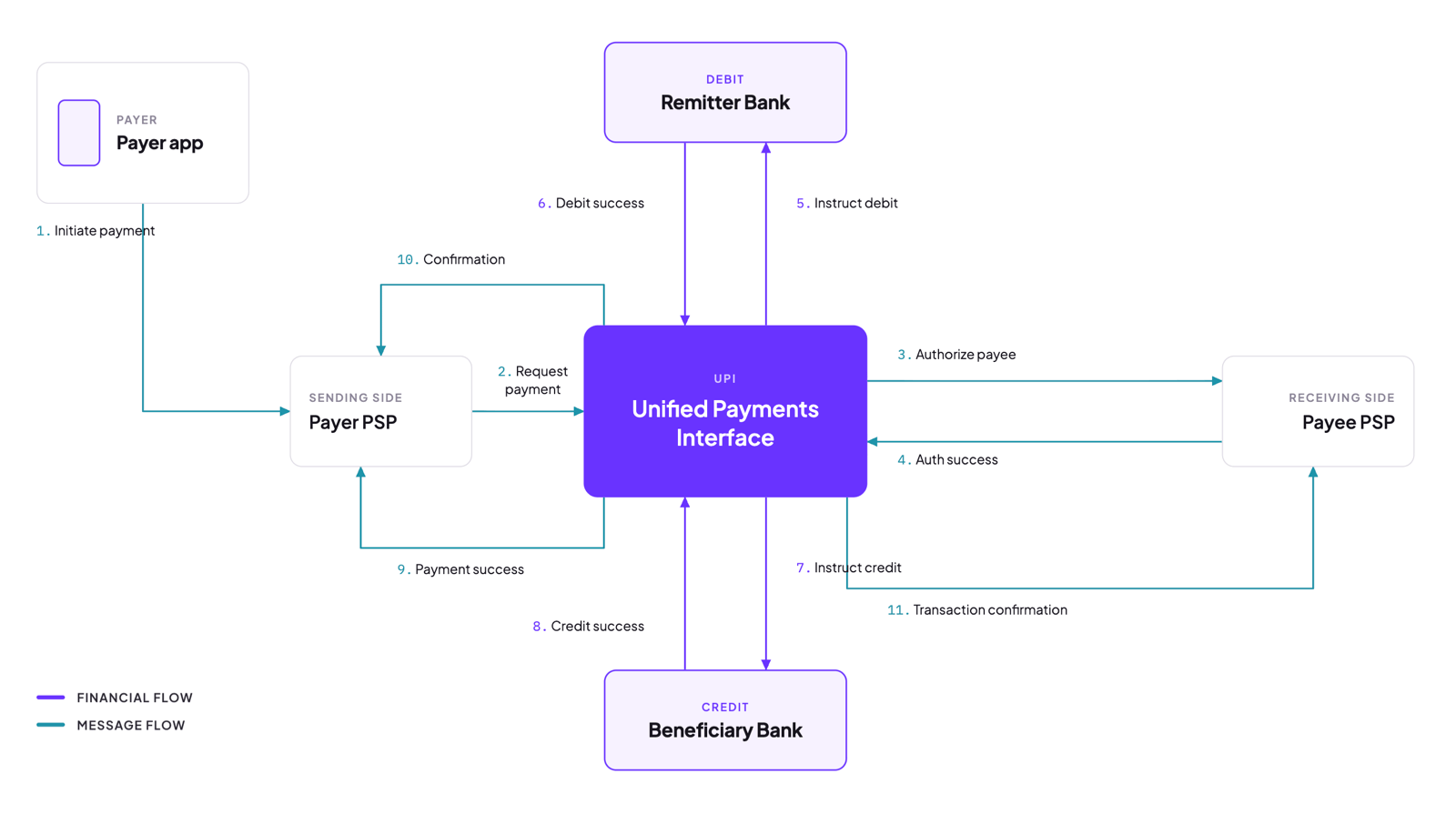
UPI flows
Cashfree supports the following UPI flows for one-time payments:- UPI Intent opens the customer’s UPI app from your mobile checkout.
- UPI QR codes let the customer scan and pay. Cashfree supports static, dynamic, and pay-on-delivery (POD) QR codes.
- UPI Collect sends a payment request to the customer’s UPI ID. It’s restricted to iOS and exempt categories.
- Offline Payments lets your stores and field agents collect UPI payments in person.
Recurring UPI payments
Use the following options to collect repeat payments from the same customer:UPI AutoPay
Debit customers automatically after a one-time mandate approval.
UPI one-time mandate
Block funds once and debit them later, for a single future payment.
UPI Reserve Pay
Block an amount once and make multiple debits against it.
AutoPay interoperability
Move existing UPI AutoPay mandates to Cashfree from another gateway.
Manage UPI payments
Use the following pages to manage UPI payments after checkout:- Settlements describes settlement cycles and how funds reach your bank account.
- Refunds describes how to refund a UPI payment and the refund statuses.
- Downtimes shows the current health of banks and UPI apps.
- UPI success rates explains why UPI payments fail and how to reduce failures.
- Flowwise routes payments across more than one payment gateway.
Before you go live
Review the following topics before you launch UPI to customers:- UPI Integration Guide takes you from account creation to live payments.
- UPI transaction limits describe the amount caps and flow restrictions for your MCC.
- UPI error codes explain each failure and how to show it to customers.
- Sandbox environment lists the test UPI IDs that simulate success and failure outcomes.