

The sections below explain how to integrate each payment method category on the Payment Gateway. To enable, configure, or check eligibility, see Manage payment methods.Documentation Index
Fetch the complete documentation index at: https://www.cashfree.com/docs/llms.txt
Use this file to discover all available pages before exploring further.
Supported payment methods
Payment methods are grouped into six categories. Each category has different capabilities and integration requirements.Cards
Support for Indian and international cards, and Apple Pay.
UPI
Support for UPI intent, QR, and collect flows.
Netbanking
Support for more than 50 major Indian banks.
Bank transfer
Support for NEFT, RTGS, and IMPS bank transfers.
Wallets
Support for digital wallets including PhonePe, Amazon Pay, and MobiKwik.
Pay Later and cardless EMI
Support for cardless EMI and Pay Later methods.
Manage payment methods
You can enable, disable, and configure payment methods based on your business requirements.- Dashboard
- API
You can manage all enabled payment modes directly from the Merchant Dashboard. To manage payment methods, follow these steps: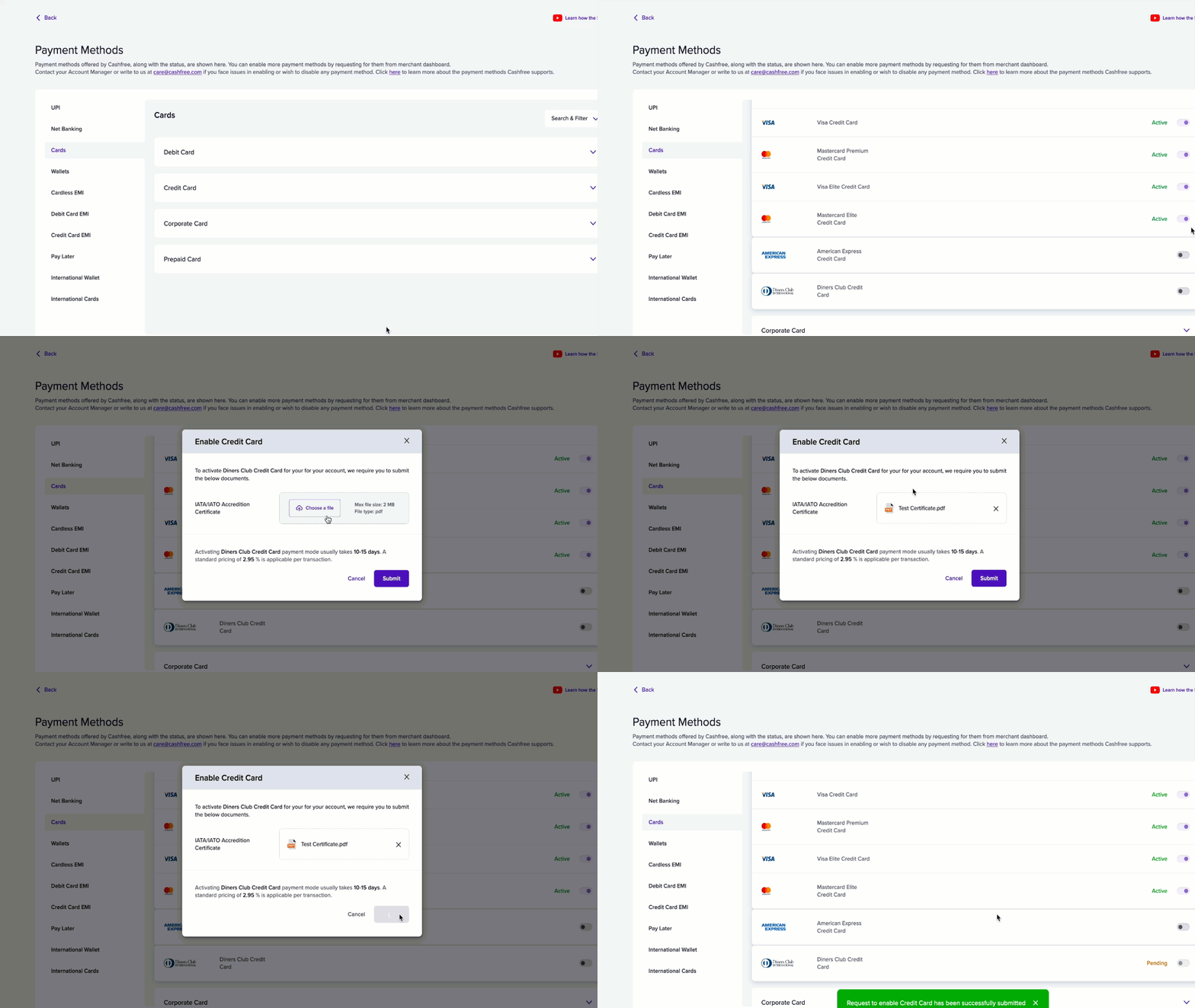
- Log in to the Merchant Dashboard.
- Go to Settings > Payment Gateway > Payment Methods.
- View all active payment modes.
- To enable a new payment mode, select Request and follow the on-screen instructions.
Advanced payment features
The following features depend on the payment method and may require additional configuration:- International payments: Accept payments in more than 140 currencies using international cards.
- Recurring payments: Set up recurring payments and subscriptions through UPI mandates, card tokenisation, and Netbanking e-mandates.
- Pre-authorisation: Reserve funds on a card before fulfilment and capture them once the order is confirmed.
- Third-party validation (TPV): Verify that payments originate from authorised bank accounts for Netbanking and UPI transactions.